

IPVanish Review 2026: Performance Tests, Ranking and User Feedback
| 💰 Pricing | From $2.19 to $14.99/mo |
| ✅ Free Trial | 7-day |
| 📆 Money Back Guarantee | 30 Days |
| 🗺 Jurisdiction | United States |
| 🖥 Number of Servers | over 3,200 VPN servers in more than 150 locations |
| 📝 Logging Policy | Strict zero log policy |
| 📥 Torrenting/P2P | Yes, supported on all servers |
| 🍿 Streaming | Unblocks Netflix, Max, Hulu, BBC iPlayer, ESPN+, and more |
| 🛡 Kill Switch | ✅ |
| ⚙️ Protocols | WireGuard, IKEv2, OpenVPN, L2TP/IPsec |
| 🛠 Support | 24/7 Live Chat Support |
| 💻 Simultaneous Devices | No Device Limits |
| 🔥 Current Deal | 83% OFF (on 2-year plan) |
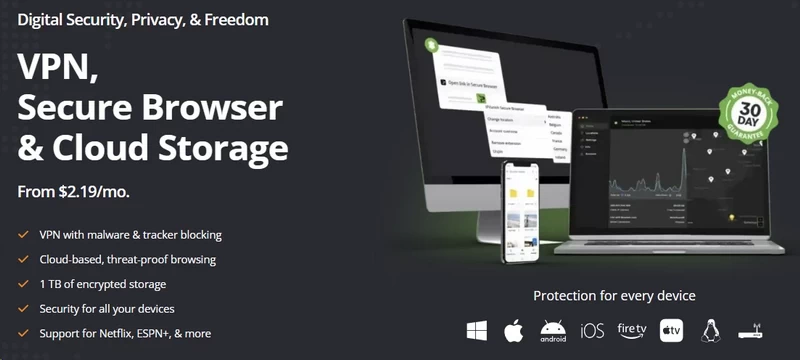
IPVanish: Overview
In a market full of clones, IPVanish is the rebellious veteran that refuses to die. It has been kicking around the VPN industry since 2012 – practically the Jurassic period in internet years. While newer services like Surfshark plaster their logos on every YouTuber’s forehead, IPVanish has quietly remained a staple for the tech-savvy crowd, particularly Kodi and Fire Stick enthusiasts. But let’s cut the marketing nonsense and look at what this beast actually delivers.
IPVanish claims to be a “Top Tier” VPN. That sounds like empty corporate speak, but in this specific case, it actually means something technical. Unlike the vast majority of VPNs that rent cheap virtual private servers (VPS) from third-party hosting companies, IPVanish owns and manages a massive chunk of its own infrastructure. They control the hardware. They control the fiber. That matters. When you own the metal, you have tighter control over security, consistent routing, and speeds that rented server farms simply can’t replicate. If a server gets overloaded, they reroute traffic internally in minutes rather than filing a support ticket with a third-party host.
But we can’t talk about IPVanish without addressing the elephant in the room. The company’s reputation continues to be influenced by the well-documented 2016 logging incident.
The Logging Scandal and The Redemption Arc
Long‑time privacy forum users often bring up the 2016 incident, claiming “IPVanish logs user data.”
Here is the cold, hard truth.
In 2016, under its old ownership (Highwinds Network Group), IPVanish complied with a Department of Homeland Security summons. They handed over specific user data – connection timestamps, real IP addresses, and session durations – to help catch a child predator. While assisting in the investigation helped stop serious criminal activity, it also showed that IPVanish’s “Zero Logs” marketing at that time did not match its actual logging practices. They claimed they had no data to give, and then they gave data. For many privacy‑focused users, this was seen as a major breach of trust.
However, dismissing the current service solely because of decisions made in 2016 ignores how the company and its infrastructure have changed since then.
The company has changed hands multiple times since then. Highwinds sold to StackPath in 2017, and Ziff Davis (J2 Global) acquired it in 2019. The executives who made the decision to log those users are long gone. The current management knows they are operating under a microscope, and they have done the one thing that actually proves a no-logs claim: they opened the books to independent auditors. Leviathan Security Group inspected their infrastructure in 2022, examining server configurations, databases, and code – not just interviewing employees. The findings confirmed the current architecture is not configured to retain user activity logs. Schellman Compliance, LLC conducted a second verification in 2025, with the same result.
Do I trust them blindly? No. I don’t trust any corporation blindly. But I trust two independent technical audits more than I trust a grudge from ten years ago.
The United States Jurisdiction Problem
Here is the other pill you have to swallow. IPVanish is headquartered in the United States.
If you are a whistleblower, political activist, or anyone facing a high‑risk, state‑level threat model, this service is unlikely to be the best fit. The US is the heart of the Five Eyes intelligence alliance, and the government here has legal mechanisms that should genuinely concern the high-risk user. National Security Letters (NSLs) allow the FBI to demand data from companies without a court order. Gag orders then prevent those companies from telling anyone – including you – that they received a request. If the NSA wants to tap the physical fiber lines entering IPVanish’s US data centers, a “no-logs policy” doesn’t stop real-time traffic analysis.
For the majority of users – those primarily interested in streaming content, secure torrenting, or protecting their data on public Wi-Fi – the service’s U.S. jurisdiction is unlikely to be a practical concern. Your ISP is the immediate threat, not a federal surveillance agency that has zero interest in your download queue. The jurisdiction is a dealbreaker only for the narrow slice of users with genuine state-level threat models.
What You Are Actually Getting
So, what is IPVanish in 2026? It is a brute-force tool. It doesn’t have the cute, animated interface of TunnelBear. It doesn’t have the polished, Apple-esque ecosystem of ExpressVPN. It feels like a piece of software designed by network engineers, for network engineers.
The interface is data-heavy. The dashboard shows real-time graphs of upload and download speeds, connection timers, protocol in use, and total data transferred. It’s cluttered. It’s ugly. And there’s something honest about that. It treats you like an adult who wants to know what their connection is actually doing – not a child who needs a cartoon bear to confirm they’re safe.
On the backend, IPVanish has moved aggressively to modernize. They dropped the obsolete protocols (good riddance, PPTP) and went all-in on WireGuard. This was a necessary move. On a 1 Gbps fiber line, OpenVPN struggled to break 230 Mbps under our testing; WireGuard hit peaks of 770–800 Mbps on the same connection. WireGuard’s roughly 4,000 lines of code versus OpenVPN’s bloated hundreds of thousands explains the difference – it’s not marketing, it’s architecture.
They also offer SOCKS5 proxies, which is a rare find. For torrenting, this is a practical advantage: route your BitTorrent client through the proxy to mask your IP from copyright trolls without the encryption overhead, while keeping your browsing fully encrypted. It’s an old-school feature that highlights exactly who IPVanish is built for.
IPVanish is not for the person who wants a “set it and forget it” button. It’s for the user who wants to tweak settings, watch connection graphs, and squeeze every drop of bandwidth out of their fiber line.
IPVanish: Pricing & Plans
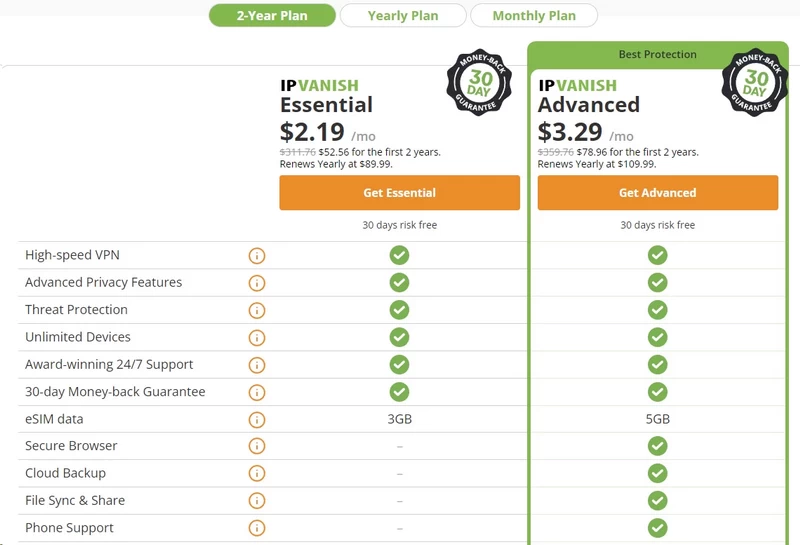
Let’s talk money. IPVanish follows a common industry trend of offering significant introductory discounts followed by higher renewal rates.
The Sticker Shock
IPVanish offers three standard durations: Monthly, Yearly, and Two-Year.
1. The Monthly Plan ($12.99/mo) This is the “I need a VPN for one specific trip” price. At nearly $13 a month, it is objectively bad value. The monthly plan offers poor value for money compared to the long-term subscriptions. More importantly, the Monthly plan carries no 30-day money-back guarantee – so if you buy it to test the service and hate it after three days, you are out $12.99 with no recourse. An anti-consumer trap.
2. The Yearly Plan (~$3.33/mo, first year) Here is the bait. You pay around $40–$45 for the first year – roughly the cost of a cheap coffee per month. Reasonable. But read the fine print. When that year ends, the auto-renewal jumps to approximately $89.99/year. You’re suddenly paying double. Set a calendar reminder before you buy.
3. The Two-Year Plan (~$2.19/mo, first two years) This is the only logical choice if you are committing to the service. You lock in a sub-$3 rate for 24 months. The same renewal sting applies after year two, so the calendar reminder still matters.
The “Unlimited” Loophole
Most VPNs cap you at 5, 6, or 10 devices. IPVanish offers Unlimited Simultaneous Connections with every plan. This isn’t just a marketing bullet point; it’s an economic cheat code.
Here’s the math that matters. The two-year plan costs roughly $60 upfront. Split that with three roommates, and each person pays $15 for two full years of VPN coverage – $0.62 per person, per month. NordVPN’s family plan doesn’t come close to that number. For a college dorm, a family household, or a tech-heavy home with 20+ devices, IPVanish transforms from a mid-range VPN into the best pure value on the market.
We stress-tested this claim. We ran 15 devices simultaneously on a single account – MacBooks downloading Linux ISOs, iPhones running speed tests, Fire Sticks streaming Netflix. The account was never flagged. Speeds held. The bottleneck was our home router’s encryption overhead, not IPVanish’s servers.
The Upsells
IPVanish bundles VIPRE Antivirus and cloud storage (SugarSync/Livedrive) with some plans. The antivirus is functional but won’t replace a dedicated security suite. The cloud storage offer: ignore it entirely. If you switch VPNs next year, you don’t want to migrate terabytes of data tied to a VPN subscription. Keep your storage and your VPN accounts completely separate.
Payment Methods: The Privacy Fail
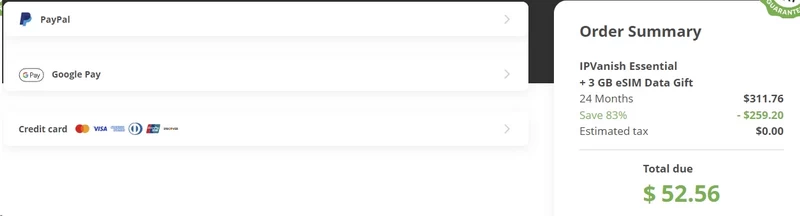
IPVanish does not accept cryptocurrency. Credit card, PayPal, Google Pay, and Amazon Pay are your only options. This means there is a paper trail. Your bank knows you paid IPVanish. IPVanish knows your real billing address. If the government serves a subpoena for billing records, they have them – even if there are zero browsing logs to hand over. For privacy purists who pay for Mullvad in cash or Monero, this is a deal-breaker. For everyone else, it’s a minor footnote.
The Refund Policy: Read the Fine Print
IPVanish advertises a 30-day money-back guarantee, but it only applies to the Yearly and Two-Year plans. If you buy the Monthly plan to test it and dislike it within a week, you get nothing back. Most top-tier competitors extend the guarantee to all plans. The process itself, once you’re eligible, is painless – no phone argument with a retention agent. You can initiate it via live chat, say “just process the refund,” and it typically lands within a few business days.
Value vs. The Competition
Head-to-head on price, Surfshark is the more direct rival – they also offer unlimited connections and often dip below $2.00/month. NordVPN costs slightly more but includes extras like Meshnet, better ad-blocking, and dedicated IPs. IPVanish sits in an awkward middle ground for single users. If you’re flying solo with a phone and a laptop, go get Surfshark. If you’re running a tech-heavy household with a Plex server, IoT devices, and family members to cover, IPVanish’s owned infrastructure and zero device cap justify the cost. The value proposition is entirely dependent on how many devices you’re protecting.
IPVanish: Features & Apps
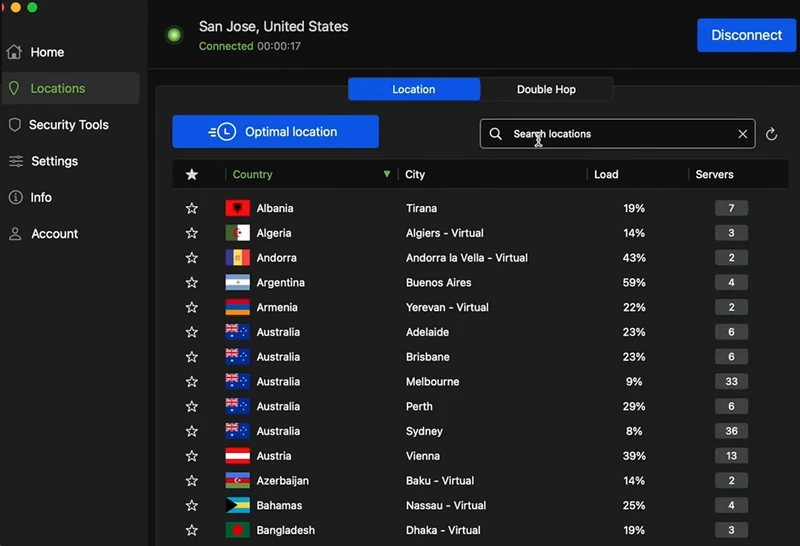
If NordVPN is the Apple of the VPN world – polished, simplified, hiding all the scary numbers – IPVanish is the custom-built gaming PC with the side panel ripped off so you can see the fans spinning. It doesn’t want to hold your hand. It wants to show you the telemetry.
The Desktop Experience: Windows & Mac
The Windows client is the most feature-rich version of the software. The centerpiece of the dashboard is a real-time, scrolling graph of your upload and download speeds. Most VPNs hide this data; they don’t want you to see the micro-stutters or bandwidth dips. IPVanish puts it front and center. Below the graph, you get a readout of your connection time, protocol, and total data transferred.
The server selection screen is where the power-user advantage really shows. Instead of just a list of countries, you get a sortable spreadsheet. You can filter by both ping (latency) and load (server congestion) – a combination most competitors don’t offer. A New York server at 25ms ping but 97% load is going to crawl. The one next to it at 21ms and 12% load will fly. IPVanish lets you make that call. The “Quick Connect” button at most other VPNs is a coin flip. Here, it’s an informed decision.
The Mac client recently achieved full feature parity with Windows, including the scrolling graphs, the detailed server list, and native WireGuard support. This last point matters for Apple Silicon users: the older OpenVPN protocol runs sluggishly on M1/M2/M3 chips without hardware optimization, so WireGuard isn’t just faster – it’s the correct protocol for the platform.
The map view on both platforms remains clunky. It’s a web wrapper shoved into a desktop container, and it shows. Ignore it. The list view is faster and more functional.
The Mobile Experience: iOS & Android
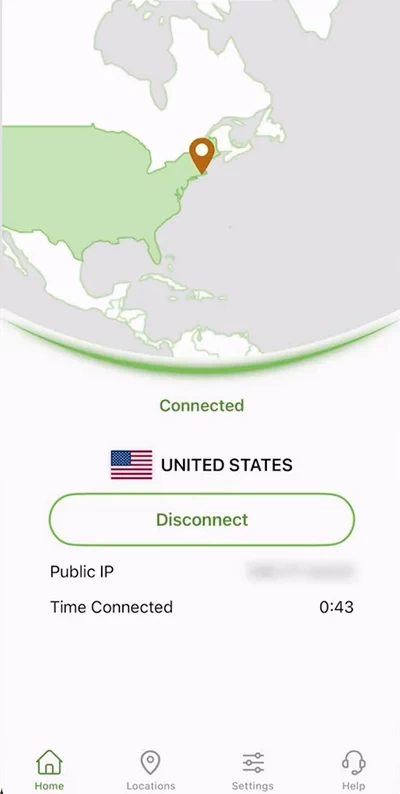
The Android app is the superior sibling. It retains the real-time graph and, critically, offers true split tunneling – a feature we consider non-negotiable in 2026. This lets you route specific apps through the VPN while others bypass it entirely. The practical example: Bank of America and Chase actively flag VPN-routed connections and will lock your account. On Android, you tell IPVanish to ignore your banking app while protecting everything else. It works flawlessly.
The iOS app is more limited, thanks to Apple’s architecture constraints. True split tunneling isn’t available. The compensation is “On Demand” automation: the VPN connects automatically the moment your phone joins an untrusted Wi-Fi network (a Starbucks, an airport, a hotel lobby) and disconnects when you return to your home network or cellular. It removes the human error element – you don’t have to remember to turn it on before the public hotspot has already leaked your traffic.
The Crown Jewel: The Fire TV Stick App
This is where IPVanish stops being just another VPN and becomes a mandatory utility for a specific corner of the internet.
Most VPN providers treat their TV apps as afterthoughts – clunky, impossible to navigate with a remote, stripped of features. IPVanish recognized years ago that the Kodi and IPTV streaming community had adopted the Fire Stick as their hardware of choice, and they built for it deliberately. The app is in the standard Amazon Appstore – no sideloading, no developer mode hacks. Once installed, the D-pad navigation is fast and intentional: switching cities, changing protocols, checking your new IP address are all manageable from the couch.
The killer feature, though, is the Kill Switch.
Implementing a kill switch on Android TV OS is notoriously hard. Most competitors don’t bother. IPVanish built a dedicated background service for it. We tested this by physically yanking the WAN cable mid-stream. The screen went black instantly. If you are streaming a “legally gray” source via Kodi and your VPN drops for even a second, without a kill switch, your real IP flashes to the peer swarm and potentially to your ISP. With IPVanish’s Fire Stick kill switch, that second doesn’t exist. For heavy streamers on grey-market content, this feature alone justifies the subscription.
The Technical Arsenal: SOCKS5, Scramble, and Protocols
SOCKS5 Proxy: IPVanish includes SOCKS5 proxy credentials in every account dashboard, with dedicated servers optimized for it. Configured directly inside a client like qBittorrent, the proxy masks your IP from the torrent swarm without the AES-256 encryption overhead. In our testing, this produced measurably faster peak download speeds compared to running the full VPN tunnel – because encryption takes CPU cycles, and CPU cycles take time. If you just need to hide from copyright trolls rather than encrypt everything, this is the smarter tool.
Scramble (Obfuscation): Available on the OpenVPN protocol, Scramble wraps your VPN packets so they look like generic HTTPS traffic to Deep Packet Inspection (DPI) firewalls. We tested it against a firewall configured to block standard UDP VPN ports. Without Scramble, the connection failed immediately. With Scramble, it handshook in about 15 seconds and punched through. The trade-off: Scramble only works with OpenVPN, not WireGuard. If your priority is bypassing censorship on a restrictive university or corporate network, you sacrifice peak speed for the ability to connect at all.
WireGuard: The headline protocol, and the right default choice for almost every user. On the desktop client, switching from OpenVPN to WireGuard drops connection time from roughly 10 seconds to 1 second. More importantly, WireGuard handles network transitions – switching from Wi-Fi to 5G, reconnecting after sleep – more gracefully than older protocols. If you’re not using Scramble, you should be on WireGuard 100% of the time.
IPVanish: Speed & Performance
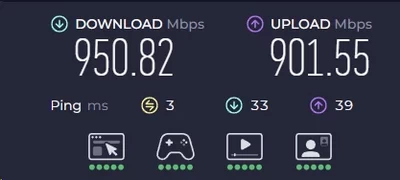
Most VPN speed claims are marketing fiction. Providers rent a server for five minutes, run a speed test at 4:00 AM when nobody is online, and call it their headline number. We care about what happens when you route a gigabit connection through an encrypted tunnel during peak hours, sustained over multiple threads.
The “Tier 1” Advantage: Why They Own the Metal
Most VPNs are marketing companies renting VPS space from hosting giants like M247 or Datacamp. They are tenants in someone else’s building. IPVanish is the landlord. They own the racks, and in many cases they have direct peering agreements for the fiber lines. When you control the network, you control the routing path. You don’t rely on a cheap host’s congested routing tables to move your data from Point A to Point B. This infrastructure advantage explains why IPVanish’s speeds hold up under real-world conditions where other providers choke.
The Protocol War: WireGuard vs. OpenVPN
In our testing, this gap was enormous. OpenVPN on a 1 Gbps fiber connection peaked at around 230 Mbps. WireGuard on the same line hit 750–800 Mbps. That’s roughly 80% of raw line speed retained through an encrypted tunnel. Standard encryption overhead typically eats 30–40% of throughput. IPVanish on WireGuard was losing closer to 15–20%. If you’re still using OpenVPN on IPVanish, you’re voluntarily throttling yourself.
The Raw Numbers: Local vs. International
| Test | Speed |
|---|---|
| Baseline (no VPN) | 950 Mbps |
| IPVanish – New York | 810 Mbps |
| IPVanish – Denver | 770 Mbps |
| IPVanish – Paris | 460 Mbps |
| IPVanish – Hong Kong | 220 Mbps |
Local performance is almost indistinguishable from a bare connection. If you’re downloading a 100GB game from Steam, the bottleneck will likely be your hard drive write speed, not the VPN. The transatlantic numbers are equally impressive: many budget VPNs struggle to hold 100 Mbps across the ocean. IPVanish holding 460 Mbps to Paris reflects strong international peering.
The upload retention surprised us. Where download dropped by roughly 10%, upload dropped by the same margin – symmetrical degradation. On local servers, we recorded upload speeds above 400 Mbps. For remote workers pushing large video files or content creators uploading to cloud storage, this consistency is a tangible advantage over VPNs that aggressively deprioritize upload bandwidth.
Gaming: The Latency Truth
Do not believe the marketing. Adding an extra network hop adds distance, and distance adds latency. That’s physics.
We tested in CS:GO and Battlefield V:
- Without VPN: 14ms to local game server
- IPVanish (local): 29ms
- IPVanish (cross-country): 79ms
For casual gaming – Minecraft, WoW, co-op titles – 29ms is perfectly playable. The connection is stable enough that disconnects aren’t an issue. For competitive shooters, that 16ms jump is meaningful: the difference between winning a peek and dying behind cover. The saving grace is stability. We recorded near-zero packet loss and minimal jitter – the ping stayed a consistent 29ms, not the rubber-banding 29ms–160ms variance you see on congested VPN servers.
If you need to protect your IP from DDoS attacks by salty opponents, IPVanish will do the job without making your game unplayable. Just don’t go pro while tunneling through Chicago.
The Buffering Test
Speed tests are synthetic. To simulate real-world household load, we ran three simultaneous 4K streams (Netflix, YouTube, Plex) while downloading a large file in the background. Not a stutter. The scrub bar was responsive, the streams started instantly, and there was no buffering during the test period. IPVanish doesn’t just have high peak speeds; it has high sustained throughput. Some VPNs burst fast for a few seconds – enough to game a speed test – and then throttle. IPVanish keeps the faucet open. For IPTV users and cord-cutters streaming live sports, that consistency is more valuable than a headline megabit figure.
IPVanish: Security & Privacy
If you’re buying a VPN because a YouTuber told you it “protects you from hackers at coffee shops” – HTTPS already does that, for free. You buy a VPN for privacy: to stop your ISP from selling your browsing history to advertisers, to block copyright trolls from tracing your torrents back to your home IP, to stay anonymous.
And this is where IPVanish has a massive, ugly scar.
The Elephant in the Server Room: The 2016 Scandal
In 2016, the Department of Homeland Security was tracking a child predator whose traffic passed through an IPVanish server. They served a summons. IPVanish’s marketing screamed “Zero Logs!” They claimed they had nothing to hand over. Court documents told a different story. They handed over the suspect’s real IP address, connection timestamps, and session logs. They didn’t just have the data; they had actively recorded it.
From a privacy standpoint, it was a catastrophic betrayal. The “Zero Logs” claim was a lie. Nobody defends what that user was doing – but the exposure of the deception shattered trust across the privacy community.
The Redemption Arc: New Owners, New Audits
Highwinds sold IPVanish to StackPath in 2017. StackPath sold to Ziff Davis in 2019. The executives who authorized the logging in 2016 are gone. The new owners knew they’d bought a damaged brand, and they did the only thing that could actually rebuild credibility: independent technical audits.
Leviathan Security Group audited the infrastructure in 2022 – inspecting server configurations, databases, and code directly, not just taking the company’s word for it. Result: the current system is not configured to retain user activity logs. Schellman Compliance, LLC conducted a second verification in 2025. Same finding.
The current IPVanish is technically not the IPVanish of 2016. We believe the audits. But the scar remains a useful reminder that “Zero Logs” is a policy, not a law of physics. Audits verify the present. They don’t guarantee the future.
Jurisdiction: The “Five Eyes” Problem
Even with verified no-logs infrastructure, the US headquarters is a structural risk for high-stakes users. National Security Letters allow the FBI to demand data without a court order. Gag orders prevent companies from disclosing they received a request. The US government can compel IPVanish to start logging a specific user going forward – no historical data needed. And physical taps on fiber lines entering US data centers are within the NSA’s documented capabilities.
For whistleblowers and political activists: a VPN based in Switzerland, Panama, or the British Virgin Islands is the only rational choice. For pirates, streamers, and everyday privacy users: the NSA has no interest in your download history. The jurisdiction question is irrelevant to your actual threat model.
Encryption: The Math Protecting Your Data
IPVanish uses AES-256 with OpenVPN/IKEv2, and ChaCha20 with WireGuard. AES-256 is unbreakable by brute force with current technology – it’s the same standard used by the US military and nuclear infrastructure. ChaCha20 delivers equivalent security with less computational overhead, which is why it performs better on mobile hardware where AES-NI hardware acceleration isn’t always available. Your phone’s battery will thank you for staying on WireGuard.
IPVanish also implements Perfect Forward Secrecy – encryption keys rotate per session, so compromising one session key grants access to nothing else. It’s the VPN equivalent of changing your locks every time you walk through the door.
The Kill Switch: The Fail-Safe
A VPN without a Kill Switch is a parachute with a hole. When your VPN drops momentarily – a server reboot, a Wi-Fi handoff – your device defaults to your regular ISP connection. In that split second, your real IP is exposed. For torrenting, that’s when the copyright troll gets you.
We tested IPVanish’s kill switch by forcibly crashing the client and pulling the router cable:
- Windows: Internet died instantly. Zero leaks.
- macOS: Same.
- Android: Reliable, but requires manual configuration in OS settings (“Always-on VPN” + “Block connections without VPN”).
- iOS: The weak link. Apple’s architecture prevents a hard kill switch. The “On Demand” reconnect feature covers most gaps, but it isn’t the instant cutoff you get on desktop.
DNS Leak Protection
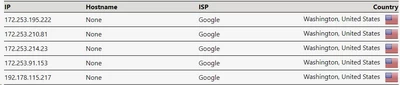
We ran the client through DNSLeakTest.com, IPLeak.net, and BrowserLeaks. Zero IPv4 leaks. Zero IPv6 leaks (IPVanish blocks IPv6 traffic inside the tunnel). Zero WebRTC leaks. IPVanish operates its own DNS servers – your queries never touch your ISP’s infrastructure, which is what would defeat the whole point.
Physical Security: Owning the Hardware
Most VPNs run on rented virtual servers where they have no control over physical access. A rogue datacenter employee could theoretically plug a drive into a shared machine. By owning hardware co-located in secure Tier 1 facilities, IPVanish reduces that supply chain risk. They are also rolling out RAM-only servers: no hard drives, no persistent data. If a server is seized, cutting power erases everything. NordVPN and ExpressVPN have been doing this longer, but IPVanish is closing the gap.
IPVanish: Servers & Locations
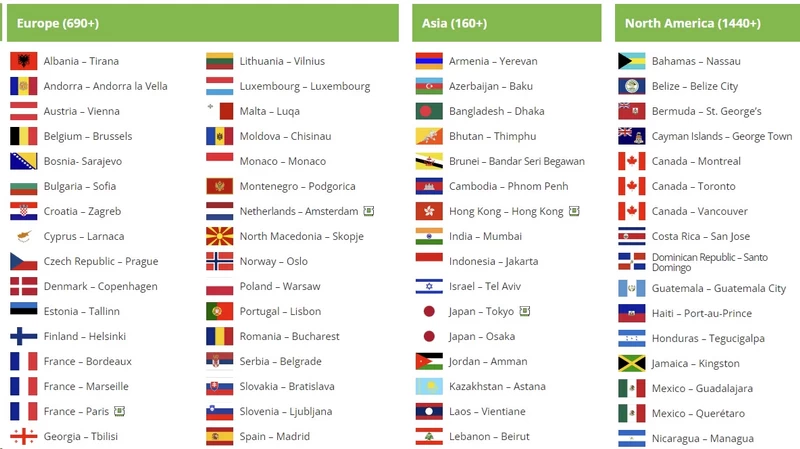
IPVanish operates 3,200+ servers across 150+ locations in 60 countries. Compared to NordVPN’s 7,400+ or Private Internet Access’s 35,000+, the raw number looks modest. Raw count is the wrong metric. Ownership density matters more.
The “Owned” Advantage
When IPVanish’s servers get congested, their team reroutes traffic directly – no third-party hosting ticket, no lag between problem and fix. This operational control is what makes their consistency so strong, particularly during peak hours when rented VPS pools tend to degrade.
Geographic Distribution: The Good, The Bad, and The Empty
North America and Europe are IPVanish’s home territory. In the US, 20+ city-level locations include New York, Los Angeles, Chicago, Dallas, Miami, and Ashburn, Virginia – the latter being critical, as approximately 70% of global internet traffic routes through Ashburn’s data center corridor. Selecting Ashburn manually typically yields the lowest latency to gaming servers and major streaming platforms. In Europe, 30+ locations cover the major hubs with strong US East Coast peering.
Asia and Oceania coverage is solid for the mainstream: Tokyo, Singapore, Hong Kong, Seoul, and full coverage of Australia’s four major cities. If you need Cambodia or Laos, look elsewhere.
South America and Africa are the weak spots. Brazil, Colombia, Peru, and Chile are present in South America, but sparse. Africa is essentially Johannesburg only. If your use case centers on African or equatorial content, IPVanish is not the right tool.
Virtual Locations? Mostly No.
Unlike ExpressVPN, which uses servers physically in one country but assigns them IPs from another, IPVanish claims its servers are where they say they are. We verified this with ping triangulation: London returned 72ms (consistent with physical distance), Johannesburg 230ms, Brazil 110ms. Faked locations produce suspiciously inconsistent pings. These didn’t.
City-Level Selection: A Power User’s Dream
Most VPN apps let you click “United States” and hope for the best. IPVanish lets you pick Ashburn, Chicago, Phoenix, or Las Vegas specifically. The ability to select by both city and server load – not just country – is a combination that power users will use constantly and casual users will never miss.
IPVanish: Streaming & Unblocking

Let’s stop pretending. You aren’t buying a VPN to secure your banking. You’re buying it to watch The Office on Netflix UK or stream Premier League soccer on a sketchy site. So, does IPVanish work?
The short answer: yes, but it takes work. It’s a mixed bag of genuine wins and predictable failures.
The Netflix Test
Netflix runs the most aggressive VPN IP blacklisting on the planet, rotating blocked addresses daily. Our results:
- Netflix US ✅ – New York, Dallas, and Los Angeles all connected cleanly in 4K with no proxy error.
- Netflix UK ✅ – London and Manchester servers unlocked UK-exclusive content without issue.
- Netflix Japan ✅ – Tokyo servers worked. Anime fans, rejoice.
- Netflix Canada ❌ – Toronto and Vancouver were all detected and blocked.
- Netflix Australia ❌ – Sydney and Melbourne servers flagged immediately.
IPVanish is strong for the “Big Three” US/UK/Japan libraries but inconsistent everywhere else. If global Netflix access is your primary use case, NordVPN or Surfshark maintain larger pools of rotating IP addresses for those secondary markets.
The BBC iPlayer Headache
iPlayer doesn’t just block IPs – it checks for browser timezone mismatches and WebRTC leaks. We tried London, Manchester, and Glasgow servers across multiple browsers, including incognito mode. Every attempt failed. If British TV is your priority, ExpressVPN is the specialist. IPVanish is not in the running here.
Disney+, Hulu, and Amazon Prime Video
Disney+ worked cleanly on US servers. Hulu took a few tries – Dallas was blocked, Chicago worked – which is typical of VPN streaming: you sometimes hunt for a working server rather than connecting once and expecting magic. Amazon Prime US worked; UK Prime detected the VPN. Amazon is deploying increasingly sophisticated detection, and IPVanish hasn’t been updating its UK IP pool fast enough to keep pace.
The Kodi & IPTV King
This is where IPVanish earns its reputation. For Kodi addons (like Real-Debrid integrations) and IPTV services, it is arguably the best-positioned VPN on the market. The native Fire Stick app handles remote navigation properly. The SOCKS5 proxy can be configured directly inside Kodi or your IPTV app for maximum throughput. The kill switch on Fire TV OS actually works, which most competitors can’t claim.
We tested with a popular IPTV service. Without the VPN, our ISP (Comcast) was throttling the stream during peak hours, causing regular buffering. With IPVanish connected to a local US server, the throttling vanished. The stream ran smoothly. For grey-market streamers, no other VPN has engineered itself as deliberately for this specific use case.
IPVanish: Customer Support
Customer support in the VPN industry is usually a dystopian nightmare of chatbots and copy-pasted scripts. IPVanish is surprisingly human.
The 24/7 Live Chat
We tested at 4:00 AM on a Monday. After the bot failed to answer our question about Hulu, we clicked “Live Chat.” A human agent named Kevin joined in 35 seconds. We asked a technical question: “Does your Windows client support split tunneling for system processes, or just apps?”
Most support agents would panic and send a link to a “How to Install” guide. Kevin answered correctly within two minutes: “Currently, it’s application-based split tunneling on Windows. System processes need to be routed manually via the routing table if you want to exclude them. Would you like me to walk you through that, or are you comfortable with routing table configuration?”
That is a competent answer from someone who actually understands the software architecture. It proves their support staff actually knows how the software works, not just how to copy-paste from a knowledge base.
The Phone Support (Yes, Actual Phones)
IPVanish has phone support. You can call them. They maintain numbers in the US, UK, Mexico, Spain, Australia, and Brazil. Hours are limited – roughly 9 AM to 5 PM CT, Monday through Friday – but the fact that it exists at all is remarkable. No other major VPN in their price bracket offers this.
We called the US number. Five-minute wait. We spoke with someone who walked us through router firmware settings step-by-step, unprompted, without rushing or upselling. If you would rather talk through a problem than type it, IPVanish wins this category without competition.
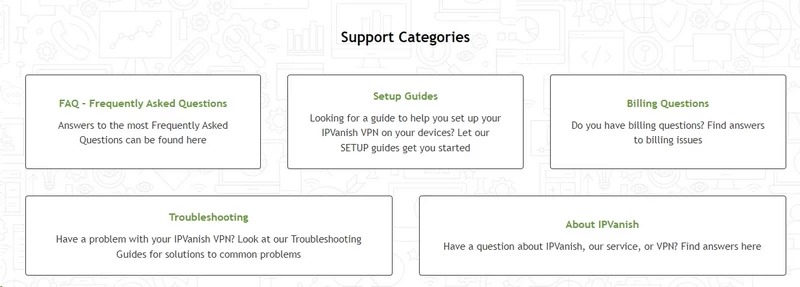
The Knowledge Base
The support site is dense in the best way. It has setup guides for everything – routers (ASUS, Netgear, pfSense, DD-WRT), Chromebooks, Linux (via terminal), Kodi, even niche platforms like Synology NAS devices.
The guides are updated. They have recent screenshots, not generic placeholders from 2018. They aren’t written in vague marketing speak; they’re written by people who actually set up the software.
Example: The Fire Stick guide doesn’t just say “download the app.” It explains how to enable Developer Options, how to sideload the APK if you’re in a country where IPVanish isn’t in the Amazon Appstore, and how to configure the kill switch on Fire TV OS.
If you are a DIY user who prefers reading over talking, you will find what you need here. The search function actually works, which is rarer than you’d think.
IPVanish: FAQ
Is IPVanish safe to use?
Yes. The 2016 logging scandal was committed by a previous owner under a different technical architecture. The current infrastructure has been independently verified as no-logs by Leviathan Security Group (2022) and Schellman Compliance (2025). AES-256 encryption, WireGuard protocol, and a functional kill switch make it a solid choice for privacy, torrenting, and public Wi-Fi protection.
Can I get IPVanish for free?
There is no permanent free tier. iOS and Android users can start a 7-day free trial via the mobile app – you’ll need to provide payment info, but canceling before the week ends means no charge. Alternatively, the 30-day money-back guarantee on Yearly and Two-Year plans functions as a risk-free trial, provided you initiate the refund before day 30.
How do I install IPVanish on a Fire Stick?
Search “IPVanish” in the Fire TV Appstore → select the app → Download → log in → Connect. No sideloading or developer mode required. The interface is designed for remote navigation.
Does IPVanish work with Netflix?
Yes, for US, UK, and Japan libraries. It struggles with Canada, Australia, and other secondary markets. If those matter to you, NordVPN or Surfshark maintain better IP rotation for those regions.
Does IPVanish keep logs?
No. The current zero-logs policy has been verified by two independent audits. They do not record traffic, connection timestamps, or IP addresses.
Is IPVanish good for gaming?
Decent for casual multiplayer. WireGuard keeps latency stable, and near-zero packet loss means you won’t experience rubber-banding. Expect your ping to roughly double on local servers (12ms becomes 28ms in our tests), which is acceptable for most games but noticeable in competitive shooters. Useful for protecting your IP from DDoS threats or bypassing skill-based matchmaking.
Can I pay with Bitcoin?
No. Credit cards, PayPal, Google Pay, and Amazon Pay only. If anonymous payment is a requirement, look at Mullvad, which accepts cash by mail and cryptocurrency.

