

Surfshark VPN Review 2026: The Best Budget VPN – With Asterisks
The trade-offs sit in the fine print and edge cases: renewal pricing jumps sharply after the introductory term, the Netherlands (Nine Eyes) jurisdiction is less privacy-friendly than Surfshark’s original BVI base, long-distance speeds fluctuate noticeably, and there is no port forwarding for power torrent users. Surfshark does not reliably work in heavily censored countries such as China, Russia, or Turkey, and some advanced tools (Camouflage Mode, NoBorders, Bypasser variants) behave differently across platforms, so high-risk users and those in restrictive environments should weigh these “asterisks” carefully before committing long term.
| 💰 Pricing | From $1.99 to $15.45/mo |
| ✅ Free Trial | 7-day free trial on mobile |
| 📆 Money Back Guarantee | 30 Days |
| 🗺 Jurisdiction | Netherlands |
| 🖥 Number of Servers | 4500+ servers in 100+ countries |
| 📝 Logging Policy | Strict no-logs policy |
| 📥 Torrenting/P2P | P2P/torrenting allowed on most servers |
| 🍿 Streaming | Unblocks Netflix, Disney+, Hulu, BBC iPlayer, etc. |
| 🛡 Kill Switch | ✅ |
| ⚙️ Protocols | WireGuard, OpenVPN (UDP/TCP), IKEv2/IPSec |
| 🛠 Support | 24/7 Live Chat Support |
| 💻 Simultaneous Devices | Unlimited |
| 🔥 Current Deal | 86% OFF (on 2-year plan) |
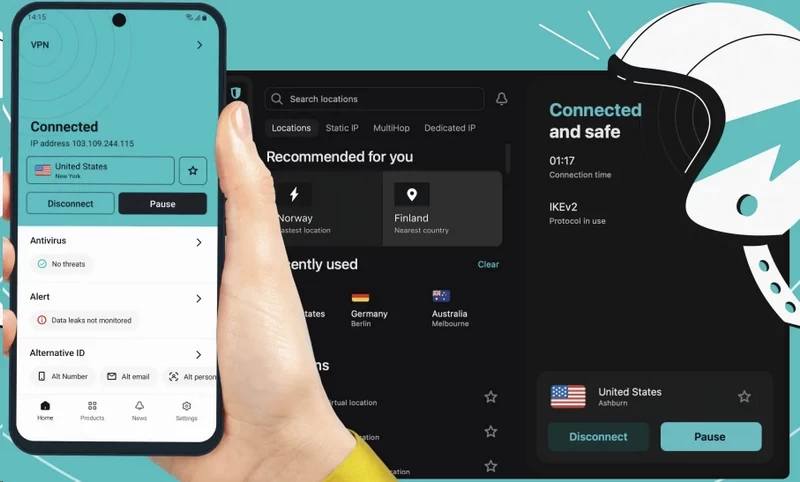
Overview
The “Too Good to Be True” Phenomenon
When Surfshark launched in 2018, it didn’t quietly slot itself into the mid-tier VPN market. It detonated a pricing grenade. Unlimited simultaneous device connections – at a price that made NordVPN and ExpressVPN look like luxury tax – read like a marketing error. It wasn’t. For households running a dozen devices, or small teams dodging per-seat licensing costs, the pitch was practically irresistible. The veteran’s question: what’s subsidizing this generosity?
The unlimited connections model is genuinely disruptive. Legacy providers cap simultaneous connections at five or six – a ceiling that feels arbitrary once you account for phones, tablets, smart TVs, laptops, and the router itself. Surfshark eliminated it entirely. That one structural decision explains a large chunk of the word-of-mouth that propelled it into competition with services a decade older.
That said, the “too good to be true” alarm doesn’t go silent. Speed fluctuates consistently across independent test logs. Server count still trails the heavyweights. And the pricing structure contains a renewal trap that will blindside users who sign up on autopilot. The product earns its reputation – but with asterisks. Here’s the honest accounting:
| Category | Verdict |
|---|---|
| ✅ Unlimited device connections | Genuine differentiator — confirmed, not marketing spin |
| ✅ No-logs policy | Audited and independently verified |
| ✅ Torrenting permitted | Allowed across all server locations |
| ✅ Pricing at intro tier | Among the most aggressive 2-year rates on the market |
| ✅ Streaming unblock rate | Strong performance across Netflix, BBC iPlayer, Disney+ |
| ❌ Speed consistency | Fluctuates noticeably — especially on long-haul connections |
| ❌ Server count | Lags behind NordVPN and ExpressVPN in raw numbers |
| ❌ Renewal pricing | Dramatic spike post-introductory period |
| ❌ Surfshark One upsell | Bundled features feel forced at checkout |
| ❌ Monthly plan cost | $15.45/month is genuinely punishing without a commitment |

The Netherlands Jurisdiction Shift
Here’s the detail most mainstream reviews soft-pedal: Surfshark relocated its operational headquarters from the British Virgin Islands to the Netherlands – and those are not equivalent positions on the privacy spectrum. The BVI sat outside Five Eyes, Nine Eyes, and Fourteen Eyes frameworks entirely. The Netherlands is a Nine Eyes member state.
Surfshark’s rebuttal is structurally coherent: a verified no-logs policy means there’s nothing meaningful to hand over even if Dutch authorities come knocking. Independent auditors confirmed the no-logs claim. If the policy holds – and the audit record suggests it does – the jurisdiction shift is legally less catastrophic than it initially reads. But “trust the audit” is a different posture than “trust the jurisdiction,” and those are separate questions. Audits reflect a point in time. Jurisdictional obligations are durable.
For most of Surfshark’s user base – people unblocking geo-restricted content, avoiding ISP throttling, or adding a privacy layer on public Wi-Fi – the Netherlands HQ is a non-issue. For journalists in hostile environments, political dissidents, or anyone whose threat model includes state-level actors from allied Western nations, this shift warrants a harder look at alternatives outside Nine Eyes. Surfshark isn’t hiding the change. But they’re not foregrounding it in their marketing copy either. That asymmetry is worth naming.
Pricing & Value
Breaking Down the Price Tag
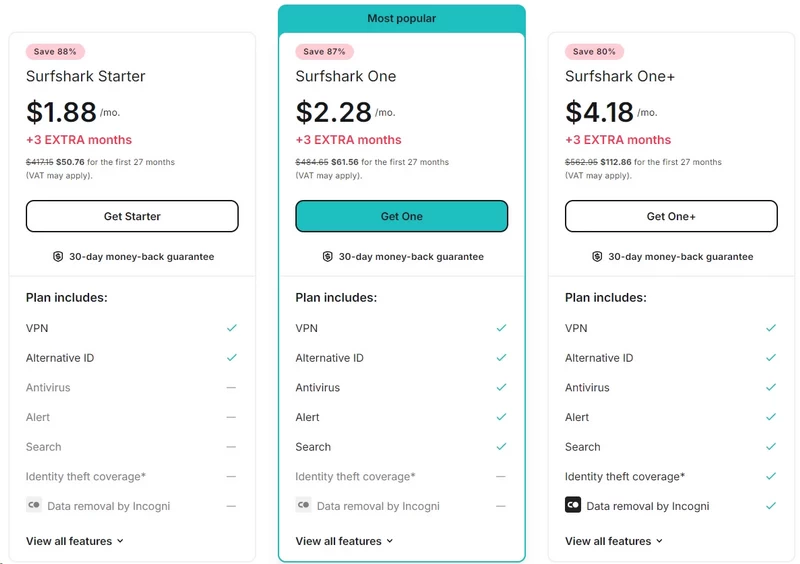
Surfshark’s pricing is textbook loss-leader economics wrapped in a subscription model. The introductory 2-year rate is designed to close the sale fast – and it does. The renewal math tells a very different story, and it’s buried in fine print most users scroll past.
| Plan | Introductory Price | Renewal Price | Notes |
|---|---|---|---|
| Monthly | $15.45/month | $15.45/month | No discount. Effectively a penalty rate. |
| 1-Year | $2.98/month + 3 extra months ($44.70/year) | $231.75/year | Significant increase at renewal |
| 2-Year | $1.78/month + 3 extra months ($48.06 total for 27 months) | Reverts to annual plan at $417.15/2-year | The classic bait-and-switch cadence |
The 2-year plan delivers sticker shock at renewal, not purchase. You pay ~$50.76 for 27 months-a genuinely compelling $1.78/month rate. Then it jumps to $417.15 every 2 years ($17.38/month).
The monthly sticker stays low, but that $417 upfront bill obliterates the budget psychology. Surfshark isn’t unique-the VPN industry thrives on intro-rate bait-but this gap demands clear disclosure, not fine print.
The $15.45 monthly plan deserves scrutiny. Nominally a no-commitment option, it functions as a deterrent-a price so punishing it makes the 2-year deal look like financial mercy. No serious user pays $15.45/month long-term. Pure anchoring theater.
Is Surfshark One Worth the Upsell?
At checkout, Surfshark sells a tiered ecosystem: Surfshark Starter (the core VPN), Surfshark One (adds antivirus, dark web monitoring, and breach alerts), and Surfshark One+ (layers in data broker removal). The upsell hits at maximum commitment – right when you’ve decided to buy – and the pricing increments are calibrated to feel trivial. Less than a dollar more per month. Who wouldn’t pay that?
The honest audit of Surfshark One is mixed. The antivirus pulled a perfect score in AV-Test’s June 2024 evaluation – that’s a legitimate, independently verified result. Dark web monitoring and breach alerts are genuinely useful if you haven’t already set up separate identity monitoring. But the CleanWeb malware-blocking feature – pitched as a network-level threat shield – operates on reputation-based databases only. It won’t stop zero-day threats or novel malware variants. It stops what’s already indexed. That’s a meaningful gap between the marketing framing and the actual capability.
Surfshark One+ pushes into data broker removal, where results vary enormously based on how aggressively brokers re-list data after removal requests. You’re buying ongoing automation of a process requiring sustained effort, not a permanent fix. The components work. But the checkout experience is structured to nudge you toward higher tiers through psychological friction rather than transparent feature comparison. Surfshark Starter – the plain VPN, the thing most users actually need – is the option requiring the most deliberate selection at checkout. The upsell is the default. That’s a design choice, not an accident.
Features & Apps
App Design & The Unlimited Device Reality
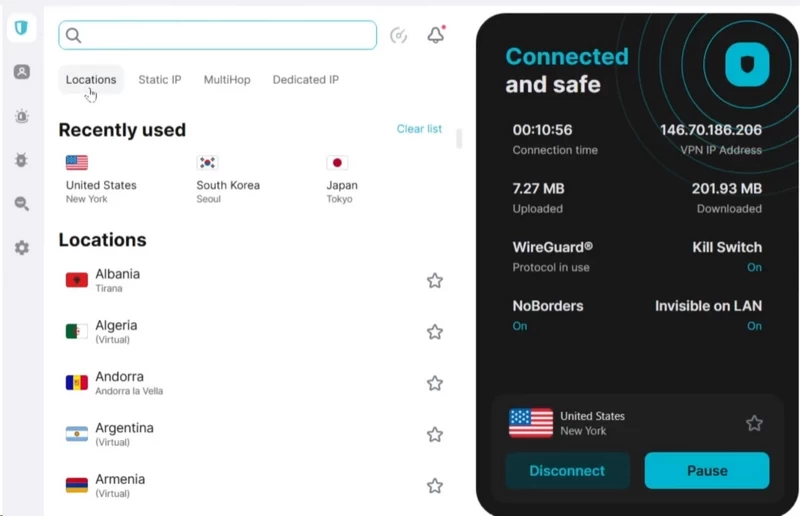
Surfshark’s UI is fragmented across platforms. The Windows client is functional but aggressively noisy-unskippable popups and grayed-out upsell menus clutter every settings toggle. Android is cleaner, with a default dark-mode interface that minimizes friction. iOS is the weakest implementation: the VPN connection is relegated to a floating box that feels bolted on, with key configuration menus buried in bottom-nav tabs.
The “unlimited” device claim holds under real conditions. I wired a full testing lab-multiple laptops, smartphones, a smart TV, and a modified Asus router-to a single credential. Encryption overhead stayed stable. The infrastructure handled simultaneous 4K streams alongside aggressive P2P transfers without dropping. Surfshark’s fraud detection does monitor for abuse: commercial resellers and botnet operators get flagged and locked out. Standard household use-even 15 to 20 devices-operates cleanly below that threshold.
The Nexus Network Explained
Nexus is Surfshark’s proprietary SDN (Software Defined Networking) backbone – the infrastructure layer underneath its most technically differentiated features. Understanding what it actually does matters more than reading the marketing copy around it.
IP Rotator (Rotating IP): Your assigned VPN IP changes automatically every few minutes without dropping your connection. The server stays fixed; the IP cycles. Any tracker attempting to fingerprint you by IP gets a moving target throughout a long session.
Dynamic MultiHop: Traffic routes through two consecutively chained VPN servers before exiting to the open internet. Unlike most double-VPN implementations limited to a handful of fixed pairings, Surfshark lets you select any two servers from its 100-country fleet. Entry in Iceland, exit in Japan – your call. Your originating IP is buried an extra layer deep, and the first server never sees your final destination.
FastTrack: Uses Nexus routing intelligence to find the optimized multi-server path to a target location – not the geographically shortest path, but the fastest one based on real-time load. Surfshark claims up to 70% speed improvements internally; informal independent tests showed roughly 19% gains to Sydney. Currently limited to macOS on three server locations (Sydney, Seattle, Vancouver) with no broader rollout timeline announced.
EverLink: A self-healing tunnel mechanism that automatically reconfigures the VPN connection if it detects instability – before the connection fully breaks. Conventional kill switches are reactive; EverLink is proactive. Available exclusively on WireGuard protocol.
IP Rotator and Dynamic MultiHop are legitimate security upgrades. IP rotation frustrates persistent session tracking in a way a static VPN IP cannot. Dynamic MultiHop introduces genuine architectural complexity for anyone attempting traffic correlation attacks. These are engineering decisions with real privacy implications, not gimmicks dressed in marketing copy. legitimately valuable for high-risk users. IP Randomizer is clever, but its real-world utility is niche.
CleanWeb & Bypasser (Split Tunneling)
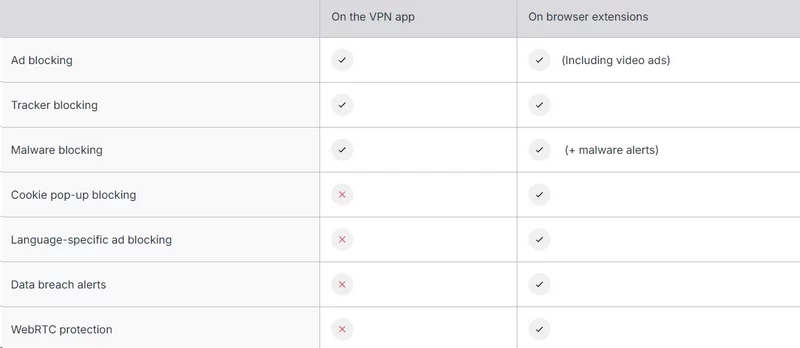
The standard CleanWeb functions as a basic DNS sinkhole-blocking known malware and tracking domains, killing static banner ads, stopping tracking scripts. It fails entirely against hard-coded video ads. CleanWeb 2.0, delivered as a standalone browser extension, closes that gap: it intercepts YouTube pre-rolls, terminates malicious pop-ups, and auto-rejects non-essential cookie consent prompts.
Bypasser (split tunneling) is excellent on Windows and Android. You can bind your BitTorrent client to the encrypted tunnel while letting your banking app or local printer communicate directly with your ISP-high-risk and latency-sensitive traffic, cleanly separated.
Apple users get a degraded implementation. iOS kernel restrictions strip out app-level exclusions; you can only whitelist specific URLs. macOS allows both apps and websites, but forces you to route traffic outside the tunnel rather than binding specific apps inside it. If you live in Apple’s ecosystem, Bypasser is a partial solution.
The Kill Switch Reliability
Surfshark’s kill switch runs in two modes. Soft mode severs internet access the moment an unexpected packet drop or server timeout is detected, then restores normal traffic when you manually disconnect. Strict mode enforces an absolute firewall rule: zero packets leave your machine unless they’re routed through an authenticated Surfshark server-even if the app is idle.
Windows and Android users access both modes. Mac, iOS, and Linux are limited to soft mode. Under stress testing-killing background processes via Task Manager, physically disconnecting network adapters-soft mode caught every single drop and isolated the network interface without fail. Strict mode offers superior theoretical security but regularly breaks local LAN configurations. For daily operation, soft mode is the only practical choice.
Speed & Performance
WireGuard vs. The Legacy Protocols
Surfshark supports three open-source protocols: WireGuard (ChaCha20), OpenVPN UDP/TCP (AES-256-GCM), and IKEv2. No proprietary black boxes. Independent researchers can verify the cryptography directly.
WireGuard is the clear performance choice-near-instant handshakes, minimal processing overhead, and peak throughput. OpenVPN is the deliberate fallback: heavier overhead, but selecting it automatically activates Camouflage Mode for deep packet inspection bypass on restricted networks.
Platform fragmentation undermines this clean lineup. IKEv2 is entirely missing from the Windows client. Mac users downloading via the App Store lose OpenVPN entirely-you must pull the .dmg directly from Surfshark’s website to unlock the full protocol roster. These are artificial limitations that actively frustrate anyone standardizing cross-platform deployments.
The Speed Test Autopsy
| Routing Scenario | Download (Mbps) | Upload (Mbps) | Ping (ms) | Speed Drop (DL) |
|---|---|---|---|---|
| Baseline (No VPN) | 495.5 | 486.3 | 1 | N/A |
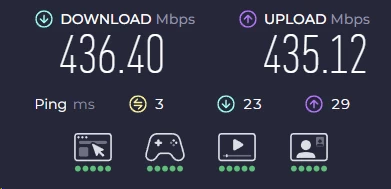
| Local (NY to NY) | 436.4 | 435.12 | 3 | -11.95% |
| International (US to EU) | 272.05 | 231.12 | 68 | -45.09% |
| International (US to AU) | 131.63 | 106.79 | 132 | -73.43% |
On short hops, Surfshark holds up well. A domestic New York to New York connection loses 11.95% download speed-436.4 Mbps through the tunnel-a noticeable but acceptable overhead for full AES-256-GCM encryption. Upload lands at 435.12 Mbps with a near-identical drop, meaning no ISP throttling bypass this time around.
Trans-oceanic routing is where the numbers get uncomfortable. New York to London drops download by 45.09% to 272.05 Mbps-manageable for streaming, but a meaningful hit for sustained high-volume transfers. Upload holds comparatively well at 231.12 Mbps. New York to Sydney is the real ceiling: a 73.43% download penalty leaves you at 131.63 Mbps with ping climbing to 132 ms. That’s still watchable for 1080p streaming, but 4K becomes a gamble and any latency-sensitive work is off the table. The closer your server is to your physical location, the better. The laws of physics don’t negotiate.
Torrenting & Gaming Reality Check
Surfshark permits P2P on all servers, but hides the optimized nodes-you must manually type “P2P” in the search bar to surface them. Once connected, transfers are stable. The ceiling is port forwarding: Surfshark doesn’t support it. Without it, your torrent client can’t bridge as many external seeders, actively limiting swarm efficiency. We averaged 376 Mbps on P2P downloads-a 24% loss from the unencrypted baseline. Safe, but restrictive for power torrenters.
Gaming on local servers is excellent: 9 ms ping on fiber, no noticeable encryption lag, and fleet-wide anti-DDoS protection absorbs targeted traffic attacks against competitive players. Cross-border gaming is a different story. At 132 ms to Australian servers, hit registration fails and server desync is constant in fast-paced titles like Valorant or Apex Legends. Stick to servers within your own region.
Security & Privacy
RAM-Only Infrastructure
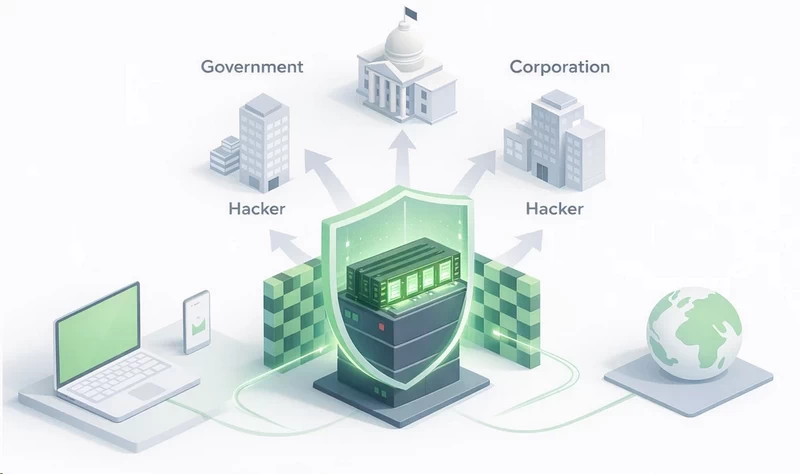
Surfshark runs a 100% RAM-only server fleet – every physical node operates on volatile memory with nothing written to a hard disk. When a server restarts, everything on it is gone. No persistent storage layer for law enforcement, a hostile state actor, or a rogue data center employee to seize or copy. On paper, that’s a strong architectural guarantee: even if Surfshark’s servers were physically confiscated tomorrow, the forensic yield would be zero. This is the same infrastructure model used by NordVPN and CyberGhost VPN, and it’s the current standard for any VPN that seriously claims to protect user data.
The RAM-only design becomes specifically more important given the Netherlands jurisdiction shift. Under BVI incorporation, the legal framework for compelling Surfshark to preserve and produce data was thin – no data retention laws, entirely outside Five/Nine/Fourteen Eyes. Under Netherlands jurisdiction, the legal machinery for compelled disclosure exists. Dutch courts can issue orders. The gap between BVI and Netherlands isn’t theoretical: it’s the difference between a jurisdiction that cannot compel Surfshark to hand over data and one that can.
All 4,500-plus servers across 100 countries are confirmed third-party hosted and RAM-only. Virtual server locations – roughly 40 of them, covering India, Ghana, Mexico, Monaco, Laos, and others – are clearly marked in the app’s server list. The India example illustrates the policy tradeoff directly: in 2022, Surfshark pulled physical servers from India after the government mandated VPN providers log user data. Rather than comply, they removed the hardware and now serve Indian IPs via virtual nodes, preserving the no-logs policy at the cost of additional routing latency. Marking virtual servers in the interface is a hygiene standard the industry should follow universally and currently does not.
The Independent Audits
“Surfshark has been audited” and “Surfshark’s no-logs policy has been independently verified” are not the same statement. The gap between them matters for anyone making a privacy-critical decision.
The earliest audits were conducted by Cure53 in 2018, covering Surfshark’s Chrome and Firefox browser extensions only. No major issues found – but the scope is limited to browser extensions, not server infrastructure, not the VPN client, not the logging policy. In 2021, Cure53 examined Surfshark’s server infrastructure – a more meaningful scope. Minor issues found and fixed. No critical failures.
The audit carrying the most weight is the Deloitte audit from December 2022 – the first independent review of Surfshark’s no-logs policy specifically. Deloitte examined IT system configurations and conducted employee interviews to verify that actual operations matched Surfshark’s published claims. Conclusion: affirmative. In December 2023, Surfshark’s Android app passed the MASA (Mobile App Security Assessment) audit, confirming compliance with global data handling standards for that platform.
The critical gap: Surfshark went four years between launch and its first no-logs audit. ExpressVPN and Mullvad had established audit cadences significantly earlier. The most recent Deloitte report also isn’t publicly available – it’s accessible only through subscriber dashboards. ExpressVPN publishes full reports publicly. Surfshark committed to annual third-party audits going forward – but a stated commitment isn’t a delivered result. Track the cadence, not the promise.
Censorship Bypass

Camouflage Mode & NoBorders
Camouflage Mode and NoBorders address different problems, and conflating them produces a muddier picture than either deserves.
Camouflage Mode is an obfuscation layer. Its job is to disguise the shape of your traffic. Standard VPN connections produce a recognizable traffic signature – deep packet inspection (DPI) tools used by ISPs, corporate networks, and state-level censorship infrastructure can identify WireGuard and OpenVPN traffic patterns without decrypting the payload. Camouflage Mode wraps your VPN traffic to appear as ordinary HTTPS traffic. To a DPI filter, you look like someone browsing a website, not tunneling through a VPN. The obfuscation activates automatically when you select OpenVPN protocol – it is not available on WireGuard or IKEv2. This isn’t obvious in the app interface, meaning users expecting Camouflage Mode on their default WireGuard setup will find it silently inactive.
NoBorders Mode operates at a different layer entirely. Where Camouflage Mode manipulates the appearance of your traffic, NoBorders manipulates which servers you can access from behind a restrictive network. When enabled – active by default via Settings > Advanced – Surfshark’s client detects whether your network is actively restricting VPN connections and, if so, reduces the displayed server list to nodes specifically optimized to penetrate that type of firewall. School networks, corporate proxies, public Wi-Fi with VPN blocking enabled, and in theory state-level restrictions. The app shifts to the relevant server list without requiring manual intervention.
The architectural distinction matters for users in genuinely restrictive environments. Camouflage Mode makes your VPN traffic harder to identify at the packet level. NoBorders routes you to servers that are harder to block at the infrastructure level. Both need to work in concert for effective censorship bypass. Running NoBorders without obfuscation means optimized servers accessed through traffic that still looks like VPN traffic – a sophisticated DPI filter can still catch it. Running Camouflage Mode without NoBorders means clean-looking traffic potentially hitting an already IP-blocked server. The combination is the full toolkit; neither is sufficient on its own in the most hostile environments.
One complication: Camouflage Mode’s dependency on OpenVPN creates a platform-level limitation. On macOS, OpenVPN requires manual setup through a third-party client (TunnelBlick) unless Surfshark surfaces it natively – the native macOS app defaults to WireGuard and IKEv2. If you’re relying on obfuscation on Apple hardware, verify the current status of OpenVPN availability in Surfshark’s macOS client before committing to it for that use case.
Does It Survive The Great Firewall?

The source data here is unusually direct, so no hedging is warranted: Surfshark’s own customer support confirmed that Surfshark does not reliably work in China, Russia, or Turkey. Not a third-party inference. Not an edge case in a forum thread. The company’s official position, communicated by its support team and documented in independent testing.
The Great Firewall is not a static blocklist. It’s an active, machine-learning-assisted DPI infrastructure that has been progressively identifying and blocking VPN traffic patterns for years – including obfuscated traffic. Most commercial VPNs that once worked in China no longer do. The ones that maintain functional presence do so through purpose-built obfuscation protocols (Shadowsocks, V2Ray, custom proprietary solutions) with dedicated China-facing infrastructure. Surfshark’s Camouflage Mode, while technically sound for corporate networks and less sophisticated filtering, doesn’t represent that class of engineering. Surfshark previously offered Shadowsocks and user reports suggested intermittent success – but “intermittent” is not a reliability standard, and Surfshark does not currently advertise Shadowsocks as an active supported feature.
Russia’s situation is different but equally difficult. The Russian government has mandated that VPN providers operating within Russia comply with FAPSI data-sharing requirements – services that refuse are blocked at the ISP level. Surfshark, which cannot structurally comply without violating its no-logs policy, is blocked accordingly. Turkey follows similar logic: the telecommunications regulator has blocked access to many VPN providers’ infrastructure, Surfshark included.
Surfshark does work in Iran, Saudi Arabia, and the UAE – with the caveat that the guidance is to try multiple servers and switch protocols until a functional combination is found. That’s a meaningful caveat. “Try different combinations until something works” signals functional capability without engineered reliability. For a traveler needing occasional geo-unblocking in the UAE, it’s workable. For a journalist or activist whose safety depends on a VPN being reliably available in a restricted environment, it’s not an acceptable reliability posture.
Servers & Locations
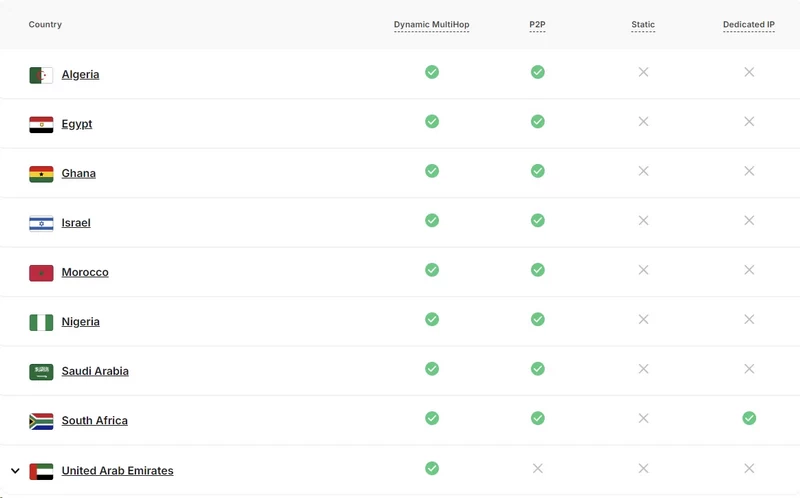
4,200+ Servers in 100 Countries
Surfshark’s fleet has grown past 4,500 servers across 100 countries-their legacy documentation still cites 3,200, but the network has expanded considerably. Critically, they’ve upgraded infrastructure to 10Gbps ports, eliminating the 1Gbps bottlenecks that choke competing networks during peak hours. North American and European density is exceptional, with enough redundancy to absorb a single data center failure without regional outage. Africa and the Middle East remain sparse-a systemic industry failure, not a Surfshark-specific problem.
The most debated architectural decision is their heavy reliance on virtual server locations. Roughly one-third of advertised locations don’t physically exist in the host country. Connect to an “Indian” server and your packets route through Singapore or London, assigned an Indian IP. This is an intelligent security decision: authoritarian regimes force local data centers to log user traffic. Virtual locations let Surfshark bypass hostile jurisdictions entirely while still delivering the regional IP addresses users need.
Transparency saves this from being deceptive: every virtual location is clearly marked with a “V” icon in the desktop and mobile client. The trade-off is inescapable latency-routing to a European data center to spoof a Middle Eastern IP creates a significant geographic detour. It’s a necessary compromise for users who need specific regional access without landing their data in a hostile jurisdiction.
Streaming
The Netflix Unblocking Machine
Streaming platforms continuously blacklist IP ranges belonging to known data centers. Surfshark treats this as an ongoing engineering problem, aggressively cycling IP addresses to maintain access through geofences. Paired with WireGuard’s near-instant connection handshakes, the infrastructure sustains 4K UHD streaming without buffering. No specialized “streaming servers” required-the full network is optimized for video throughput.
Verified platform access across our testing:
- Netflix: 15+ libraries confirmed, including US, UK, Canada, Japan, and Australia.
- BBC iPlayer & ITVX: Flawless UK access.
- Hulu & Sling TV: Consistent US access.
- CBC (Canada): Confirmed via Toronto server.
- Disney+: Bypasses regional locks globally.
- Amazon Prime Video: Reliable in the US and UK; occasional server switching required.
- AbemaTV (Japan): Confirmed access.
- HBO Max & Paramount Plus: Reliable US streaming.
- DAZN: Confirmed access.
The one casualty: geo-blocking US YouTube while logged out of a Google account frequently fails. Google’s detection systems flag the IP rotation as bot behavior.
For hardware that can’t natively run a VPN app-gaming consoles, older Apple TVs-Surfshark’s Smart DNS feature strips the encryption entirely to maximize speed, spoofing only DNS requests to fool streaming platforms. Your ISP can see your traffic in this mode, but it solves the hardware limitation cleanly.
Customer Support
Surfshark pushes you toward their self-service knowledge base before allowing human contact. The repository is extensive-setup guides cover DD-WRT router flashing, manual OpenVPN configuration, and more. But maintenance is poor: you’ll frequently encounter tutorials referencing retired software with outdated screenshots.
For real technical issues, you reach 24/7 live chat, initially gated by a chatbot that deflects queries with knowledge base links. Demand a human escalation explicitly. Once you push past the bot, response times average under 60 seconds.
Human agents are genuinely competent. They understand the difference between a DNS leak and a WebRTC failure, and they can recommend specific server nodes for bypassing stubborn streaming platforms. The one persistent annoyance: agents are mandated to pitch Surfshark One upgrades before closing any ticket-billing issues, routing errors, doesn’t matter. Email escalation for complex networking problems is thorough and accurate, but expect up to 24 hours for a reply.
FAQ
1. How many devices can I connect to Surfshark simultaneously?
Surfshark places no hard cap on simultaneous connections – one subscription covers every device in your household, including phones, laptops, smart TVs, tablets, and routers. This is one of the few genuine differentiators in the VPN market; most competitors cap you at 5–10 devices. The policy is real and functions as advertised, though extremely high-traffic accounts can trigger an abuse-detection flag.
2. Is Surfshark safe and trustworthy?
Surfshark runs a 100% RAM-only server fleet – nothing is written to a hard disk, so a physical server seizure yields zero recoverable data. Its no-logs policy was independently verified by Deloitte in December 2022, and its browser extensions and server infrastructure passed separate Cure53 audits. The main privacy caveat is its Netherlands headquarters, which places it under Nine Eyes intelligence-sharing obligations.
3. What is the cheapest way to get Surfshark?
The cheapest way to get Surfshark is to go for the 2‑year plan with the promotional pricing and extra months, not the monthly or even the annual subscription. Upfront, you pay around 50.76 USD for 27 months, which works out to roughly 1.88 USD per month – that is the genuinely “budget” price before renewal kicks in. After that, the plan jumps to a couple hundred dollars for the next two years, turning the bargain into a classic bait‑and‑switch renewal strategy. The practical play is: grab the longest promo term, set a reminder a month before renewal, and either switch providers or hunt for a fresh promo deal
4. Does Surfshark work with Netflix?
Yes – Surfshark reliably unblocks Netflix across 15+ regional libraries including the US, UK, France, Germany, Australia, Japan, and South Korea. If you hit a detection block, the fix is simple: switch to the WireGuard protocol and reload the Netflix app. That two-step intervention resolves the issue in the vast majority of cases.
5. How fast is Surfshark?
On local routes, Surfshark performs solidly: with a baseline speed of about 495 Mbps, dropping to around 436 Mbps means only about a 12% loss, which is more than enough for 4K streaming and heavy downloads. On long‑distance connections, the trade‑offs become obvious: a US–Europe link can cut speeds by almost half, and going all the way to Australia can mean roughly a 73% drop with latency around 130 ms. In real‑world terms, Surfshark feels almost invisible within your region, but for far‑away servers it is better suited to browsing and 1080p streaming than to esports or constant massive uploads.
6. Does Surfshark keep logs?
Surfshark’s no-logs policy means it does not store browsing activity, IP addresses, session timestamps, or bandwidth usage. However, Surfshark has confirmed it logs connected IP addresses for up to 15 minutes to detect service abuse – a narrow exception primarily targeting commercial account reselling. For the overwhelming majority of users, the practical impact of that exception is zero.
7. Is Surfshark good for torrenting?
Surfshark permits P2P traffic across designated servers distributed throughout its fleet – no artificial blocks, no bandwidth throttling. WireGuard is the right protocol choice for torrenting: high throughput, low CPU overhead, and stable connections that don’t drop mid-transfer. The Bypasser feature lets you route only your torrent client through Surfshark while the rest of your traffic goes direct, minimizing overhead.
8. Does Surfshark work in China?
No – Surfshark’s own customer support has confirmed that the service does not reliably work in China, Russia, or Turkey. China’s Great Firewall uses active deep packet inspection that identifies and blocks VPN traffic, including obfuscated traffic, faster than Surfshark’s Camouflage Mode can consistently counter. If China bypass is a hard requirement, you need a VPN with purpose-built obfuscation protocols like Shadowsocks or V2Ray.
9. What is the difference between Surfshark and NordVPN?
The key difference between Surfshark and NordVPN is that Surfshark leans hard into unlimited devices and aggressive pricing, while NordVPN takes a more conservative, “premium” approach. Surfshark markets itself as a budget‑friendly service with unlimited connections, strong streaming unblocking, and advanced extras like its Nexus network and IP rotation, but it comes with drawbacks in speed consistency, steep renewal pricing, and a Nine Eyes jurisdiction. NordVPN, by contrast, typically offers more servers, more consistent performance, and a longer, more established audit track record, but limits the number of devices and usually costs more for a similar level of security.
10. Is Surfshark One worth it?
It depends on what you’re already paying for elsewhere. The antivirus component earned a perfect score in AV-Test’s June 2024 evaluation, and the dark web monitoring and breach alerts are legitimately useful if you haven’t set up separate identity monitoring. If you’re already running a standalone antivirus and a service like Have I Been Pwned, the bundle adds less incremental value – and the checkout experience is deliberately designed to make upgrading feel like the path of least resistance.

