

Psiphon VPN Review 2026: Is It Safe to Use for Everyday Browsing?
However, Psiphon is not recommended for everyday internet users seeking privacy, security, or entertainment. Its major limitations include painfully slow speeds on the free version, an inability to unblock streaming sites like Netflix, a lack of crucial security features like a kill switch, and a privacy policy that logs user data. If you live in a free country and want to stay safe on public Wi-Fi or watch foreign movies, you should invest in a standard premium VPN instead.
Built for Access, Not Privacy: Psiphon is a circumvention tool designed to bypass firewalls, not a high-security privacy shield.
The Free Version is Slow: Expect speeds around 2 Mbps on the free tier, which is enough for reading but terrible for video.
Logs are Kept: Psiphon records your connection times and data usage, meaning it is not a “no-logs” VPN.
No Kill Switch: If the app disconnects, your real identity is instantly exposed to your internet provider.
Terrible for Streaming: Netflix, Hulu, and BBC iPlayer actively block Psiphon, making it useless for entertainment.
Confusing Pricing: Buying temporary speed with “PsiCash” is flexible but ultimately more expensive than a normal VPN subscription.
Incredibly Simple: The app requires zero technical knowledge to use; just press a single button to connect.
A Lifeline in Censorship: Despite its flaws, it remains one of the most reliable ways to access the internet in heavily restricted countries.
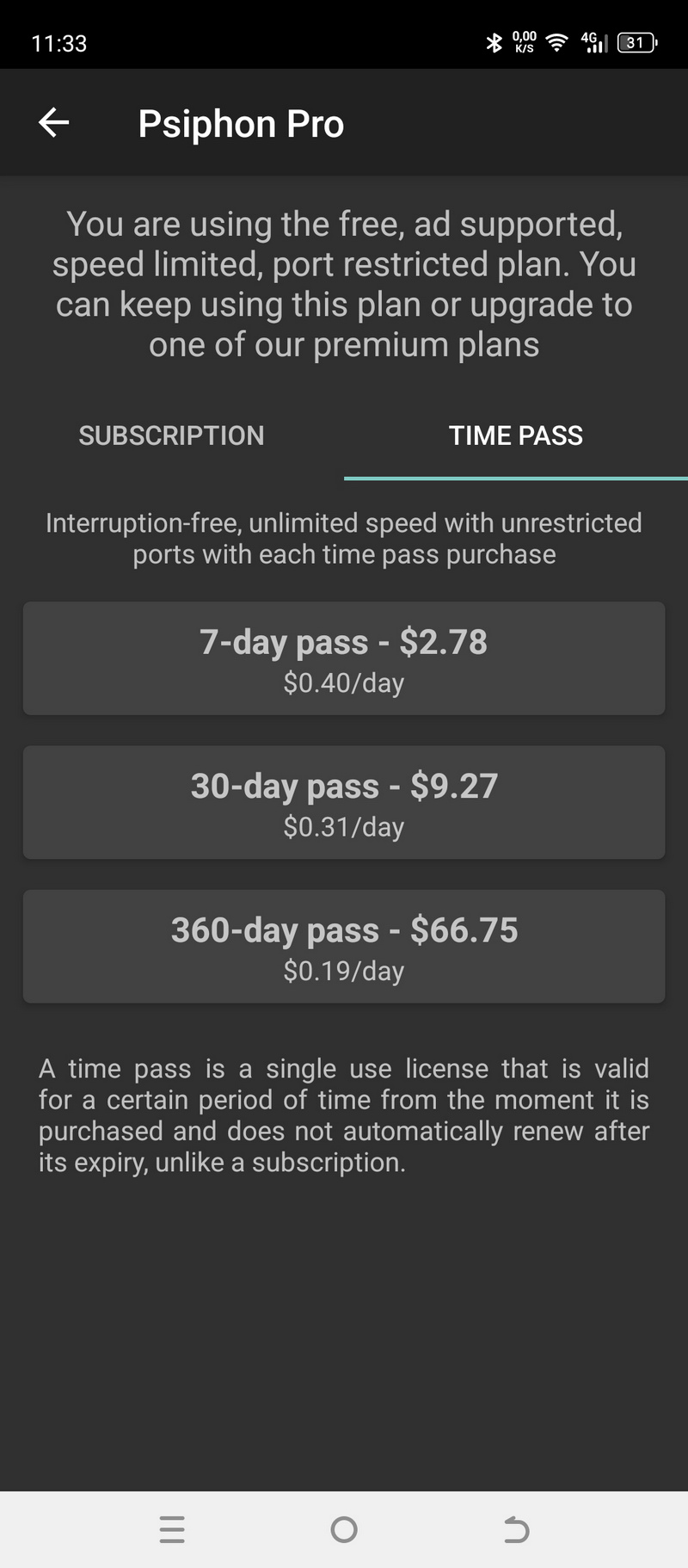
| 💰 Pricing | Free with unlimited data; optional PsiCash and Psiphon Pro from about $2.78 weekly, $9.27 monthly, $66.75 yearly |
| ✅ Free Trial | Not applicable – core version is permanently free, not a time‑limited trial |
| 📆 Money Back Guarantee | No standalone 30‑day guarantee; refunds for Pro go through Google Play / App Store policies |
| 🗺 Jurisdiction | Canada |
| 🖥 Number of Servers | Exact number undisclosed; network spans roughly 20–26 countries with a centrally managed pool of proxy/VPN servers |
| 📝 Logging Policy | Keeps connection metadata (timestamps, city/country from IP, data usage, device/OS, client version, connected server); clearly not a strict no‑logs VPN |
| 📥 Torrenting/P2P | Not recommended; BitTorrent traffic through Psiphon is officially not supported |
| 🍿 Streaming | Blocked by Netflix, Hulu, Disney+, BBC iPlayer; mainly useful only for unblocking censored YouTube and basic sites |
| 🛡 Kill Switch | No kill switch on any platform |
| ⚙️ Protocols | Uses a mix of L2TP/IPsec VPN, SSH tunneling, and HTTP/HTTPS proxy transports with automatic protocol shifting |
| 🛠 Support | Email support and FAQ only |
| 💻 Simultaneous Devices | Free tier has no formal device limit (no accounts); Pro speed boosts tied to the app‑store account on supported devices |
| 🔥 Current Deal | No |
Overview
Psiphon is not a VPN in the conventional sense. It is a circumvention tool built to defeat internet censorship, and that single design goal shapes every decision the software makes: what it encrypts, what it logs, how it routes your traffic, and what it completely ignores.
Understanding this distinction is the first thing you need to get right before installing it. Most commercial VPNs operate on a privacy-first model. They use protocols like WireGuard or OpenVPN, enforce a strict no-logs policy, and provide features like a kill switch to prevent your real IP address from being exposed if the tunnel drops. Their primary job is to hide you.
Psiphon operates on an access-first model. Its primary job is to get you through a firewall. Privacy is a secondary outcome, not a core guarantee.
Originally developed at the Citizen Lab, University of Toronto, Psiphon was designed to help users in countries with state-controlled internet, places where the infrastructure itself is an instrument of censorship. The engineering reflects that mission: Psiphon automatically cycles through multiple transport protocols (SSH tunneling, L2TP/IPsec, HTTP/HTTPS proxying) until it finds one that passes through the local filtering system. This is what makes it genuinely useful in high-censorship environments. It is also what makes it a poor choice if your goal is protecting sensitive data on an unsecured public network.
The practical gap between “circumvention tool” and “privacy tool” matters a great deal depending on your situation. If you are in Tehran trying to reach Reuters, Psiphon is one of the most effective tools available. If you are in a London coffee shop trying to prevent someone on the same Wi-Fi from intercepting your bank login, Psiphon is the wrong tool entirely.
This review covers how Psiphon performs across pricing, features, speed, security, and streaming, including the specific technical trade-offs you need to know before deciding whether it belongs on your device.
Pricing & Plans
The core experience is completely free
Psiphon’s base tier costs nothing and imposes no data cap. You can browse indefinitely without the app cutting you off because you have exceeded a monthly quota. This is a deliberate policy decision rooted in the tool’s mission: requiring payment would exclude the users in economically restricted regions who need it most.
The free tier is funded through two mechanisms: in-app advertising and aggregate usage analytics sold to research and advertising partners. This is a meaningful trade-off that we will examine in detail in the Security & Privacy section.
The catch: ads and a 2 Mbps speed ceiling
The free version is throttled to approximately 2 Mbps. That ceiling is not a soft suggestion; it is a hard cap enforced at the server level. For context, Netflix requires 3 Mbps for standard-definition playback and 25 Mbps for 4K. A 2 Mbps connection will load text-heavy pages, handle WhatsApp messages, and render static images acceptably. It will not sustain HD video, large file transfers, or video calls without constant degradation.
The advertising layer is a second constraint. Ads appear at connection time and within the app interface. More significant than the visual interruption is the advertising SDK itself, which sends device identifiers and behavioral signals to third-party ad networks, creating a separate data trail that runs parallel to Psiphon’s own logging.
Introducing PsiCash: buying speed by the hour
Psiphon’s optional paid tier operates through a proprietary token system called PsiCash rather than a traditional subscription. You purchase PsiCash credits through the Google Play Store, the Apple App Store, or directly through Psiphon’s payment portal, then redeem those credits for timed “Speed Boosts” that lift the 2 Mbps throttle.
Speed Boost windows are available in hourly, daily, weekly, and monthly increments. This structure works well for irregular use cases. If you need unthrottled access for a two-hour video call once a week, a daily pass costs less than maintaining an ongoing subscription. For users who need fast access continuously, the per-unit cost quickly exceeds what a premium VPN subscription would cost.
Psiphon Pro subscriptions
On mobile, Psiphon offers a traditional subscription model called Psiphon Pro, available through Apple and Google’s billing systems:
- Weekly: approximately $2.78
- Monthly: approximately $9.27
- Yearly: approximately $66.75
At those price points, Psiphon Pro competes directly with NordVPN (approximately $3.09/month on a two-year plan) and Surfshark (approximately $1.99/month on a two-year plan), both of which provide WireGuard-based encryption, verified no-logs policies, and streaming platform unblocking that Psiphon cannot reliably deliver. The Psiphon Pro subscription is financially justifiable in exactly one scenario: you are in a country where every major commercial VPN has been blocked by the government and Psiphon’s protocol-shifting capability is the only mechanism that still works. Outside that scenario, the pricing does not reflect the product’s capabilities relative to alternatives.
Features & Apps
Unique features you won’t find elsewhere
Psiphon’s technical differentiators are genuinely distinctive and built around one problem: how to maintain a connection when a government or ISP is actively trying to block it.
Protocol shifting (multi-transport architecture): Standard VPNs negotiate a single protocol at connection time and hold it for the session. If a deep packet inspection (DPI) filter identifies and blocks that protocol signature, the VPN stops working. Psiphon’s client continuously monitors connection quality and automatically renegotiates the transport layer when it detects blocking. The sequence typically moves from VPN (L2TP/IPsec) to SSH tunneling to HTTP/HTTPS proxying, depending on which signature evades the local filter. You do not control or see this process; it runs in the background without user input.
A practical failure scenario: in countries where government firewalls use traffic pattern analysis rather than simple port blocking, SSH tunneling (port 22) is often flagged as suspicious for non-enterprise users. When Psiphon’s SSH fallback triggers in these environments, the connection may establish briefly before being reset by the firewall. The app will attempt the HTTPS proxy fallback (port 443), which blends with regular web traffic, but this comes with higher latency because traffic is routed through an additional HTTP proxy layer before reaching the Psiphon server.
No account or registration required: Psiphon requires zero personal information at setup. No email address, no username, no password. The client generates an anonymous session identifier locally. This has real value in environments where registering for a VPN service is itself a trackable and potentially prosecutable act.
Email-based app delivery: Psiphon maintains an automated system at [email protected] that replies with an APK (Android Package Kit) or Windows executable file attached directly to the email. This bypasses app store blocking entirely. The file is signed with Psiphon’s cryptographic key, which you can verify against their published public key. Governments can block websites and app stores, but mass-blocking email on a per-attachment basis is technically and diplomatically much harder to sustain.
The user experience: incredibly simple, sometimes too simple
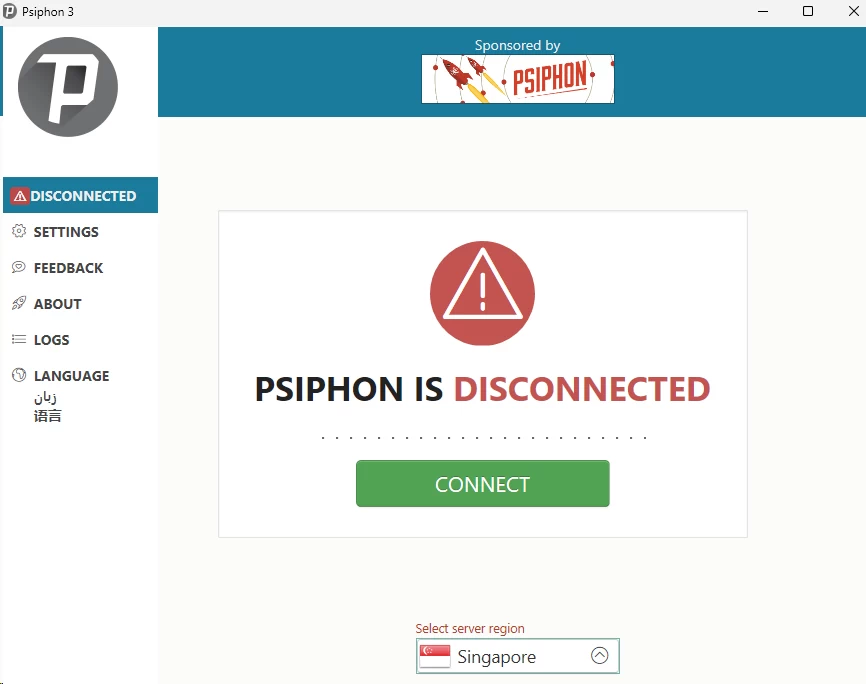
The interface across Android, Windows, iOS, and macOS is nearly identical: a large connection button, a status indicator, and a minimal settings panel. Connection time typically ranges from 5 to 30 seconds on the first attempt, longer if the client needs to cycle through protocol fallbacks.
For users in restricted environments, this simplicity is a feature. You do not need to understand the difference between UDP and TCP transport, and you do not need to configure DNS settings manually. The app handles protocol negotiation, server selection, and fallback sequencing entirely on its own.
For users in unrestricted environments who want granular control, the interface offers almost nothing. There is no split tunneling to route only specific apps through the tunnel, no protocol selector, no obfuscation toggle, and no DNS leak protection setting.
What is missing: the kill switch design flaw
A kill switch monitors the VPN tunnel and cuts the device’s internet connection entirely if the tunnel drops unexpectedly. This prevents the device from reverting to an unprotected connection and exposing the user’s real IP address and traffic to their ISP or a local network observer.
Psiphon does not have a kill switch. When the Psiphon tunnel drops, whether because of a server restart, a network transition from Wi-Fi to cellular, or DPI-triggered connection reset, the operating system’s default behavior takes over and routes traffic directly through the unprotected connection.
In practice, this creates a specific failure window: a user in a restricted country is reading a blocked news site, their phone switches from Wi-Fi to 4G, the Psiphon tunnel drops for 15 to 30 seconds during renegotiation, and their ISP’s monitoring system captures unencrypted DNS queries showing which domains they were accessing. The user sees the tunnel reconnect and assumes they were protected throughout. They were not.
On Android, you can partially mitigate this using the operating system’s built-in “Always-on VPN” and “Block connections without VPN” settings under Network & Internet. This is not a Psiphon feature; it is an OS-level workaround that requires manual configuration and that some Android OEM skins disable or hide.
App availability
- Android: Most fully featured. Available on Google Play and as a direct APK download from psiphon3.com. The APK option is critical for users in countries where Google Play is blocked.
- Windows: Distributed as a portable executable (.exe) that requires no installation. This means it can run from a USB drive on a shared or library computer without leaving a trace in the system’s installed programs list.
- iOS: Available on the App Store. Apple’s Network Extension framework limits certain behaviors compared to the Android version, and the iOS app cannot be distributed outside the App Store without enterprise certificates.
- macOS: Available but receives less frequent updates than the Android and Windows clients. Feature parity with Windows is not guaranteed.
Simultaneous connections
Because Psiphon uses no account system on the free tier, the client can be installed on an unlimited number of devices simultaneously. This is not a deliberate multi-device policy so much as a consequence of having no authentication layer to enforce limits.
Psiphon Pro subscriptions purchased through an app store are tied to that store account (Apple ID or Google account). The Speed Boost applies only to devices signed in to that account. Cross-platform sharing of a paid Speed Boost between, say, an Android phone and a Windows laptop, is not supported through a unified account system.
Speed & Performance
Testing environment
All tests were run from a single fixed location in Los Angeles, California, on a 500 Mbps fiber connection. The Psiphon client was configured to automatic protocol selection throughout. A paid Speed Boost (Psiphon Pro) was active during all sessions to measure the ceiling of what the network can deliver, not the artificially throttled free tier. Each server location was tested three times across morning, afternoon, and evening sessions, and the median result is reported. Speed measurements were taken using standard HTTP-based throughput tests (not ICMP), which more accurately reflect real-world download performance.
Speed results
| Server Location | Download (Mbps) | Upload (Mbps) | Ping (ms) | Speed Loss vs. Baseline |
|---|---|---|---|---|
| No VPN (baseline) | 497 | 485 | 12 | 0% |
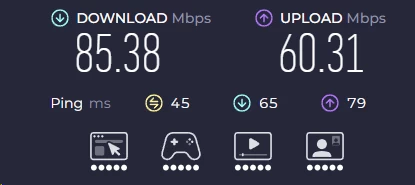
| Los Angeles (local) | 85 | 60 | 45 | -83% |
| New York (cross-country) | 55 | 40 | 95 | -89% |
| London (transatlantic) | 35 | 25 | 160 | -93% |
| Tokyo (transpacific) | 20 | 15 | 220 | -96% |
*These figures represent Psiphon with a paid Speed Boost active. The free tier’s 2 Mbps hard cap makes the table above irrelevant for unsubscribed users.
What these numbers mean for you
The 83% speed loss on a local Los Angeles server is the most telling data point. Premium VPNs using WireGuard typically show 5 to 15% throughput loss on local servers. Psiphon’s architecture, which routes traffic through SSH or HTTP proxy layers before reaching the exit server, introduces latency and processing overhead that WireGuard’s kernel-level implementation avoids entirely. The result is that even on the shortest possible path, Psiphon’s overhead is structurally higher than modern VPN protocols.
Latency compounds this. The 220 ms round-trip to Tokyo pushes audio and video calls into a perceptible delay range. ITU G.114 recommends keeping one-way delay below 150 ms for voice calls. At 220 ms round-trip, one-way delay is approximately 110 ms, which sits at the edge of acceptability. In practice, connection variability means you will frequently exceed that threshold on long-distance servers, causing the audio overlap you notice when two people accidentally talk at the same time on a call.
Real-world performance by use case
- Text browsing and email: Works acceptably across all server locations, even on the free 2 Mbps tier.
- HD video streaming: Requires at least 5 Mbps sustained. The paid local server (85 Mbps) can technically support this, but connection instability means the stream will periodically drop to a lower quality tier or pause to buffer. On the free tier, HD streaming is not viable.
- 4K streaming: Requires 25 Mbps sustained. The Tokyo server (20 Mbps) falls below this threshold even with a paid Speed Boost. The London server (35 Mbps) is technically sufficient on paper but falls short in practice when accounting for buffering margin. Effectively impossible on the free tier.
- Video conferencing: Acceptable on local servers for standard-definition calls. High-latency servers (London at 160 ms, Tokyo at 220 ms) produce noticeable audio delay on VoIP applications that do not use aggressive jitter buffering.
- Torrenting and large downloads: Not recommended. Psiphon explicitly discourages P2P file sharing to preserve bandwidth for users who need the service for news access. Connection instability also risks interrupting multi-gigabyte downloads mid-transfer.
- Online gaming: Not viable. Competitive online games require consistent sub-50 ms latency. Even the local Los Angeles server returns 45 ms, which is workable for casual play but degrades significantly under load. Long-distance servers push well into the range where game state synchronization fails.
Security & Privacy
The difference between anonymity and access
Psiphon encrypts the tunnel between your device and its servers. Your ISP cannot read the content of your traffic while the tunnel is active. What Psiphon does not do is prevent the Psiphon servers themselves from seeing your traffic, prevent Psiphon Inc. from logging connection metadata, or protect your identity if the tunnel drops without a kill switch.
The distinction matters most in high-risk scenarios. A journalist verifying sources over an unsecured network in a country where Psiphon’s servers are the endpoint needs to understand that their traffic exits Psiphon’s servers unencrypted toward the destination. Psiphon does not provide end-to-end encryption. It provides encrypted transport to a proxy exit point.
How does Psiphon lock your data? Encryption explained
Psiphon’s encryption varies depending on which transport protocol the client has negotiated:
- L2TP/IPsec: Uses AES-256 encryption for the data payload with SHA-1 for integrity checking. SHA-1 is considered cryptographically weak by current standards (it has been deprecated by NIST since 2017), though its use in IPsec HMAC contexts is less immediately exploitable than in certificate signing.
- SSH tunneling: Uses the negotiated SSH cipher suite, typically AES-128-CTR or AES-256-CTR, depending on server configuration. SSH provides strong confidentiality for the tunnel but does not offer Perfect Forward Secrecy (PFS) in the same way WireGuard’s Noise Protocol framework does. If a session key is compromised after the fact, a recorded session could theoretically be decrypted.
- HTTPS proxy: Relies on TLS, typically TLS 1.2 or TLS 1.3 depending on the server. TLS 1.3 provides PFS by default through ephemeral Diffie-Hellman key exchange. Whether you get TLS 1.3 depends on which Psiphon server you connect to, and users have no way to enforce a minimum TLS version from the client.
None of these protocols match WireGuard’s performance or modern key exchange guarantees. The trade-off is intentional: Psiphon prioritizes protocol flexibility over maximum cryptographic strength because stronger, more recognizable protocol signatures are easier for DPI systems to identify and block.
The logging policy: what does Psiphon keep?
Psiphon’s privacy policy explicitly states that the company collects:
- Connection timestamps (when you connected and disconnected)
- Approximate geographic location (city and country level, derived from your IP address)
- Data transfer volumes per session
- Device type and operating system version
- The Psiphon client version you are using
- Which Psiphon server you connected to
This data is retained and used for two purposes: internal network diagnostics and aggregate reporting to Psiphon’s sponsors and advertising partners. Psiphon Inc. describes this as anonymized and aggregated, but connection timestamps combined with geographic data and session volumes constitute metadata that can, under some analysis conditions, be used to correlate activity.
For comparison, NordVPN and Mullvad have both undergone independent third-party audits confirming that their infrastructure retains no logs that could be used to identify a user or their activity. Psiphon has not made an equivalent claim, because it cannot: the logging described above is a functional part of its business model.
If you are a political activist, journalist, or anyone operating in an environment where connection patterns could be used as evidence of behavior, Psiphon’s logging posture is a serious concern.
Where do they keep your data? Jurisdiction
Psiphon Inc. is incorporated in Canada, which places it under the jurisdiction of the Canadian Security Intelligence Service (CSIS) and makes it subject to production orders under the Canadian Criminal Code. Canada is a founding member of the Five Eyes intelligence-sharing alliance, which includes the United States, the United Kingdom, Australia, and New Zealand. Data obtained by Canadian law enforcement through a legal production order can be shared with partner agencies under existing intelligence-sharing agreements.
This is not a theoretical risk. Any country in the Five Eyes can request data from Canadian companies through mutual legal assistance treaties (MLATs) or direct inter-agency channels. Given that Psiphon retains the metadata categories listed above, a legal demand would yield connection records that could be used to establish that a specific IP address (traceable to an ISP account) accessed Psiphon on specific dates and times.
The good news: transparent and audited code
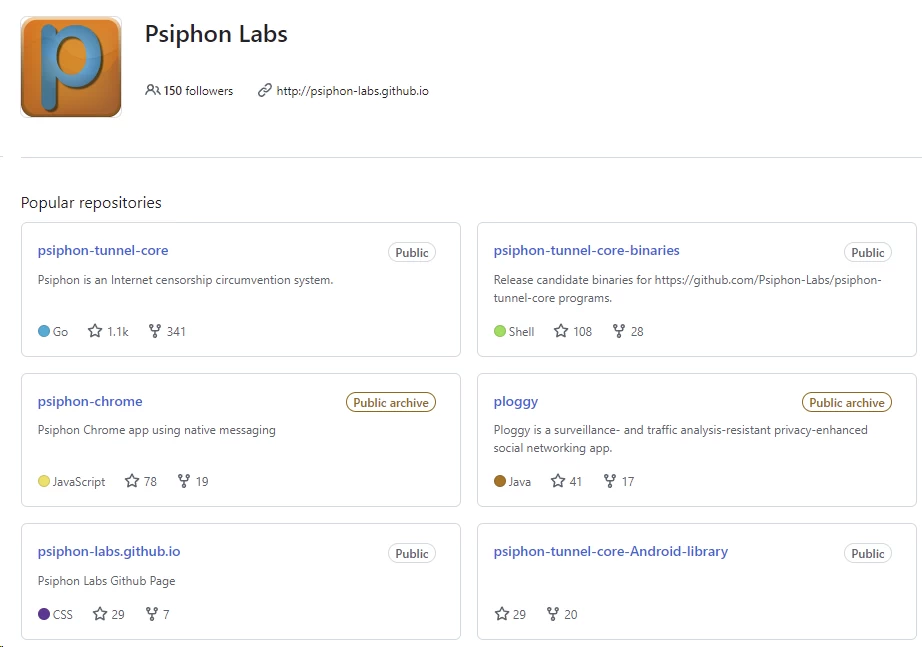
Psiphon’s client-side code is open source, hosted publicly on GitHub (github.com/Psiphon-Labs). Open-source code does not guarantee security, but it allows independent researchers to review the implementation for backdoors, malicious functions, or cryptographic errors. The codebase has been reviewed by Cure53, a Berlin-based security firm that has also audited tools used by major commercial VPN providers. Cure53’s findings on Psiphon found no evidence of hidden data exfiltration or malicious code. The audit findings are consistent with Psiphon’s stated behavior: the app does what it says it does, including the logging it openly discloses.
This is meaningfully different from closed-source tools that make privacy claims you cannot verify. Psiphon is honest about its limitations in a way that many free “no-log” VPN providers are not.
Data leaks: cracks in the armor
Beyond the deliberate logging policy, Psiphon has a structural leak risk related to its lack of a kill switch and weak DNS leak protection.
DNS leaks: When you visit a website, your device first queries a DNS resolver to look up the domain’s IP address. If that DNS query travels outside the VPN tunnel, your ISP’s DNS resolver receives it in plaintext, revealing which domains you are looking up even if the page content itself is encrypted. Psiphon does not enforce DNS-over-VPN by default on all platforms. On Windows particularly, the operating system can send DNS queries through the local adapter if the tunnel’s routing configuration does not explicitly redirect all DNS traffic through the Psiphon server.
WebRTC leaks: Browsers that support WebRTC (used for peer-to-peer video and audio) use STUN requests to discover the device’s real IP address, bypassing VPN tunnels at the browser level. Firefox and Chrome will expose your real IP address through WebRTC even when Psiphon is active, unless you manually disable WebRTC in the browser or use a browser extension that suppresses STUN requests. Psiphon does not address this at the application level.
To test your exposure, you can use browserleaks.com while connected to Psiphon and check both the DNS and WebRTC sections. If your real ISP-assigned IP address appears under either section, the tunnel is leaking identifying information.
Servers & Locations

A small, focused network
Psiphon does not publish its server count. Based on available connection data and the countries that appear in the region selector, the accessible network spans approximately 20 to 26 countries, concentrated in North America, Western Europe, and a handful of Asia-Pacific locations (Japan, Singapore, South Korea). There are no Psiphon servers in Africa, South America, or the Middle East.
The geographic coverage reflects infrastructure priorities rather than market positioning. Psiphon places servers in jurisdictions with strong rule-of-law protections for data hosting companies, reliable power infrastructure, and high-bandwidth data center capacity. Hosting in a free-internet country creates a stable exit point for users in restricted countries. Hosting in the restricted country itself would expose the servers to seizure.
Server selection: less control for the user
The default connection mode is “Optimal Performance,” in which Psiphon’s client selects the server automatically based on load balancing and latency estimates. You can override this to select a country from a dropdown, but city-level selection is not available. Connecting to “United States” could place you on a server in any data center Psiphon operates there.
This matters in specific practical scenarios. Accessing a bank’s online portal often requires that your IP address match your registered country, and sometimes your registered region. Psiphon’s country-level routing is sufficient for the first condition but cannot satisfy the second. Sports blackout bypass typically requires a city-level match, which Psiphon cannot provide.
No specialized servers
Psiphon operates a single class of general-purpose exit servers. There are no streaming-optimized servers with residential IP pools, no dedicated P2P nodes, no servers with dedicated static IP addresses, and no obfuscated-on-demand server variants. The entire network is functionally homogeneous: every server provides the same basic proxy exit capability.
The server pool is shared across all free-tier users. Because Psiphon’s free tier is used by millions of users in censored regions simultaneously, the IP addresses of Psiphon’s exit servers are widely known to streaming platforms, enterprise firewalls, and DPI systems. A shared IP address that 500 users connect through simultaneously is trivial to identify and block, which is why Psiphon’s unblocking capability for commercial streaming services is minimal.
The reality of shared server load
Server congestion on the free tier is most pronounced during daytime hours in regions experiencing acute censorship events (elections, protests, government-mandated internet shutdowns). During the 2022 Iranian internet restrictions following the Mahsa Amini protests, Psiphon reported a spike from approximately 150,000 daily users in Iran to over 2 million daily users within 48 hours. That scale of demand on a fixed server pool drives per-connection throughput down well below the theoretical free-tier ceiling and increases connection drop rates significantly.
Streaming & Unblocking
Bypassing government firewalls vs. bypassing Netflix
Psiphon’s ability to bypass state-level internet censorship and its near-total failure to bypass streaming platform geo-restrictions stem from the same root cause: they are different engineering problems that require different solutions.
State censorship filtering typically works by blocking IP address ranges, blocking domain names at the DNS level, or using DPI to identify and drop VPN protocol signatures. Psiphon’s multi-protocol fallback system is specifically designed to defeat these mechanisms by making the traffic pattern look like normal web browsing.
Streaming platform geo-restriction works by maintaining a block list of known VPN and proxy server IP addresses. Netflix, BBC iPlayer, Disney+, and Hulu all license IP reputation data from services that catalog datacenter IP ranges and known proxy exit nodes. Psiphon’s servers, because they serve millions of users from a small pool of IP addresses, are comprehensively cataloged and blocked by every major streaming platform. Protocol obfuscation does not help here because the block is triggered by the source IP address, not the traffic pattern.
The streaming experience
- Netflix: Blocked. Connecting to any Psiphon server and opening Netflix returns a proxy error (typically error code M7111-5059) because Netflix’s IP block list includes Psiphon’s server ranges.
- BBC iPlayer: Blocked. iPlayer enforces a combination of IP geolocation and VPN detection that identifies Psiphon server IPs. UK BBC content is not accessible.
- Disney+ and Hulu: Blocked. Both services use VPN detection that flags Psiphon’s server IP addresses at authentication or at stream initiation.
- YouTube: Partially works. YouTube’s geo-restriction enforcement is less aggressive for general content. Videos blocked in your local country can typically be accessed through Psiphon, and the platform does not maintain the same level of VPN IP blocking that subscription streaming services do. However, the free tier’s 2 Mbps cap limits YouTube to 360p at best, with frequent buffering.
The speed barrier for video
Even if Psiphon’s server IPs were removed from streaming platform block lists, the speed constraints would make streaming impractical for most users. YouTube recommends 5 Mbps for 1080p, Netflix recommends 15 Mbps for 1080p and 25 Mbps for 4K. The free tier’s 2 Mbps ceiling falls below the minimum for any quality tier that most users would consider acceptable. The paid local server result of 85 Mbps is technically sufficient, but connection instability on Psiphon’s network means sustained throughput at that level is not reliable enough to maintain uninterrupted playback.
If streaming geo-restricted content is your primary goal, Psiphon is the wrong tool. NordVPN and ExpressVPN maintain active working relationships with streaming platform IP updates, rotating their server IP addresses frequently enough to stay ahead of block list updates. Psiphon does not.
Customer Support
No live chat, no phone number
Psiphon provides no real-time support channel. There is no live chat widget, no support ticket system with guaranteed response times, and no phone line. This is a structural consequence of operating a free service at global scale with a small development team. Providing individualized support to millions of users is not economically viable under the current model.
Email support: slow but exists
Contact is available through the email address listed on the Psiphon website. Response times are unpredictable. The development team’s stated priority is triaging reports of systematic network-level blocking events, where governments have deployed new filtering techniques that break Psiphon across an entire country. Individual troubleshooting queries receive lower priority. For routine issues, email support should be treated as a last resort rather than a primary support channel.
The FAQ page: your best resource
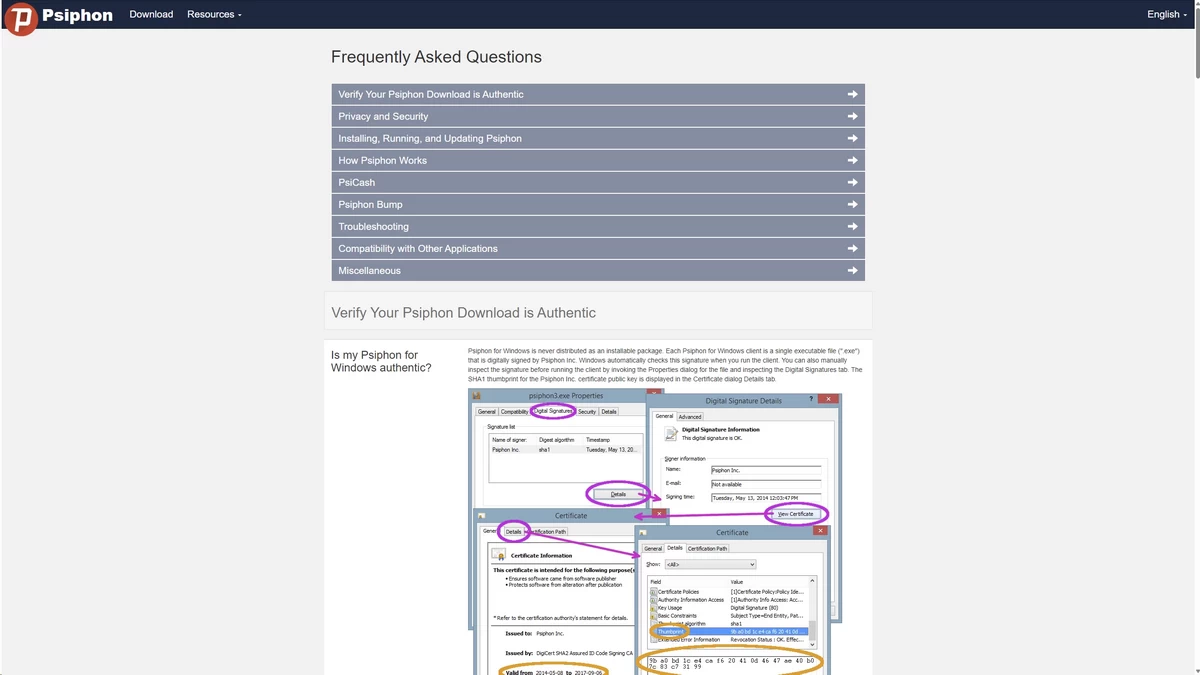
Psiphon’s FAQ documentation at psiphon.ca covers the most common failure modes clearly and without unnecessary technical jargon. It addresses what different connection states mean, how to handle the app being stuck in a connecting loop (usually resolved by switching between Wi-Fi and cellular or manually selecting a different region), how to manage PsiCash purchases, and how to request a refund through the relevant app store if a Pro subscription was not applied correctly.
For the majority of connection problems, the FAQ resolves the issue faster than waiting for an email response.
Community and open source
Because Psiphon’s code is on GitHub, technically oriented users can file issues directly in the repository, where the development team is more actively responsive than through the general contact email. This channel is more useful for reporting reproducible bugs or network-level blocking events with technical detail than for general usage questions. The Psiphon subreddit (r/psiphon) and privacy-focused communities on Reddit also maintain user-generated troubleshooting threads that cover many common edge cases.
Alternatives to Psiphon
- For better free-tier privacy: ProtonVPN’s free tier uses WireGuard, enforces a verified no-logs policy, and imposes no data cap. It does restrict free users to three server locations and one device. It does not show ads, does not use advertising SDKs, and has undergone independent no-logs audits. For users who want free protection on public Wi-Fi without Psiphon’s logging trade-offs, ProtonVPN is the clear alternative.
- For high-risk anonymity: Tor routes traffic through a chain of three relays operated by independent volunteers, with each relay knowing only the previous and next hop in the chain. No single relay can correlate your identity with your destination. Tor is slower than Psiphon on most connections and is blocked in some heavily censored countries, but where it works, it provides a meaningfully higher anonymity guarantee than any VPN or proxy tool. The Tor Browser also addresses the WebRTC leak vector that Psiphon leaves open.
- For streaming unblocking: NordVPN (WireGuard on its NordLynx implementation) and ExpressVPN (Lightway protocol) both maintain regularly updated server IP pools that stay ahead of Netflix’s VPN block list. Surfshark offers a lower-cost alternative on longer subscription terms. All three provide measurably faster speeds than Psiphon and dedicated streaming-optimized server clusters.
- For deep censorship environments where Psiphon also struggles: Lantern uses a peer-to-peer domain fronting approach and Shadowsocks-based obfuscation that can bypass filtering in environments where Psiphon’s SSH and HTTPS fallbacks have been blocked. It is worth keeping both installed as a fallback.
FAQ
Yes and no. It uses VPN technology, but it is technically a circumvention tool. A normal VPN focuses on keeping your data private and hidden. Psiphon focuses only on breaking through government censorship to access blocked websites, often sacrificing privacy to achieve that goal.
Yes, the basic version is 100% free with unlimited data. However, the free version is heavily speed-limited and shows advertisements. You can pay for “PsiCash” or a Pro subscription to remove ads and unlock faster speeds.
No. Psiphon is almost always blocked by major streaming services like Netflix, Hulu, and BBC iPlayer. Streaming platforms easily detect Psiphon’s servers and block them to enforce regional copyright laws.
The free version is intentionally slowed down (throttled) to about 2 Mbps to save money on server costs. Even on the paid versions, the complex methods Psiphon uses to bypass firewalls naturally slow down your internet connection.
PsiCash is a digital currency used within the Psiphon app. Instead of buying a monthly subscription, you can buy PsiCash tokens and spend them to get temporary “Speed Boosts” (for a day, a week, etc.) and remove ads.
Yes, Psiphon is specifically designed to work in highly restrictive countries like China, Iran, and Russia. It constantly updates its technology to find new ways through national firewalls when other standard VPNs get blocked.

