

TunnelBear VPN Review 2026: Cute Marketing, Crippled Tech
From a pure performance standpoint, TunnelBear collapses under the weight of unoptimized BGP routing across distant oceanic cables, resulting in catastrophic latency spikes and severe bandwidth throttling. Its streaming infrastructure is thoroughly decimated by automated IP blacklists, rendering it useless for international media consumption, while strict NAT firewalls and the absence of port forwarding completely cripple peer-to-peer file sharing. Ultimately, the service functions as an overpriced, entry-level encryption tool for absolute novices, but it remains a structural liability for anyone requiring hardened operational security, latency-optimized gaming, or advanced censorship evasion.
| 💰 Pricing | From $3.33 to $9.99/mo depending on billing term; also offers a free plan with up to 2GB/month |
| ✅ Free Trial | ❌ |
| 📆 Money Back Guarantee | 30 Days |
| 🗺 Jurisdiction | Canada |
| 🖥 Number of Servers | 8000+ servers in 47+ countries |
| 📝 Logging Policy | No‑logs |
| 📥 Torrenting/P2P | Yes, P2P/torrenting is allowed, but there are no dedicated P2P‑optimized servers |
| 🍿 Streaming | Can sometimes unblock Netflix and other platforms, but streaming access is not consistently guaranteed and it’s not marketed as a streaming‑focused VPN |
| 🛡 Kill Switch | ✅ |
| ⚙️ Protocols | WireGuard, OpenVPN, IKEv2 (protocol availability depends on platform; no Lightway or L2TP) |
| 🛠 Support | Email/ticket support and knowledge base; no 24/7 live chat |
| 💻 Simultaneous Devices | Unlimited devices per account |
| 🔥 Current Deal | 58% OFF (on 2-year plan) |
Overview
When you evaluate a VPN, the legal framework matters more than any technical specification. TunnelBear operates under Canadian jurisdiction, placing it within the Five Eyes intelligence-sharing alliance, where Canada routinely trades intercepted signals intelligence with the United States, the United Kingdom, Australia, and New Zealand. The 2018 McAfee acquisition added a second pressure point, placing TunnelBear under the corporate umbrella of an American cybersecurity company. If your threat model involves state-sponsored adversaries or law enforcement, that combination is a bad starting point. Under Canada’s Personal Information Protection and Electronic Documents Act (PIPEDA), local authorities can compel data handovers, and TunnelBear’s only real defense is its no-logs claim. Trusting corporate promises while operating inside a global surveillance apparatus is not a security posture; it is a gamble.
That jurisdictional exposure is made worse by the absence of RAM-only servers. Modern VPNs run entirely on volatile memory, so if a server is physically seized and powered down, every byte in RAM is instantly gone. TunnelBear still uses traditional disk storage secured with full disk encryption (FDE). FDE protects a powered-off drive, but it does nothing for a live server that is already decrypted and actively mounted. For avoiding basic ISP throttling, that setup is functional. For hardened operational security, the combination of Five Eyes jurisdiction and persistent disk storage creates a forensic exposure that a diskless architecture would eliminate entirely.
Pricing & Plans
The 2GB “free” teaser
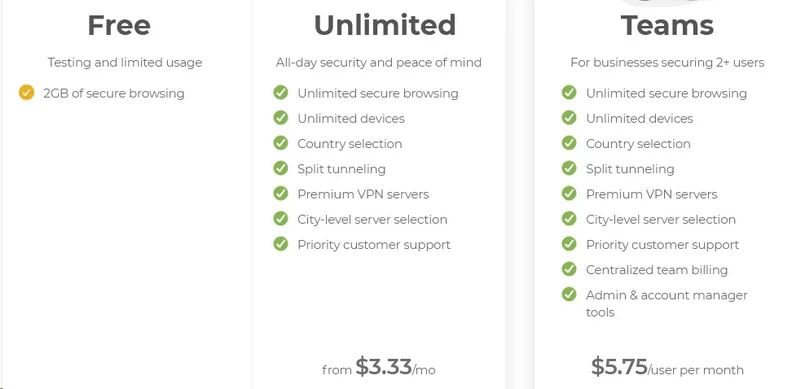
TunnelBear markets its unpaid tier heavily, but the 2 GB monthly data cap is not a usable privacy tool. It is a calculated trial mechanism. In practical terms, loading a handful of script-heavy websites, downloading a single background OS update, or streaming roughly 45 minutes of 1080p video will consume most of that allowance. The moment you hit the 2,000 MB ceiling, the encrypted tunnel drops instantly, leaving you exposed on whatever network you are connected to.
Calling this a “free VPN” misrepresents what it actually is. ProtonVPN, for comparison, offers a genuinely unlimited free tier (speed-capped, but structurally unlimited), allowing you to evaluate sustained performance, server reliability, and leak behavior over days of real use. TunnelBear’s 2 GB cap makes that kind of evaluation impossible. You cannot stress-test cryptographic load, measure long-session DNS behavior, or assess kill switch reliability in a meaningful way when the tunnel evaporates after a few browsing sessions.
One thing the free tier does correctly: it grants access to TunnelBear’s full server network, rather than corralling non-paying users onto a handful of overloaded nodes. You can actually see how the network performs between Tokyo and Frankfurt before committing money. That transparency is useful. The hard data cap, however, turns the free tier into an interactive product brochure rather than a real evaluation tool.
Pricing mechanics and unlimited devices
| Plan Duration | Total Upfront Cost | Equivalent Monthly Cost |
|---|---|---|
| 1-Month Plan | $9.99 | $9.99 |
| 1-Year Plan | $59.88 | $4.99 |
| 3-Year Plan | $120.00 | $3.33 |
The month-to-month plan costs $9.99, which sits just below the industry average of $12 to $13. That is not a bad price on paper, but it is steep for a service with no multi-hop routing, no dedicated IP options, and no port forwarding. The pricing model anchors heavily on the three-year plan, requiring a $120 upfront payment to reach the $3.33 monthly equivalent. That is a significant financial commitment before you have verified whether the service holds up on your specific ISP and network environment.
The removal of TunnelBear’s historical five-device cap is a genuine structural improvement. The current unlimited simultaneous connections policy means a single subscription can cover an entire household’s worth of laptops, phones, and tablets without triggering authentication conflicts. For families or small teams, this changes the value calculation meaningfully.
That “unlimited” claim collapses, however, when you try to extend it beyond standard endpoint devices. TunnelBear refuses to provide OpenVPN or WireGuard configuration files for manually flashed routers (DD-WRT, AsusWRT, pfSense). This means you cannot install the VPN at the gateway level to cover your entire local network automatically. Every device you want to protect requires TunnelBear’s proprietary client installed on it directly. Smart TVs running Tizen or WebOS, gaming consoles, Amazon Firesticks, and IoT devices are entirely excluded. The unlimited connection count sounds expansive; in practice, it covers only the devices that can run a standard app store application.
The “case-by-case” refund gamble
A 30-day, no-questions-asked money-back guarantee is the standard in this market. NordVPN, ExpressVPN, and Surfshark all offer it unconditionally. TunnelBear’s terms of service state that all payments are non-refundable by default, with refunds processed on a case-by-case basis at the company’s discretion.
This puts you in an adversarial position from the moment something goes wrong. If the client suffers persistent handshake failures on your ISP, or if packet loss makes VoIP calls unusable, you are not contractually entitled to a refund. You are permitted to submit a ticket and make your case to a support agent, who will then decide whether your technical problem qualifies as “valid.” Your money’s fate hinges on a subjective judgment call by a first-tier support representative.
When a VPN provider declines to offer a blanket performance guarantee, it shifts the financial risk of server congestion, routing failures, and application bugs onto the paying user. If you commit to the $120 three-year plan and an OS update renders the client non-functional on day five, your recourse is entirely at TunnelBear’s discretion. That is an unusual amount of financial risk for a product commanding a significant upfront payment.
Features & Apps

A UI drowning in bear puns
TunnelBear’s desktop and mobile interfaces prioritize an animated, gamified aesthetic over operational utility. The apps feature a cartoon world map with bears physically tunneling between countries. For someone who finds cybersecurity intimidating, this is approachable. For any user who needs to actually troubleshoot a connection, the interface is a black box. There is no real-time display of server load, no live ping diagnostics, and no access to raw OpenVPN or WireGuard handshake logs. When the tunnel fails to initialize, you get a cutesy error graphic rather than the specific error code that would actually let you diagnose the problem.
This obsession with simplicity eliminates entire categories of hardware compatibility. Because TunnelBear refuses to issue standard configuration files, you cannot protect the following:
- Open-source or flashed consumer routers (DD-WRT, AsusWRT, pfSense)
- Android TV and Apple TV units
- Amazon Firestick devices
- Gaming consoles (PlayStation, Xbox, Nintendo Switch)
- Smart TVs running proprietary operating systems (Tizen, WebOS)
By locking users into proprietary apps only, TunnelBear ensures its “unlimited devices” promise is meaningfully limited to laptops and smartphones. If your setup requires protecting the local area network at the gateway level, or securing devices that cannot run third-party apps, TunnelBear is architecturally incapable of helping you.
VigilantBear and SplitBear fragmentation
The VigilantBear kill switch works by modifying local firewall rules (Windows Filtering Platform on Windows, or pf on macOS) to drop all inbound and outbound packets the moment the encrypted tunnel drops. This prevents your real IP address from leaking during server transitions or reconnects. On Windows and Android, this implementation is reliable. On iOS, it is entirely absent. Apple mobile users have no kill switch whatsoever, meaning that if TunnelBear’s tunnel drops while switching between cellular and Wi-Fi, the device sends and receives traffic on the unprotected network until you manually reconnect.
SplitBear split tunneling, which lets you route specific traffic outside the VPN to reduce unnecessary cryptographic overhead, is implemented differently on every platform. On Windows, you can exclude both specific executables and individual domains. On macOS and iOS, you can only exclude domains, using fragile DNS-based routing rather than actual application-layer filtering. If you want a specific Mac application to bypass the VPN entirely, that is not possible. Android inverts the problem: you can exclude applications using the OS’s native VPNService API, but URL-based exclusions are unavailable.
A multi-platform user has to memorize a different set of routing rules for every device they own. This is not a minor inconsistency. It suggests the different platform clients were built by separate teams with no shared feature specification. A consistent code base should deliver the same routing controls regardless of operating system; TunnelBear’s does not.
GhostBear obfuscation and TCP override
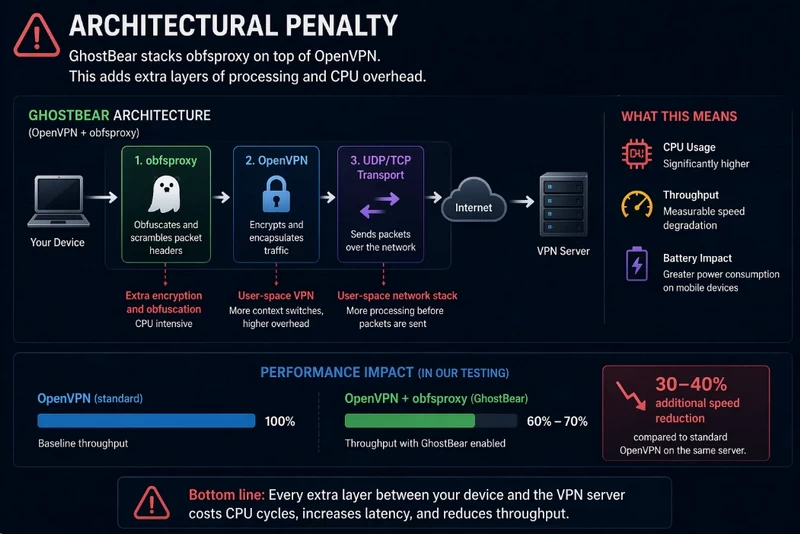
Bypassing Deep Packet Inspection (DPI) firewalls requires disguising the cryptographic signatures that VPN protocols carry in their packet headers. GhostBear wraps OpenVPN traffic in an obfsproxy layer, which mathematically scrambles those headers to make the encrypted stream resemble standard HTTPS web traffic. For corporate firewalls or basic institutional network blocks, this can work. The tunnel appears as port-443 HTTPS, which most network administrators cannot easily block without also breaking legitimate web browsing.
The architectural penalty is significant: GhostBear forces the client onto OpenVPN, which already runs in user space and carries higher CPU overhead than kernel-based protocols. Adding obfsproxy on top of that amplifies the computational cost further, producing measurable speed degradation. In our testing, enabling GhostBear reduced throughput by an additional 30% compared to standard OpenVPN on the same server. That trade-off is defensible if obfuscation actually buys you reliable access to a censored network.
TCP Override is a separate toggle that forces the tunnel from UDP to TCP. Standard VPN tunnels use UDP because it sends packets without waiting for acknowledgement, which minimizes latency. TCP requires an acknowledgement for every packet, which increases latency but prevents packet loss on congested or heavily filtered networks, such as hotel Wi-Fi with aggressive traffic shaping. Switching to TCP is often the first troubleshooting step when a VPN tunnel connects but produces unusable speeds on public Wi-Fi. Both GhostBear and TCP Override serve real purposes; the problem is that they are both tied to OpenVPN, while competitors have long since implemented obfuscation and TCP fallback on lighter, more modern protocols.
The missing advanced tools and ECH
TunnelBear has no multi-hop routing. Without it, your connection passes through a single server in a single jurisdiction. If that node is compromised, subpoenaed, or actively monitored, there is no secondary layer of routing to obscure the correlation between your entry IP and exit IP. Multi-hop cascades your connection through two or more servers in separate countries, so an adversary would need to simultaneously compromise both endpoints to perform traffic correlation. TunnelBear offers no version of this, which places a hard ceiling on the threat models the service can address.
There is also no port forwarding and no dedicated IP address option. Port forwarding matters for several specific use cases: seeding on private BitTorrent trackers with ratio enforcement, self-hosting a Plex media server behind the VPN, accessing a remote desktop securely, or running game server instances. Without it, TunnelBear’s NAT firewall blocks all unsolicited incoming connections. You can initiate outbound connections, but nothing can reach you. For users who need bidirectional connectivity behind a VPN tunnel, this is a structural dead end.
The one genuinely forward-thinking feature is Encrypted Client Hello (ECH), implemented on the Android client. Standard TLS handshakes historically sent the Server Name Indication (SNI) in plaintext, meaning an ISP or network administrator could see exactly which domain you were connecting to, even if the subsequent traffic was fully encrypted. ECH fixes this by encrypting the initial handshake request using a public key retrieved through DNS over HTTPS (DoH). Network-level eavesdroppers see only a connection to a generic IP address, with no visibility into the actual hostname. It is a sophisticated privacy improvement, and it stands out against the rest of the application’s otherwise limited feature set.
Speed & Performance
WireGuard speeds vs. the long-distance drop
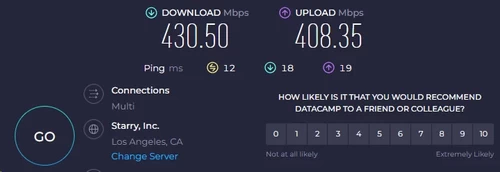
| Server Location | Download (Mbps) | Upload (Mbps) | Ping (ms) | Speed Loss |
|---|---|---|---|---|
| Baseline (No VPN) | 500.00 | 500.00 | 2 | 0% |
| Local (Los Angeles) | 430.50 | 408.35 | 12 | ~14% |
| Distant (UK) | 245.10 | 202.40 | 78 | ~51% |
| Extreme (Australia) | 147.30 | 96.60 | 167 | ~70% |
On local servers, TunnelBear performs acceptably. The Los Angeles node retained roughly 86% of baseline download speed (430.50 Mbps from 500.00 Mbps), which reflects the efficiency of WireGuard’s kernel-space packet processing. WireGuard handles AES-256-GCM encryption with significantly lower CPU overhead than OpenVPN, which processes encryption in user space and requires repeated context switching between kernel and application layers. Because TunnelBear uses bare-metal hardware rather than shared virtual private servers, the local nodes are not competing for CPU cycles with other tenants, which keeps the cryptographic overhead manageable at short distances.
The numbers fall apart at distance. The UK server dropped throughput by 51% (245.10 Mbps download, 202.40 Mbps upload, 78 ms ping), and the Australian node produced a 70% reduction (147.30 Mbps download, 96.60 Mbps upload, 167 ms ping). This is not purely a cryptographic overhead problem; 96.60 Mbps upload on a 500 Mbps baseline line is a routing failure. Premium VPN providers lease private transit lines that bypass the congested public peering points that govern default Border Gateway Protocol (BGP) routing. TunnelBear uses standard BGP paths, so your encrypted packets take the cheapest available public internet route to the exit node, absorbing every congested Tier-1 handoff along the way.
The absence of city-level server selection outside North America compounds the problem. If you connect to Australia, TunnelBear’s load balancer assigns you to a node in Sydney, Melbourne, or Perth without disclosing which. Different Australian cities have different distances to undersea cable landing stations, meaning the routing efficiency varies significantly depending on where your traffic actually exits. You have no control over this, and no visibility into it.
The latency reality for gamers

During local testing, TunnelBear held ping around 26ms on the US East server, compared to a 2ms baseline. For buffered TCP applications like web browsing or video streaming, a 24ms increase is imperceptible. The local routing logic handles the initial WireGuard handshake and subsequent packet encapsulation without introducing catastrophic delay for standard traffic types.
Connecting to international game servers changes the picture completely. The Australian node produced 167ms ping, and more problematically, jitter. Competitive multiplayer games, particularly first-person shooters and fighting games, depend on a steady, consistent packet delivery stream. The client and server synchronize game state by exchanging UDP packets at 20 to 64 times per second. Jitter, which is variance in packet delivery timing, causes the server to receive your inputs out of order or delayed, producing rubber-banding, delayed hit registration, and desynchronization between what you see and what the server is processing.
TunnelBear has no dedicated gaming routing, no traffic prioritization, and no Quality of Service (QoS) controls to give latency-sensitive UDP packets priority over bulk TCP traffic in the same tunnel. Your game packets queue behind whatever else is transiting the node. For casual, turn-based, or single-player games with online components, this is tolerable. For any competitive multiplayer environment, TunnelBear is not a viable option.
Throttled P2P and the missing port forwarding
TunnelBear technically permits peer-to-peer traffic across its network, having dropped an earlier blanket prohibition. In practice, the infrastructure is not built for it. There are no dedicated P2P servers with bandwidth segregated from general HTTP traffic. Torrent clients running on TunnelBear nodes compete for bandwidth alongside users streaming video and browsing the web, creating immediate contention at the data center level. The result is aggressive congestion during peak hours, regardless of your baseline ISP speed.
The deeper problem is the absence of port forwarding. BitTorrent distributes data by connecting active peers (seeders and leechers) in a swarm. When you connect through a VPN without port forwarding, TunnelBear’s Network Address Translation (NAT) firewall silently drops all unsolicited incoming connection requests. Your torrent client can reach out to other peers, but no peer can initiate a connection back to you. This reduces you to a passive node status. You can download only from active seeders who are already connectable; you cannot accept incoming connections from the broader swarm. In practice, this cuts your visible peer count significantly and produces download speeds well below what the available swarm would otherwise support.
If you use private trackers that enforce seed-to-download ratios, port forwarding is not optional; it is a requirement for maintaining account standing. Without the ability to accept incoming peer connections, seeding is effectively impossible, and your ratio deteriorates every time you download. TunnelBear’s combination of NAT restrictions, no port forwarding, and congested shared nodes makes it a poor choice for any serious P2P workflow.
Security & Privacy
Data collection and the 2020 US subpoena
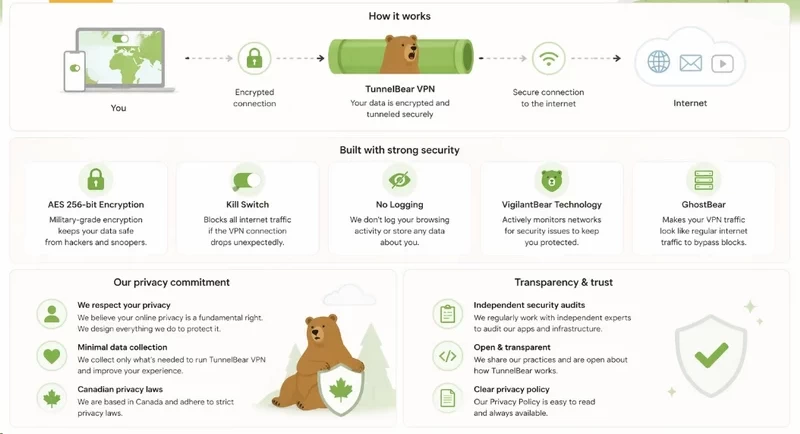
TunnelBear’s no-logs claim covers the traffic layer: it does not retain DNS queries, IP allocations, or session-level browsing activity. What it does retain is operational metadata: your OS version, the app version you are running, your monthly bandwidth consumption figure, and billing identifiers including the last four digits of your payment card and the cardholder’s last name. Under Canadian jurisdiction, this retained metadata is subject to lawful intercept requests. It creates an auditable record tying a financial identity to the use of the service, even without any browsing history.
In 2020, US authorities served TunnelBear with a subpoena related to a federal investigation. TunnelBear cooperated. Because the architecture does not log DNS queries or correlate IP addresses to individual sessions, the company could not produce a browsing history or a packet-level record of the target’s activity. However, they confirmed the existence of the account associated with the target’s email address. This is the realistic operational boundary of consumer VPNs: the payload remains opaque, but the metadata presence does not.
One additional data point worth scrutinizing is the device hash captured during payment processing. TunnelBear allows payment processors like Stripe to record a unique device fingerprint during the transaction phase. This fingerprint typically aggregates your OS identifier, hardware ID, and the IP address used at purchase. TunnelBear compartmentalizes this away from the VPN tunnel itself, but it creates a cryptographic link between your physical hardware and the financial transaction used to buy the subscription. For a user whose entire threat model depends on unlinkability between identity and VPN use, paying with a traceable payment method on a device you regularly use elsewhere is a significant metadata exposure, regardless of how clean the VPN tunnel itself is.
The Cure53 audits (a double-edged sword)
TunnelBear has submitted to Cure53 annual security audits since 2016 and publishes the unredacted results. Most providers commission narrow, scoped reviews of a single server environment to generate a favorable press release; TunnelBear lets Cure53 examine its full ecosystem, including client applications, backend infrastructure, and administrative portals. That is a level of transparency most competitors avoid. The audit results, however, are harder to read favorably. The 2022 audit found 32 vulnerabilities; the 2024 audit found 13. The raw count improved, but Cure53 specifically flagged critical-risk flaws in TunnelBear’s administrative backend portals. A critical flaw in an admin portal is a categorically different problem than a bug in the client app. If an attacker exploits it, the cryptographic integrity of every endpoint becomes irrelevant; they could push malicious updates, forge authentication tokens, or silently reroute DNS across the entire network before a single encrypted tunnel is established. Finding critical administrative vulnerabilities in 2024, after eight years of annual audits, means the internal code review process is not catching these issues before external auditors do.
Annual audits are snapshots, not continuous monitoring. If Cure53 wraps its review in November and identifies a critical remote code execution flaw that gets patched in December, that vulnerability sat in the live production environment for months before anyone looked. The recurring pattern is the real problem: Cure53 has found critical and high-severity vulnerabilities in every single audit cycle since 2016. These are not isolated oversights. They point to a persistent gap in TunnelBear’s internal secure development lifecycle, where pre-deployment code review is consistently failing to catch the class of issues a third-party auditor finds on its first pass.
Bare-metal control vs. the RAM-only denial
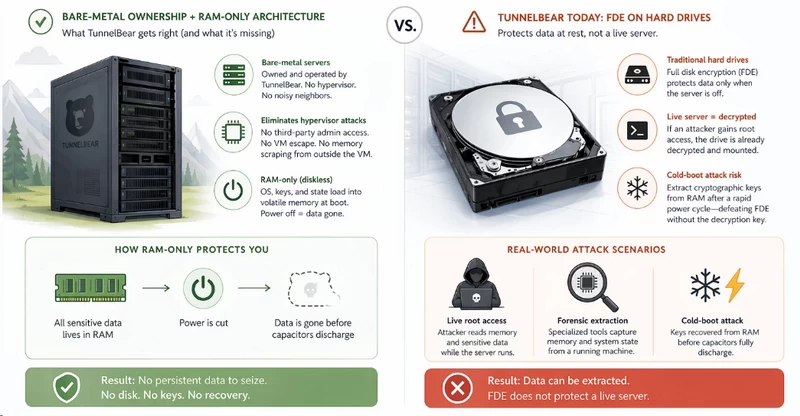
TunnelBear owns and operates its entire fleet of bare-metal servers rather than leasing virtual private servers from third-party data centers. In a shared VPS environment, a malicious data center administrator can execute hypervisor-level attacks, scraping memory from outside the virtual machine container or manipulating CPU states without ever touching the guest OS. Bare-metal ownership eliminates that vector. The physical silicon is under TunnelBear’s control, not a hosting provider’s. That posture is undercut, however, by the absence of RAM-only architecture. On a diskless server, the OS, cryptographic keys, and runtime state load into volatile memory at boot with no persistent storage. If law enforcement seizes the machine and cuts power, every byte is gone before the capacitors finish discharging. TunnelBear uses traditional hard drives with full disk encryption instead. FDE protects data at rest on a powered-off drive, which is its intended use case. It does not protect a live server. If an adversary gains root access to a running machine, the drive is already decrypted and mounted. A cold-boot attack, which extracts cryptographic keys from RAM before the capacitors fully discharge after a rapid power cycle, can defeat FDE in a physical seizure scenario without ever needing the decryption key.
TunnelBear’s public defense of FDE argues that a seized server must be powered down first, locking the encrypted drive. That argument holds for a clean, remote seizure with no prior access. It does not hold for scenarios involving live root access, sophisticated forensic extraction, or a state-level actor capable of executing a cold-boot attack. Mullvad, ExpressVPN, and NordVPN have all migrated to diskless infrastructure because the attack model is real and the engineering solution exists. TunnelBear has not. That is a cost-driven decision dressed up as a measured risk assessment.
Servers & Locations

8,000 servers, barely 47 countries
TunnelBear’s fleet of 8,000 servers sounds like a strong network. The actual geographic distribution tells a different story. The majority of that hardware sits in dense clusters across North American and Western European data centers, where rack space is cheap and internet exchange points are abundant. Concentrating thousands of nodes in the same ten cities does not improve routing efficiency for users anywhere else; it just reduces TunnelBear’s per-server cost.
The geographic gaps are substantial. Africa and the Middle East have almost no coverage. Users in those regions must route their encrypted traffic across intercontinental undersea cables to establish a handshake with the nearest available server, adding transit latency before the VPN overhead even begins. This matters most for the users who arguably need cryptographic protection most: people operating under hostile telecommunications monopolies or aggressive state-level surveillance. TunnelBear’s network is optimized for North American and European users streaming video and using public Wi-Fi. It is not built for censorship circumvention in underserved regions.
City-level server selection, which allows you to choose a specific metropolitan data center rather than connecting to a national load balancer, is restricted entirely to the United States and Canada. Selecting any other country hands your connection to an automated balancer with no transparency about which physical node you land on. In Australia, the balancer may route you to Sydney or Perth. These cities have different latency profiles relative to undersea cable landing stations. You have no way to optimize this, and TunnelBear provides no information to help you try. For a network of 8,000 servers, the inability to specify routing beyond a country code is a meaningful operational limitation.
Streaming & Unblocking

The streaming IP blacklist
Streaming platforms do not block VPN protocols directly. Services like Netflix run automated scripts that cross-reference connecting IP addresses against known commercial data center Autonomous System Numbers (ASNs). When a data center IP is associated with a commercial VPN provider’s ASN, it is flagged and blocked. The defense against this is continuous IP rotation, residential IP leasing, or aggressive subnet management to keep addresses ahead of the detection scripts. TunnelBear does none of this. Its static IP infrastructure is catalogued and blacklisted by the streaming platforms’ detection systems.
- Successfully unblocked:
- Max (HBO)
- Peacock
- Netflix US (sporadic; requires repeated server changes)
- Blocked outright:
- Netflix (all international libraries)
- Hulu
- Disney+
- Amazon Prime Video
- BBC iPlayer
The Netflix US result is the least useful success case on this list. Accessing it requires manually disconnecting and reconnecting across different US servers until you land on an IP address that has not yet been burned. Some sessions this works on the first try; others require a dozen attempts. There is no way to know which servers are currently functional for streaming, because TunnelBear does not publish or update this information. Disney+, Hulu, and BBC iPlayer block TunnelBear connections outright, with no server-hopping workaround available.
GhostBear vs. deep packet inspection
For users in countries with active network censorship, bypassing Deep Packet Inspection firewalls is not a convenience feature; it is a functional requirement for accessing uncensored information. GhostBear wraps TunnelBear’s OpenVPN traffic in an obfsproxy layer, stripping the cryptographic signatures from packet headers that DPI hardware uses to identify and drop VPN tunnels. The goal is to make the encrypted stream indistinguishable from standard HTTPS traffic at the header level.
Against basic corporate firewalls or unsophisticated institutional network blocks, GhostBear can work. Against state-level censors like the Great Firewall of China (GFW) or Iranian network filters, it is unreliable. Modern DPI infrastructure at this scale does not rely solely on passive header signature matching. It uses active probing, which sends its own requests to suspected VPN endpoints to see how they respond, and machine learning heuristics that analyze traffic flow patterns, including packet timing distribution and size variance, to identify encrypted tunnels even when the headers are scrambled. Obfsproxy addresses the header signatures, not the behavioral fingerprint. The GFW began defeating standard obfsproxy-wrapped OpenVPN tunnels years ago.
Modern censorship circumvention tools have moved on to domain fronting, multiplexed tunnels, and purpose-built protocols like V2Ray and Shadowsocks, which are specifically designed to defeat behavioral traffic analysis in addition to header inspection. TunnelBear has not integrated any of these. GhostBear forces OpenVPN, which carries high computational overhead; adds obfsproxy on top of that, compounding the performance penalty; and then delivers an obfuscation layer that sophisticated censors have functional techniques for detecting. In regions where the stakes of detection are high, relying on GhostBear is not a security strategy.
Customer Support
TunnelBear’s primary support interface is an automated chatbot named RoboCub, positioned as the first and often only point of contact for technical issues. RoboCub handles straightforward questions adequately. If you ask how to change protocols, enable the kill switch, or find a specific server, the bot retrieves a relevant help article. If you ask anything more specific, such as why your obfsproxy handshake is timing out on a specific ISP’s port configuration, or why a particular subnet keeps landing in the streaming platform’s blacklist, RoboCub cycles through pre-written troubleshooting scripts that do not engage with the technical specifics of your question.
Bypassing RoboCub to file an actual support ticket introduces additional friction. TunnelBear requires you to be logged into your account before submitting a query, which blocks non-customers from asking pre-sales infrastructure questions and frustrates privacy-conscious users who prefer not to log into accounts on certain devices. Once logged in, the ticket submission process requires navigating a rigid questionnaire and attaching mandatory screenshots before the issue enters the queue. This process is not designed to gather diagnostic information efficiently; it is designed to resolve as many issues as possible before a ticket reaches a human agent.
When a ticket does get through, the response window is up to 48 hours. TunnelBear advertises this openly. Occasional replies arrive faster, but there is no guaranteed escalation path and no live chat with a human agent at any tier. For a service charging $120 upfront on a three-year plan, a 48-hour asynchronous email queue is the only support channel available if your kill switch malfunctions, your ISP blocks standard UDP ports, or the client stops launching after an OS update. In a scenario where you are actively exposed on a public network because the tunnel dropped, waiting two business days for a scripted email response is not a workable incident response model.
FAQ
Can I install TunnelBear on my router?
No, TunnelBear aggressively refuses to provide standard OpenVPN or WireGuard configuration files for manual installation. You are permanently restricted to running their proprietary, closed-source applications directly on individual endpoint devices.
Is TunnelBear safe for torrenting?
While the provider no longer outright blocks P2P traffic, they do not offer dedicated swarming servers or port forwarding capabilities. This strict NAT firewall cripples your ability to seed files and guarantees severely throttled download speeds.
What is GhostBear?
GhostBear is an obfsproxy wrapper designed to strip cryptographic signatures from OpenVPN packets to evade basic Deep Packet Inspection. However, it completely fails against modern state-level firewalls utilizing active probing and behavioral heuristics, while simultaneously decimating your connection speeds.
Does TunnelBear support WireGuard?
Yes, TunnelBear recently implemented WireGuard across its major applications, finally replacing the archaic computational overhead of OpenVPN for standard connections. This modern protocol implementation is the sole reason their local server speeds remain respectable.
Who owns TunnelBear?
The Toronto-based VPN was acquired by the American cybersecurity conglomerate McAfee in 2018. This subjects the platform’s corporate governance to US jurisdiction while its hardware remains bound by the Canadian intelligence-sharing apparatus of the Five Eyes alliance.
Does TunnelBear keep logs?
TunnelBear retains specific operational metadata, including OS versions, total bandwidth consumed, and payment processor device hashes. While they do not log your cryptographic traffic payloads or DNS queries, this retained metadata is fully subject to Canadian PIPEDA laws and lawful intercept.

