

Hide.me VPN Review 2026: The Free Plan is a Trap (But Premium Delivers)
| 💰 Pricing | From $2.49 to $11.99/mo |
| ✅ Free Trial | Free plan |
| 📆 Money Back Guarantee | 30 Days |
| 🗺 Jurisdiction | Malaysia |
| 🖥 Number of Servers | 2600+ |
| 📝 Logging Policy | Strict no‑logs policy |
| 📥 Torrenting/P2P | Allowed |
| 🍿 Streaming | Works with major streaming platforms |
| 🛡 Kill Switch | ✅ |
| ⚙️ Protocols | OpenVPN, IKEv2, WireGuard, SoftEther, SSTP |
| 🛠 Support | 24/7 Live Chat Support |
| 💻 Simultaneous Devices | Up to 10 devices at the same time on Premium; 1 device on the free plan |
| 🔥 Current Deal | 79% OFF (on 2-year plan) |

Overview
The Malaysian Safe Haven
Let’s establish the baseline. Founded in 2012 by eVenture Ltd, Hide.me operates out of Labuan, Malaysia. Why does physical location matter for a digital service? Because jurisdiction dictates exactly how much your VPN can be legally bullied into betraying you by state actors.
The Malaysian jurisdiction is a massive win for the genuinely paranoid. It sits entirely outside the intelligence-sharing agreements of the 14 Eyes alliance-the sweeping, multilateral surveillance coalition that includes the US, UK, Canada, Australia, and New Zealand, among others. These nations actively share intercepted communications intelligence with one another, meaning a subpoena issued in Washington can cascade into a legal obligation for a VPN provider operating in London. Hide.me’s Labuan registration sidesteps this network entirely. There are no mandatory data retention directives breathing down the necks of ISPs or tech companies in this region. If a foreign intelligence agency comes knocking with a subpoena, Hide.me has the legal standing to shrug and point to the exit.
The Inconvenient Irony of Malaysian Law
Let’s not pretend Malaysia is a digital utopia. The country has a track record of internal censorship, surveillance of political dissidents, and strict laws governing online speech-the Communications and Multimedia Act 1998 grants authorities broad powers to police domestic internet activity, and the government has used them. The irony is thick: a nation that restricts its own citizens’ digital freedom hosts one of the more privacy-respecting VPN providers on the market. The resolution lies in the distinction between domestic regulatory obligations and international data-sharing treaties. Malaysian law governs what Hide.me must do when served a warrant by Malaysian authorities, not foreign ones-and because the vast majority of Hide.me’s users are not Malaysian nationals violating Malaysian law, the domestic regulatory environment is largely irrelevant to their privacy calculus. They literally cannot hand over what they are not legally forced to collect, and the legal architecture of Labuan ensures no one can force them to start collecting it retroactively.
Hide.me VPN pricing and plans

The “Unlimited” Free Plan Trap
Let’s talk about the bait. Hide.me is famous for its free tier, and recently they removed the old 10GB monthly data cap-on paper, an absolute steal in a market obsessed with nickel-and-diming users. You do not even need a credit card or email address to get started, a frictionless entry point no competing provider matches without requiring account creation. Now for the reality check: free bandwidth is never truly free. You are restricted to a single device connection and just 8 server locations. The free servers actively block streaming platforms, and torrenting is kneecapped by network-level restrictions that inspect and drop BitTorrent protocol handshakes before they can establish a connection. Features like WireGuard, dynamic port forwarding, and the SmartGuard ad-blocker are strictly reserved for paying customers.
The performance tax compounds all of this. The free server architecture deliberately routes every non-paying user through heavily congested nodes, and during peak evening hours the degradation is severe. Speed tests on free servers yielded downloads barely hovering around 2 to 10 Mbps-enough to load a text-heavy webpage, entirely useless for anything requiring real throughput. Streaming a 1080p video becomes a slideshow. Uploading a file to cloud storage is an exercise in patience. The free tier secures your traffic on a sketchy public Wi-Fi network at a coffee shop, and that is roughly the ceiling of its utility. A power user who tries to run their daily workflow through it will be driven to either upgrade or uninstall within a week.
Pricing Reality Check
| Plan Duration | Monthly Breakdown | Total Billed Amount |
|---|---|---|
| 1 Month | $11.99 | $11.99 every month |
| 12 Months | $4.58 | $54.99 every year |
| 24 Months (+2 Free) | $2.49 | $69.99 every 26 months |
If you want the actual Hide.me experience, you have to pay the toll. The pricing structure is mercifully straightforward, avoiding the deceptive multi-tiered feature packages that other providers use to confuse buyers into an overpriced “Plus” plan when the “Basic” plan is perfectly adequate. With Hide.me, you get the exact same security tools, 10 simultaneous connections, and access to all 2,600+ servers regardless of the billing cycle you choose. There is no artificial feature gating between subscription durations.
The month-to-month pricing is aggressively steep. At $11.99 per month, Hide.me positions itself right alongside premium heavyweights like ExpressVPN-a provider with a substantially larger network, more polished applications, and a more proven track record of bypassing censorship in hostile environments. For a 30-day commitment, that price-to-value ratio is difficult to justify. If you are only looking for a VPN to cover a single international vacation, there are cheaper and better-equipped short-term alternatives on the market.
The math only starts making sense when you commit to their long-term contracts. The 12-month plan drops the price to a much more reasonable $4.58 per month, but the true value lies in the 24-month (often billed as 26-month with two free months) package at $2.49 per month. At that price point, Hide.me transforms from an overpriced novelty into a highly competitive privacy tool that meaningfully undercuts NordVPN, Surfshark, and most other established providers when compared on a per-month basis over a two-year term.
Here is the breakdown of what you can expect to pay at current pricing:
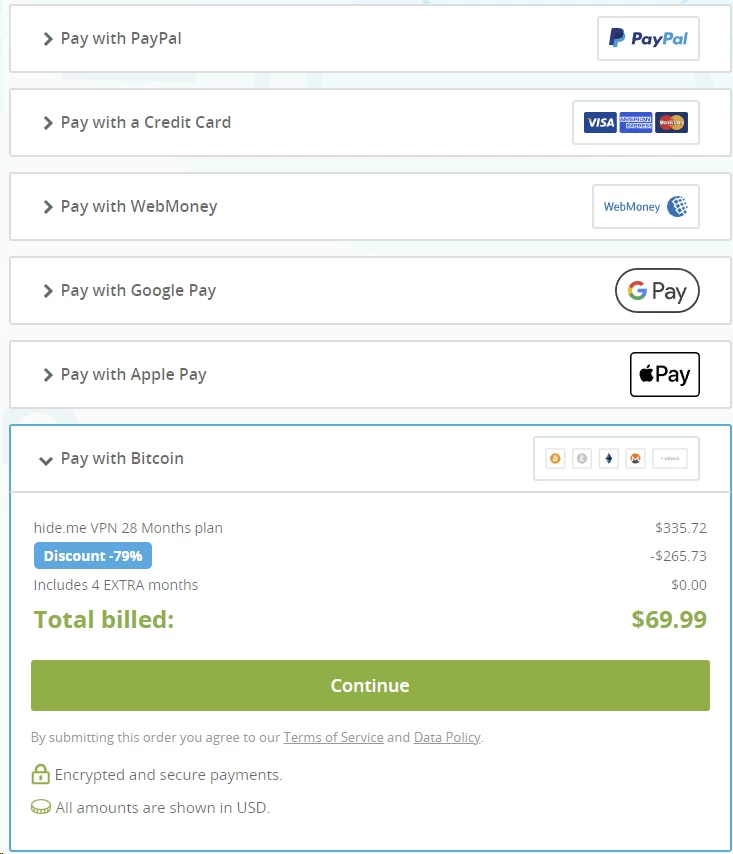
One additional consideration on payment method: Hide.me accepts credit cards, PayPal, and cryptocurrency. The crypto option is relevant for privacy maximalists who want to keep even their billing details off-grid. If you pay in Bitcoin or Monero, the payment chain is severed-Hide.me never has a credit card number tied to an identity, which aligns cleanly with their no-logs architecture.
The Refund Policy Evolution
A VPN’s refund policy tells you exactly how confident the company is in its own infrastructure. For years, Hide.me hid behind a clause so brutal it bordered on predatory: exceed a pitiful 500MB data limit during your trial-roughly two speed tests and a YouTube video-and your refund request was instantly voided. It was a classic dark pattern, the cap small enough that any user actually evaluating the service would inevitably blow past it. Thankfully, the company finally abandoned this practice and upgraded to a true, industry-standard 30-day money-back guarantee with no hidden data caps attached. You can now stress-test the premium servers, run your torrent clients, and benchmark WireGuard vs. OpenVPN speeds without the anxiety of accidentally voiding your safety net.
The cancellation process itself is entirely painless. Open a support ticket or ping live chat, state that you want a refund, and the transaction is reversed-no aggressive retention tactics, no guilt trips, no hidden fees deducted from the reimbursement. Refunds land within 24 hours for PayPal and cryptocurrency transactions; credit card refunds can take a few business days depending on your issuing bank. It is a meaningful trust signal that Hide.me is finally willing to let its technology make the case for renewal rather than relying on fine-print technicalities to hold your payment hostage.
Hide.me VPN apps and features on all devices
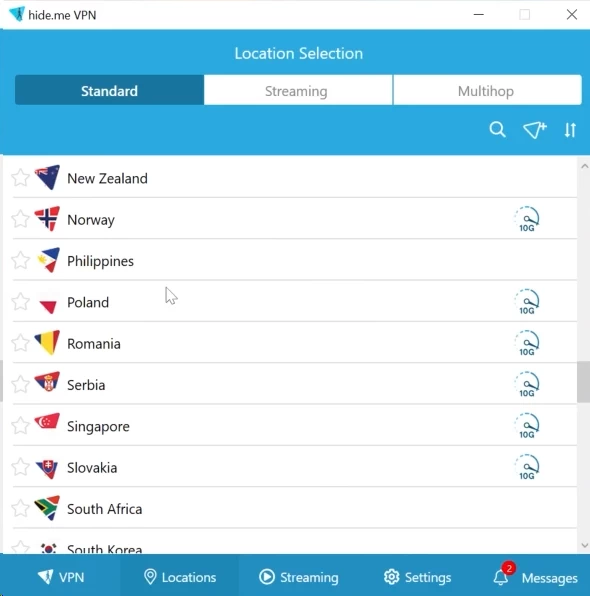
A UI Only a Sysadmin Could Love
Hide.me gives you exactly 10 simultaneous connections per paid account-double the industry standard of five, providing ample overhead for a household of mixed devices without requiring a router-level installation. You get native clients for Windows, macOS, Android, iOS, and Linux. The Linux client, notably, ships as a fully functional GUI application rather than the command-line-only configuration files that most providers dump on Linux users and call it “support.”
The user experience, however, is polarizing in a way that few VPN clients manage. The desktop applications were clearly designed by engineers optimizing for capability, not by UX designers optimizing for clarity. The Windows app, in particular, is a tile-based dashboard overflowing with configurable widgets. You can rearrange your connection status readout, live IP address display, server selection lists, speed meters, and account details into whatever layout suits your workflow. Every major setting-protocol selection, MTU size, DNS configuration, port forwarding, split tunneling, and StealthGuard bindings-is exposed directly in the interface rather than buried behind an “Advanced Settings” toggle that most users never click.
For a power user who loves tweaking MTU sizes to optimize performance on high-latency satellite connections, configuring custom DNS to route through Pi-hole or NextDNS, or building granular application-level routing rules, this interface is a dream. For a beginner who wants to hit a single button and have the bad guys go away, it is an absolute nightmare of clutter. The visual design is dated-it feels like a product from 2012, which is, not coincidentally, the year Hide.me was founded. The server map view is arguably the worst offender, resembling early-2000s clip art rather than the sleek interactive globe that competitors like ExpressVPN and NordVPN have normalized. Hide.me forces you to confront the complexity of your network. If that makes you uncomfortable, this app will frustrate you into switching providers. If that excites you, you will find more raw control here than in almost any comparable consumer VPN client on the market.
StealthGuard vs. The Standard Kill Switch
Network lockdown mechanisms are where a VPN proves whether it actually takes security seriously. A standard kill switch is a reactionary measure: if your VPN connection drops, it severs your internet access to prevent raw, unencrypted traffic from spilling over your ISP’s network. Hide.me includes a functional kill switch on desktop and mobile-including iOS, where Apple’s restrictive networking APIs make proper implementation genuinely difficult and where many providers simply omit the feature entirely. The standard implementation, however, has a documented failure mode. During testing on macOS, actively switching between server locations caused the client to temporarily drop the VPN tunnel without engaging the kill switch. For several seconds, the device routed unencrypted traffic over the local network until the new connection was re-established-a server-switching leak that is particularly dangerous if your torrent client is mid-transfer, briefly broadcasting your real IP address to every peer in the swarm.
StealthGuard was built to solve exactly this. Rather than reacting to dropped connections after the fact, StealthGuard functions as a proactive, app-level firewall enforced at the network interface level. You configure specific applications-or your entire network stack-to operate exclusively when a Hide.me tunnel is active. If the tunnel is down, bound applications cannot transmit or receive a single packet. They do not fail gracefully to the clearnet. They simply cannot connect, eliminating the leak vector entirely regardless of how or why the VPN connection was interrupted.
The three-tier implementation gives you surgical control over what gets locked:
- Bind Internet to VPN: The nuclear option. Zero network connectivity exists outside the encrypted tunnel. If you forget to launch Hide.me before a session, you have no internet access until the VPN is connected. This is the appropriate setting for high-risk activities where even a second of IP exposure is unacceptable.
- Limit Apps to VPN: Granular application binding. Your browser can route through your raw ISP connection, but qBittorrent will refuse to transfer a single packet unless the VPN is active and authenticated. This is the most practical configuration for the majority of users who torrent alongside normal browsing.
- Custom Scripts: The Windows client allows you to execute custom shell scripts automatically whenever the kill switch is triggered or deactivated. A security researcher, for example, could automatically wipe a local log file, close a database connection, or fire a webhook whenever the VPN drops-automating an incident response workflow directly from within the VPN client.
The SmartGuard Disappointment
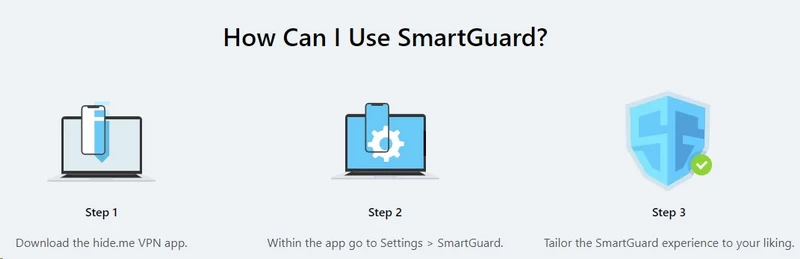
SmartGuard promises to block trackers, malicious domains, and ads across your entire network at the DNS resolution layer-intercepting requests before they are even dispatched to the target server. In theory, it is an elegant approach: a regularly updated blocklist null-routes known advertising and telemetry domains system-wide, affecting every application on the device without requiring a browser extension. In practice, it is a buggy, inconsistent mess. SmartGuard blocks basic static banner ads on text-heavy websites and little else. It failed to block a single YouTube pre-roll ad-YouTube serves ads from the same domains as its video content, making DNS-level blocking effectively impossible without breaking playback entirely. Google Analytics scripts passed through unhindered. It scored approximately 71 out of 100 on standard ad-block test suites, and independent reviewers documented known malicious domains loading without triggering any response. The DNS blocklist is neither aggressive enough nor updated frequently enough to function as a reliable security layer. A dedicated browser extension like uBlock Origin outperforms it dramatically while consuming fewer system resources.
The stability problems compound everything else. Multiple users documented that enabling SmartGuard broke their internet connectivity entirely, returning constant DNS resolution errors until the feature was disabled. The compatibility matrix is equally restrictive: SmartGuard cannot operate alongside multi-hop servers or streaming-optimized nodes, because those routing configurations require DNS behavior that directly conflicts with SmartGuard’s interception logic. It is an underbaked feature that feels tacked on for marketing purposes-useful for a checkbox comparison table, completely unreliable as an actual security control.
Windows Gets Bolt, Apple Gets Left Behind
Hide.me’s development team clearly favors the Windows ecosystem, and the feature parity gap is significant enough to affect a purchasing decision. The most glaring example is Bolt Fast Proxy-an experimental, Windows-exclusive acceleration technology with no equivalent on macOS or iOS. Bolt is designed to bypass aggressive UDP bandwidth throttling that some ISPs apply to encrypted traffic via deep packet inspection. It responds by routing OpenVPN traffic over TCP instead, then applying packet packing and connection overhead optimization to compensate for TCP’s inherent latency disadvantages. In specific test scenarios the results are dramatic: Bolt increased OpenVPN throughput by up to 50%, transforming a throttled 240 Mbps connection into a 375 Mbps stream. The catch is that Bolt is still in beta and behaves accordingly-prone to crashing the client entirely during sustained speed testing, with performance gains that are wildly inconsistent depending on whether your ISP’s throttling heuristics have shifted since your last session.
The platform disparity extends well beyond Bolt. Split tunneling is available on Android, Windows, and macOS, but iOS users are completely excluded due to Apple’s rigid Network Extension API restrictions, which prevent VPN applications from implementing the per-app routing tables the feature requires. Hide.me also strips SoftEther and SSTP from both its iOS and macOS clients. If your primary device is an iPhone or a MacBook, you are paying full price for a product missing multiple features that Windows users receive as standard. Apple’s networking restrictions are a genuine platform-level constraint-this is not a flaw unique to Hide.me-but it is a concrete trade-off that heavily Apple-embedded users need to weigh before committing to a long-term subscription.
Hide.me VPN speed tests and real-world performance
WireGuard Saves the Day
A VPN is only as good as its underlying infrastructure and tunneling protocols, and with Hide.me, WireGuard is non-negotiable. Legacy OpenVPN-particularly over TCP-is a performance killer by design: architected in 2001 to run in userspace, every packet crosses the boundary between kernel space and user space twice, introducing measurable latency and CPU load on modern high-speed connections. IKEv2/IPSec is faster but its complex key negotiation makes it sluggish in environments with poor initial connectivity. WireGuard operates entirely within the Linux kernel as a first-class kernel module with roughly 4,000 lines of code-about 100 times smaller than OpenVPN’s codebase. The ChaCha20-Poly1305 cipher it uses is significantly faster than AES-256-CBC on hardware lacking AES acceleration instructions, which covers most mobile processors. On local or regional Hide.me servers, the encryption overhead is nearly invisible: speed penalties of just 3% to 10% on high-speed connections are typical, making 4K streaming and large file transfers entirely practical.
Long-distance routing, however, exposes architecture limitations that no protocol can fully compensate for. When traffic traverses oceanic routes-US to Australia, Europe to Southeast Asia-Hide.me’s performance degrades substantially. The inconsistency is often the more frustrating problem: a distant server that performs acceptably on Monday may crawl on Thursday with no visible explanation. Upload speeds are particularly vulnerable, collapsing by as much as 79% on transoceanic routes even when download speeds remain relatively resilient-a critical distinction for anyone seeding torrents, uploading to cloud storage, or conducting video calls over the tunnel.
| Connection Type | Download Speed | Upload Speed | Ping (Latency) | Speed Drop (%) |
|---|---|---|---|---|
| Baseline (No VPN) | 497.36 Mbps | 494.43 Mbps | 2 ms | N/A |
| Local (New York) | 468.81 Mbps | 340.79 Mbps | 28 ms | -5.74% |
| Regional (Los Angeles) | 359.81 Mbps | 269.05 Mbps | 78 ms | -27.67% |
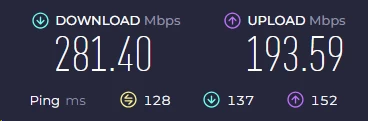
| Distant (London) | 281.40 Mbps | 193.59 Mbps | 128 ms | -43.44% |
| Far Distant (Melbourne) | 103.80 Mbps | 56.23 Mbps | 271 ms | -79.13% |
The Free Server Bottleneck
Hide.me’s free tier offers unlimited data, but do not mistake that generosity for usability. The entire non-paying user base-likely numbering in the millions-is herded onto just 8 server locations, creating a congestion problem that is structural and intentional. When you connect to a free node, you are competing for bandwidth against thousands of simultaneous users sharing the same small menu of locations. Under moderate load this produces aggressive bandwidth throttling; under heavy load during peak evening hours, the connection is barely functional. Free server downloads rarely break 10 Mbps, and upload speeds are frequently suffocated below 3 Mbps. If you are located in Asia and forced through the free German server, the round-trip latency easily exceeds 200ms-compounding the bandwidth restrictions into something that makes the web feel like dial-up. DNS queries alone can take 5 to 10 seconds to resolve on an overloaded node, making even basic page loading an exercise in frustration.
This is a deliberate architectural decision, not an infrastructure failure. The free tier exists to provide a proof-of-concept experience for the client software and to serve as emergency encryption on an insecure public Wi-Fi network. Expect 10 minutes of secure coffee-shop browsing, not a daily driver. P2P file sharing, geo-blocked streaming, and any bandwidth-intensive media consumption are categorically impossible on the free tier-and trying to use it as such will drive you to either upgrade or uninstall within days.
Gaming and Latency Issues

If you are a competitive gamer looking for a VPN to protect against DDoS attacks-a legitimate concern for high-profile streamers, tournament players, and anyone whose home IP address has been doxed-Hide.me is a significant gamble that requires careful server selection.
On a local server using WireGuard, the ping overhead typically adds between 20ms and 40ms to baseline latency. That is an acceptable tradeoff for casual multiplayer gaming, MMORPGs, turn-based strategy titles, or any game where a 40ms response window does not meaningfully affect outcomes. The client’s built-in DDoS protection is a genuine security benefit-by masking your real IP address behind Hide.me’s server IP, you eliminate the attack surface for volumetric denial-of-service attacks that can sever your home internet connection entirely. For streamer security, this alone can justify the subscription cost.
The problem arises with fast-paced, competitive shooters. In titles like CS2, Valorant, or Call of Duty: Warzone, the difference between winning and losing a gunfight frequently comes down to 20–30ms of response time advantage. Even on nearby servers, frequent latency spikes and elevated jitter-the variance in packet delivery time, which is arguably more disruptive than high consistent latency-were recorded during testing. A connection that averages 35ms ping but spikes to 120ms every few seconds is significantly worse for competitive play than a stable 50ms connection. Hide.me’s routing infrastructure simply does not provide the consistency required for ranked competitive play.
Cloud gaming is entirely out of the question. Platforms like GeForce Now and Xbox Cloud Gaming require sustained, low-latency throughput with minimal packet loss to maintain a fluid, artifact-free stream of rendered frames. These services are already sensitive to the quality of your raw ISP connection. Introducing a VPN hop adds routing overhead, increases the effective physical distance between you and the streaming server, and creates additional points of failure where packet loss can cascade into visual artifacts and input lag. Do not route cloud gaming through Hide.me. Use the raw connection and accept the IP exposure risk, or use the VPN’s split tunneling feature to exclude the cloud gaming client from the tunnel entirely while protecting your other applications.
Hide.me VPN security, encryption and no‑logs policy
Protocol Soup (And SoftEther)
Hide.me offers a full buffet of tunneling protocols when most mainstream providers have lazily consolidated around OpenVPN or WireGuard: the full menu adds IKEv2/IPSec, SSTP, and SoftEther. The baseline encryption across the standard options is excellent. OpenVPN uses AES-256-GCM paired with RSA-4096 or RSA-8192 handshakes and SHA-256 HMAC authentication. WireGuard uses ChaCha20-Poly1305 for authenticated encryption and Curve25519 for key exchange-a modern cryptographic suite with a substantially smaller attack surface than OpenVPN’s older TLS-based handshake. Critically, all standard configurations implement Perfect Forward Secrecy through ephemeral key negotiation, meaning that even if a session key is compromised retroactively through a server seizure or cryptanalysis attack, previously recorded traffic cannot be decrypted because each session key was transient and no longer exists.
The bizarre outlier is SoftEther-an open-source framework developed at the University of Tsukuba, designed to tunnel VPN traffic inside what appears to be standard HTTPS over TCP port 443, theoretically invisible to deep packet inspection systems. The practical problem is cipher negotiation. When you select SoftEther, you surrender control over which encryption algorithm the session uses. SoftEther can dynamically negotiate downward from AES-256 to entirely deprecated standards: RC4-MD5, deprecated by the IETF in 2015 via RFC 7465 due to plaintext recovery vulnerabilities, or DES-CBC, a 56-bit cipher computationally broken in 1998. Allowing a production VPN session to fall back to either in 2025 is not a performance trade-off-it is a fundamental cryptographic integrity failure. Use SoftEther only if you are actively evading a national firewall with no other option. For everything else, WireGuard is the correct answer.
The Long-Awaited Securitum Audit
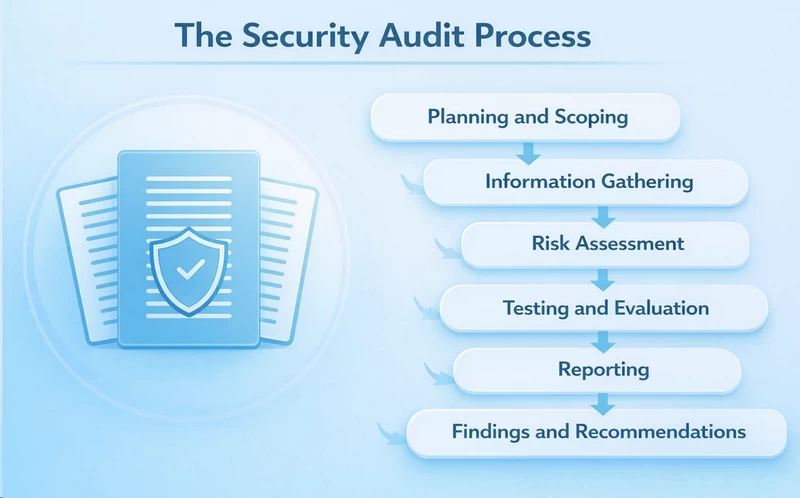
Trusting a VPN provider on marketing copy alone is a fool’s errand, and for nearly a decade Hide.me gave privacy-conscious users little else to go on. The company coasted on a single independent audit conducted in 2015 by DefenseCode Ltd.-a assessment that confirmed the zero-logs policy at the time but has essentially nothing in common with a 2024 deployment in terms of software stack, containerization, and logging infrastructure. Thankfully, in July 2024 Hide.me published the results of a comprehensive assessment by Securitum, a respected European penetration testing firm with a verifiable track record across major financial institutions and critical infrastructure-not a boutique shop hired to rubber-stamp a marketing claim. The auditors confirmed that Hide.me does not store browsing behavior, connection timestamps, session durations, originating IP addresses, or DNS query logs. The only persistent data tied to an account is the email address used for billing and a temporary internal IP address for network troubleshooting, automatically wiped from server memory every few hours.
Full IPv6 Support (A Rare Win)
One of the most pervasive and technically lazy practices in the VPN industry is the outright blackholing of IPv6 traffic. Most VPN infrastructure was built on IPv4, and properly routing IPv6 through an encrypted tunnel requires dual-stack server configuration, additional routing table management, and careful leak-prevention architecture. The easier solution for most providers is to forcibly reject all IPv6 packets while the VPN is active. The problem is that this creates a silent failure mode: if your ISP or mobile carrier allocates you an IPv6 address-increasingly common as global IPv4 exhaustion accelerates-your device will quietly fall back to routing IPv6 traffic through your raw ISP connection rather than the encrypted tunnel. An adversarial observer can trivially identify your real IPv6 address while your VPN client displays “Connected,” defeating the anonymization purpose entirely.
Hide.me is one of the very few commercial VPNs that engineered a genuine dual-stack solution. IPv6 traffic is natively routed through the encrypted tunnel alongside IPv4, eliminating the leak vector at the architecture level. The Windows and macOS clients expose granular control: prefer IPv4 with IPv6 fallback, prefer IPv6 with IPv4 fallback, or force traffic exclusively over one protocol family-a level of control virtually absent from competing consumer VPN clients. For users on modern cellular networks like T-Mobile or Vodafone, which are increasingly IPv6-primary, this is not an academic feature. It is critical infrastructure, and its presence is evidence that Hide.me’s engineering team understands modern network topology at a level that goes well beyond slapping a UI over a generic OpenVPN deployment.
Hide.me VPN servers, locations and virtual regions

The Bare-Metal vs. Smart Routing Contradiction
Hide.me operates roughly 2,600 servers across 91 locations in over 60 countries-a mid-tier footprint smaller than NordVPN’s 6,000+ node network but substantially larger than privacy-focused minimalists like Mullvad (580 servers) or IVPN (70 servers). The central marketing differentiator is bare-metal infrastructure: physical hardware dedicated entirely to a single provider, eliminating the noisy neighbor problem of shared cloud hosting where another virtual machine’s workload spike silently degrades your performance. The security argument is equally sound-a cloud-hosted VM can theoretically be copied, snapshotted, or migrated without the provider’s knowledge, while a physical server requires someone to physically enter the data center and touch the hardware. For a privacy provider, that distinction matters enormously.
The problem is that independent ping analysis and traceroute testing have exposed a significant transparency failure. Servers listed in the client as operating in Saudi Arabia frequently route traffic through physical hardware in France or Quebec. A Morocco-listed node resolves to a machine in Germany. The IP address you receive does correspond to the advertised country, but the actual network path traverses thousands of additional miles, introducing latency penalties that cannot be explained by the listed location. Virtual locations are not inherently deceptive-there are legitimate reasons to provide IP addresses in countries with hostile data retention laws or poor data center infrastructure. The problem is the lack of disclosure. ExpressVPN, NordVPN, and Surfshark all label virtual locations explicitly in their interfaces. Hide.me does not, which directly contradicts their bare-metal claims and undermines credibility on their central infrastructure selling point.
Dynamic Port Forwarding for P2P
Hide.me permits P2P traffic on nearly all 2,600 servers-a deliberate contrast to providers who quarantine torrenters to a handful of overloaded designated nodes. The crown jewel for seeders is dynamic port forwarding, implemented via UPnP and NAT-PMP. The problem it solves is fundamental: VPN servers sit behind NAT firewalls that block unsolicited inbound connections, meaning your torrent client can only make outbound connections and is cut off from a large portion of the peer swarm. Static port forwarding is the naive fix, but a permanently open port on a fixed IP is trivially detectable by automated scanners within minutes. Dynamic port forwarding solves this elegantly-your client requests a port opening at session initiation, Hide.me opens it for the duration of the transfer, then closes it automatically when the session terminates. The port is never permanently exposed, and the implementation typically boosts swarm connectivity by 10% to 30% depending on torrent health and peer pool size.
Hide.me also includes a SOCKS5 proxy endpoint in the premium subscription. By configuring your torrent client-qBittorrent, uTorrent, Deluge-to route through the SOCKS5 proxy while simultaneously maintaining an active WireGuard tunnel, you achieve layered protection: the proxy handles P2P traffic path optimization while the VPN tunnel provides cryptographic security for everything else on the device. This dual-path configuration squeezes out additional throughput by reducing the encryption overhead applied specifically to torrent traffic, without sacrificing IP protection at the OS level. None of these features-dynamic port forwarding, SOCKS5 proxy, or broad P2P server access-are available on the free tier.
Hide.me VPN for Netflix and streaming platforms

The Great Firewall Remains Undefeated
The Great Firewall of China does not operate like Netflix’s IP blocklist. It employs deep packet inspection (DPI)-analyzing packet contents and traffic patterns at the protocol level-to actively identify and sever VPN handshakes before connections can be established. Standard OpenVPN and WireGuard handshakes both carry distinctive fingerprints the Firewall detects and resets. Hide.me attempts to counter this with two mechanisms: obfuscation toggles that wrap OpenVPN traffic in an additional TLS/HTTPS layer, and the SoftEther protocol, engineered to masquerade VPN traffic as standard encrypted web browsing over port 443. In theory, SoftEther should appear to the inspection system as nothing more than a user visiting a secure banking website-a TLS handshake with no VPN-specific fingerprint.
In practice, the Chinese censorship apparatus is far more sophisticated than a port filter or protocol fingerprinter. It uses machine learning-based traffic classification that examines byte-level entropy patterns, connection timing characteristics, and long-term behavioral analysis across IP ranges. Protocols with consistent packet timing signatures-as SoftEther has-can be detected and throttled without a protocol-specific fingerprint. Independent testing consistently confirms Hide.me is highly unreliable in China, Iran, and the UAE: the client frequently hangs during connection, and tunnels that do establish are notoriously unstable. If you are traveling to a country with active, adaptive DPI infrastructure, you need a provider maintaining dedicated, constantly rotating obfuscation endpoints-like ExpressVPN’s Lightway or Astrill’s StealthVPN. Hide.me cannot sustain the arms-race cadence required to defeat a nation-state firewall.
A Dark Horse for Streaming
Pivot away from censorship evasion and look exclusively at commercial geo-blocking bypass, and Hide.me becomes a genuinely impressive performer. Streaming services like Netflix, Hulu, and BBC iPlayer run aggressive, continuously updated IP blocklists against commercial VPN infrastructure. They acquire lists of known VPN server IP ranges from threat intelligence vendors and blacklist them in bulk. Most mid-tier VPNs are caught in these sweeps within days of adding new IP addresses. Maintaining persistent access to major streaming libraries requires active IP rotation, dedicated monitoring, and significant operational overhead.
Hide.me has invested meaningfully in this infrastructure. The client interface segregates streaming-optimized servers into their own dedicated tab, visually separated from the general server list. These specialized nodes in 20+ countries are continuously monitored by Hide.me’s team for streaming access, and IP addresses are rotated proactively-before they appear on blacklists-rather than reactively after users report breakage. The result is a meaningfully higher reliability rate than the general server pool for streaming-specific use cases.
During extended testing across the dedicated streaming nodes, Hide.me reliably bypassed the geo-restrictions for the following platforms:
- Netflix (US, UK, Canada, Japan, Australia, and numerous European libraries)
- BBC iPlayer (UK)
- Disney+ (US and UK)
- Amazon Prime Video (US)
- Hulu (US)
- Max (formerly HBO Max)
- ITVX and Channel 4 (UK)
Performance on these dedicated nodes is generally excellent when using WireGuard and connecting to a region geographically close to your physical location. 4K HDR streams load quickly with minimal initial buffering and sustain consistent bitrates without mid-stream quality drops. The practical workflow for a user in Europe accessing US Netflix: connect to a US streaming-optimized node, open the Netflix app or browser, and the library swap is immediate and reliable.
The critical caveat is unavoidable: the free plan is completely useless for streaming. Free servers are flagged and blocked by Netflix, BBC iPlayer, and effectively every major streaming platform within seconds of a connection attempt.
Hide.me VPN customer support

Hide.me’s support structure covers the full stack: a knowledge base, ticketing system, community forums, and 24/7 live chat. The knowledge base is a genuine asset-densely packed with technical setup guides covering router-level OpenVPN configuration, manual WireGuard key management, Linux CLI installation, and protocol-specific troubleshooting trees that do not condescend to users who already know what they are doing. If you need to configure Hide.me on a pfSense router or manually establish an IKEv2/IPSec tunnel on Ubuntu, the documentation is comprehensive and current. Live chat connection times are fast-typically under 30 seconds to a human agent-and for administrative tasks like processing refunds, identifying which streaming node is currently passing BBC iPlayer traffic, or resetting credentials, the frontline agents are efficient and accurate.
The breaking point arrives with moderately technical questions. Ask a live chat agent why StealthGuard is failing to bind a specific executable on Windows 11 after a recent OS update, or why a SoftEther session is negotiating RC4 instead of AES-256, and the agent hits a wall. The immediate response is a link to a vaguely related knowledge base article. When pressed for actual diagnostic engagement, the ticket is escalated to the email queue. The email team is substantively more knowledgeable-responses typically arrive within 2 to 4 hours with actual troubleshooting steps rather than rote copy-paste-but live chat functions more as a triage interface than a real-time diagnostic tool. For basic needs it is perfectly adequate. For complex infrastructure problems, budget for an email thread.
FAQ
Is Hide.me VPN actually free?
Yes, the free tier is permanently free and offers unlimited data. However, it restricts you to a single device, limits you to 8 congested server locations, and aggressively throttles your bandwidth.
Does Hide.me keep logs of my activity?
No. Hide.me operates a strict zero-logs policy verified by a 2024 independent audit by Securitum. They do not log your IP address, browsing history, or connection timestamps.
Can I watch US Netflix with Hide.me?
Yes, but only on a premium subscription. The dedicated streaming servers easily bypass Netflix’s geo-blocks in the US, UK, Japan, and several other regions.
Is Hide.me safe for torrenting?
Absolutely. Premium users have access to P2P-friendly servers, dynamic port forwarding, and a SOCKS5 proxy to maximize download speeds while maintaining cryptographic security.
Does the kill switch actually work?
The standard kill switch is functional but occasionally leaks during server switching on macOS. You must use the advanced StealthGuard feature to proactively bind specific apps to the VPN tunnel for foolproof protection.
Why is Hide.me so slow on my PC?
If you are connecting to a distant server using OpenVPN, the encryption overhead will crush your throughput. Switch your protocol to WireGuard or utilize the Windows-exclusive Bolt Fast Proxy for immediate speed improvements.
Does Hide.me work in China?
No, it is highly unreliable. Despite offering obfuscation and the SoftEther protocol, the Great Firewall easily identifies and blocks Hide.me connections in heavily censored regions.
What is the SmartGuard feature?
SmartGuard is Hide.me’s built-in DNS filter designed to block ads, trackers, and malicious domains. Unfortunately, independent testing proves it is highly ineffective and frequently breaks internet connectivity.

