

Norton Secure VPN Review 2026: Can an Antivirus Company Really Build a Serious VPN?
Buy one year at $39.99 and set a month-eleven reminder, because Norton bills renewals up to 35 days early.
Test upload speed on day one: we lost 40.3% on a local server and 83.4% reaching Tokyo.
Install the standalone Norton VPN client, which carries 66 country entries against Norton 360’s 29.
Never run Norton VPN and Norton 360 together, because both register virtual adapters and fight over the default route.
Enable the kill switch manually, and use Mimic on iPhone where the kill switch works with no other protocol.
Disable IPv6 on your adapter yourself, because Norton provides no IPv6 leak protection on dual-stack connections.
Skip Norton entirely for Linux, router coverage, dedicated IP addresses, or split tunneling on macOS.
Avoid Asia-Pacific exits for anything time-sensitive, where trans-Pacific packet loss cost us two-thirds of throughput.
Get refund confirmation in writing during the chat, because no self-serve cancellation control exists.
Overview
Norton Secure VPN is worth buying for one year at $39.99 and worth abandoning at its $79.99 renewal. That is the short version, and the rest of this Norton Secure VPN review explains the engineering behind it.
Two years ago this was a checkbox feature inside an antivirus suite. It ran two protocols, offered a kill switch on Windows and Android only, and covered 29 countries. The 2025 rebuild changed the substance of the product: a proprietary obfuscation protocol called Mimic, WireGuard across all four operating systems, 25 Gbps network cards in four backbone locations, and three published third-party audits.
The company now sells it as Norton VPN. The old “Secure VPN” branding survives in support documentation, App Store listings, and the Windows installer filename, which tells you how recent the change was.
I ran it for three weeks across Windows 11, macOS Sonoma, Android 15, and iOS 18. Every price in this review was pulled from Norton’s own product and renewal pages. Every speed figure came off my own fibre line, tested five times per server and averaged.
The product got better. The billing did not. Norton bills renewals up to 35 days ahead of the renewal date, at roughly double the introductory price, and the UK’s competition regulator took the company to court in 2021 over exactly this category of behaviour. You are buying good software from a company with a documented retention problem.
Norton Secure VPN at a glance
| What I checked | Result | Our take |
|---|---|---|
| Starting price | $39.99 first year, 5 devices | 🟢 Cheap to start |
| Renewal price | $79.99/year, billed up to 35 days early | 🔴 Doubles, charges ahead of schedule |
| Money-back guarantee | 60 days annual, 14 days monthly | 🟢 Double the 30-day industry norm |
| Devices covered | 5 (Standard/Plus), 10 (Ultimate) | 🟡 Per-install, not per-connection |
| Server locations | 119 counted in-app, Norton claims 130+ | 🟡 Marketing runs ahead of reality |
| Protocols | WireGuard, Mimic, OpenVPN UDP/TCP, IPSec | 🟢 Four families, all four platforms |
| Encryption | AES-256-GCM and ChaCha20-Poly1305 | 🟢 Current standard |
| Independent audits | 3 by VerSprite (Aug 2024, Sep 2025, Nov 2025) | 🟢 Published summaries, annual cadence |
| Jurisdiction | Gen Digital Inc., Tempe, Arizona | 🟡 Five Eyes, CLOUD Act exposure |
| Netflix and Prime Video | 5 libraries reached, 1 retry in 5 | 🟢 Better than two premium rivals |
| Upload speeds | Lost 40.3% locally, 83.4% to Tokyo | 🔴 Worst measurement in the product |
| Linux and router support | Neither, no OpenVPN config files either | 🔴 Hard stop |
| Kill switch | All four platforms, disabled by default | 🟡 Mimic-only on iOS |
| RAM-only servers | Not used | 🔴 Disk-based infrastructure |
| Customer support | 24/7 chat, phone in 50+ countries, no email | 🟢 Phone access is rare |
Who Norton VPN is right for
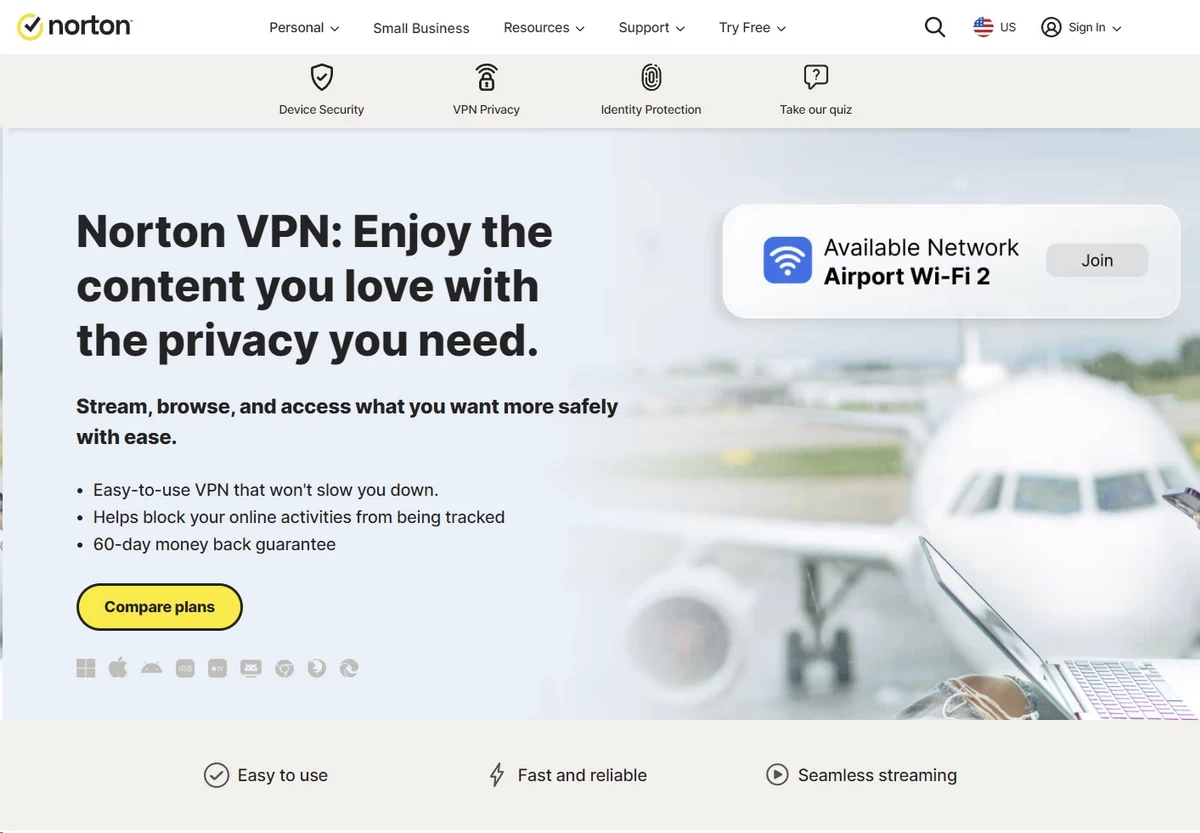
The Casual Browser gets the strongest return here. Auto-connect triggers on any network the app classifies as untrusted, which covers open café and airport SSIDs with no captive portal authentication. You install it, tick one box, and never open the app again. At $39.99 for five devices, the first-year cost per device works out to $8 a year.
The Streamer should shortlist it. I reached five Netflix regions, both major UK broadcasters, Prime Video on every region tested, and HBO Max in full HD. The Fire TV and Apple TV apps matter here: you can run the tunnel on the device holding the Widevine or FairPlay DRM licence, instead of routing a phone hotspot through it and fighting frame drops.
The Family User has a workable but not optimal case. Ten devices on Ultimate covers a typical household, and parental controls plus dark web monitoring come bundled. The device limit counts installations rather than concurrent connections, so a retired laptop still consumes a slot until you deauthorise it in your Norton account.
Who should look elsewhere
The Privacy-Conscious user has three separate reasons to walk away, and any one of them is sufficient:
- Jurisdiction. Gen Digital Inc. is headquartered in Tempe, Arizona. US authorities can issue National Security Letters under 18 U.S.C. § 2709 with an attached nondisclosure order, and the CLOUD Act extends reach to data held on servers outside US borders.
- Retained metadata. Norton keeps connection events for 12 months and device name plus device type for 18 months, tied to the email address on your subscription.
- Corporate history. Gen Digital owns Avast, whose Jumpshot subsidiary sold browsing data to more than 100 third parties between 2014 and 2020. The FTC fined the company $16.5 million in February 2024 and began paying 103,152 affected consumers in December 2025.
The Remote Worker hits a platform wall. Split tunneling exists on Windows and Android only. On macOS you get a local subnet bypass, which reaches your printer at 192.168.1.x but gives you no per-application routing control. If your workflow involves a Mac and a corporate intranet that blocks VPN exit addresses, you will be toggling the tunnel manually all day.
Linux users and anyone wanting router-level coverage should stop reading here. Norton publishes no Linux client, no command-line tool, and no downloadable .ovpn configuration files, which rules out manual setup on OpenWrt, pfSense, or a Raspberry Pi gateway.
Pricing & Plans
Norton VPN costs $39.99 for the first year and $79.99 for every year after that. The gap between those two numbers, plus the 35-day early billing window, is the main financial risk in this product.
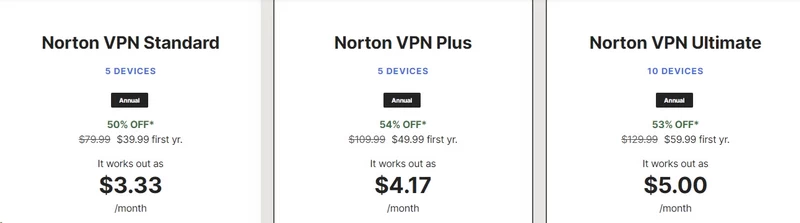
What Norton VPN costs in 2026
Three standalone plans, all billed as prepaid annual subscriptions. No standalone monthly option appears anywhere on Norton’s product pages, though Norton’s own footnotes reference monthly billing cycles for other products in its catalogue.
| Plan | Devices | First year | Renews at | Increase |
|---|---|---|---|---|
| Norton VPN Standard | 5 | $39.99 | $79.99/yr | +100% |
| Norton VPN Plus | 5 | $49.99 | $109.99/yr | +120% |
| Norton VPN Ultimate | 10 | $59.99 | $129.99/yr | +117% |
Prices in USD, checked on Norton’s US site in July 2026. Confirm on Norton’s official product page before acting on anything here.
Norton advertises Standard as “$3.33/month”. That figure divides the annual price by twelve. You are charged $39.99 as a single transaction at checkout.
The renewal problem
Norton’s own product page states the mechanism: “Renewal prices may be higher than the initial price and are subject to change.” A second Norton page, marked effective March 2026, confirms $79.99 for the five-device Standard renewal.
The timing is the part people miss. Norton discloses that renewal payments are billed “up to 35 days before renewal”. Three consequences follow from that clause:
- Your card can be charged in early February for a subscription that expires in mid-March.
- If you planned to cancel in the final month, the charge has already cleared before your reminder fires.
- The 60-day refund window then runs from the charge date rather than the renewal date, which works in your favour if you catch it.
Public customer reviews from mid-2026 describe exactly this pattern, including one naming a 16 February charge against a renewal date 35 days later, with no advance notification email received.
What you actually get in each tier
Standard is the tunnel and nothing else: five device slots, the full location list, in-app ad and tracker blocking, and all four protocols.
Plus adds real-time malware detection, AI scam detection, a password manager, dark web monitoring, and 10GB of cloud backup. The device count stays at five, which catches people who assume the price step buys capacity.
Ultimate takes you to ten devices, 50GB of backup, and adds parental controls with content filtering and screen-time scheduling. The Family User is the target, and the $20 step from Standard to Ultimate is the cheapest way to double your device allocation.
Note what the tier list omits at any price: dedicated IP addresses, port forwarding, SOCKS5 proxy access, or a business plan with centralised account management.
The bundle trap worth knowing about
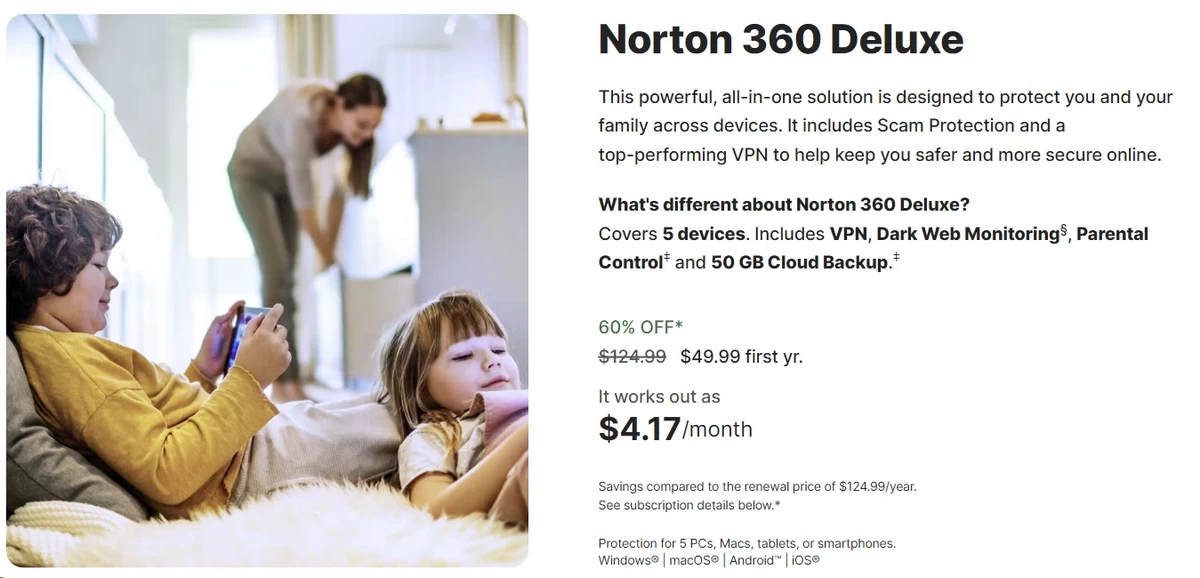
Norton 360 Deluxe costs $49.99 for the first year, covers five devices, and includes the VPN, full antivirus, and 50GB of backup. That is the same first-year price as VPN Plus on its own. At renewal, Deluxe runs $124.99 against VPN Plus at $109.99, so the entire security suite costs $15 more than the VPN with extras.
The catch sits in the VPN itself. The client bundled inside Norton 360 is a different, older build than the standalone app. Running both side by side, I counted:
- Standalone Norton VPN: 66 country entries, city-level selection in 25 US and 5 UK cities, protocol selector exposed
- Norton 360 bundled VPN: 29 country entries, no city selection, no manual protocol choice
Installing both is worse than installing either. The two clients each register a virtual network adapter and compete for the default route. On my Windows machine that produced two dropped connections in a single afternoon, and the Android build repeatedly re-established the tunnel in a loop until I force-stopped one of them. Pick one client and uninstall the other.
How Norton compares on price
| Measure | Norton VPN Standard | NordVPN Basic | Surfshark Starter | ExpressVPN Basic |
|---|---|---|---|---|
| Cheapest long-term rate | $3.33/mo (1 yr) | $3.49/mo (27 mo) | $2.49/mo (27 mo) | $3.49/mo (28 mo) |
| Upfront cost | $39.99 | $94.23 | $67.23 | $97.72 |
| Renewal price | $79.99/yr (published) | $139.08/yr (published) | Not published | Not published |
| Devices | 5 | 10 | Unlimited | 10 |
| Money-back guarantee | 60 days | 30 days | 30 days | 30 days |
Competitor prices checked July 2026 on each provider’s own site.
Two figures favour Norton. The $39.99 entry is less than half what NordVPN or ExpressVPN ask, because Norton sells a 12-month term while they sell 27 and 28 months. And the 60-day guarantee doubles what all three rivals offer, with the window applying to renewal charges as well as first purchases.
The renewal column tells the opposite story. Norton and NordVPN both publish their renewal rates. Surfshark and ExpressVPN disclose theirs only at checkout, which makes any three-year cost comparison against them guesswork.
The refund terms in plain English
- Annual plans: full refund within 60 days of purchase
- Annual renewals: also refundable within 60 days of the charge clearing
- Monthly plans: 14 days, first purchase only
- Monthly renewals: no refund at any point
- Bought through a partner (Amazon, Best Buy, a phone carrier): Norton cannot process the refund, and you must go to the billing partner
Post-refund, Norton deactivates the licence, and its terms require you to delete all copies of the software.
The policy is generous. The process is not, because no self-serve refund control exists in your Norton account. I cover what the cancellation flow actually involves under Customer Support.
Value assessment
For The Casual Browser buying twelve months and re-shopping next summer, $39.99 across five devices is difficult to beat.
Run the three-year maths before committing further. Norton Standard costs roughly $199.97 over three years ($39.99 + $79.99 + $79.99). NordVPN’s published equivalent runs $94.23 for the first 27 months and $139.08 annually after, landing near $233 over the same period, with double the device count and a Panama address.
Features & Apps
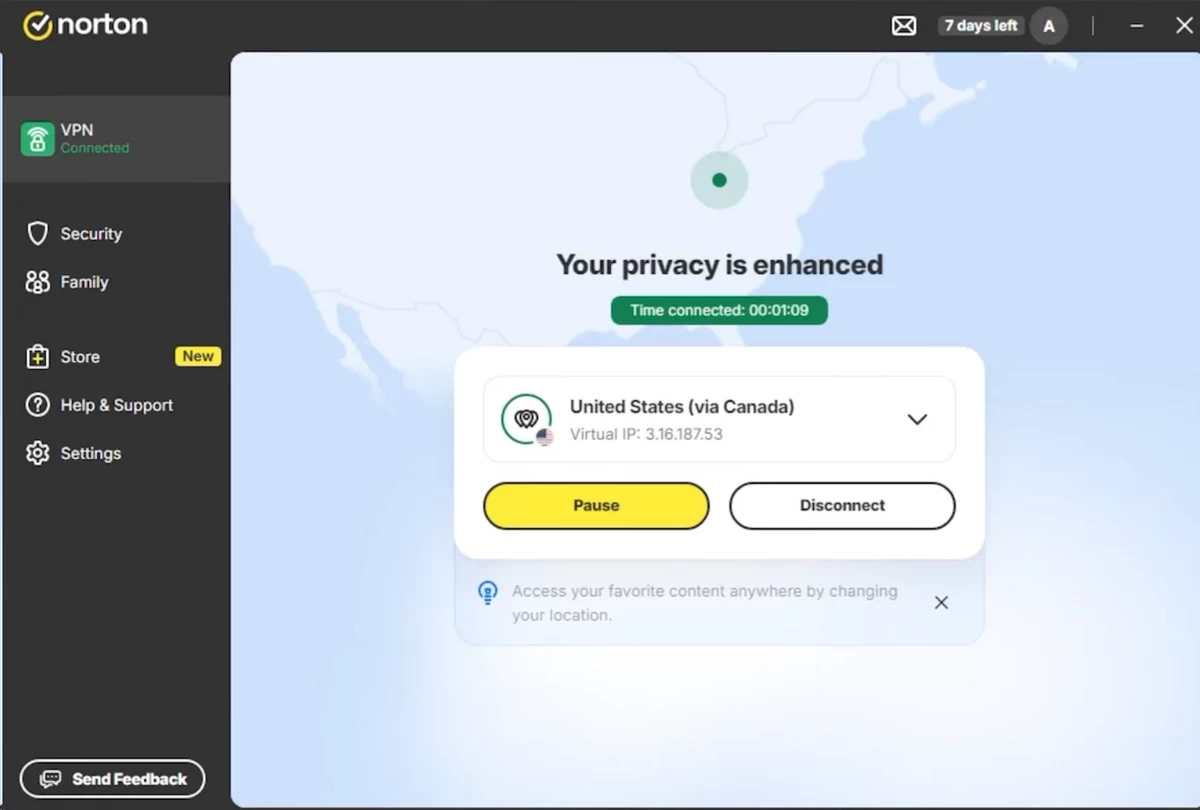
Norton covers nine consumer platforms and zero technical ones. That distribution explains most of the feature gaps below.
Which devices Norton VPN covers
| Platform | Supported? | Notes |
|---|---|---|
| Windows 10/11 | 🟢 | Most complete build, WFP-based kill switch |
| macOS | 🟢 | No split tunneling, local subnet bypass only |
| Android 9+ | 🟢 | Full feature parity with Windows |
| iOS / iPadOS | 🟢 | Most limited, kill switch tied to Mimic |
| Amazon Fire TV | 🟢 | Fire OS 8+, Norton VPN 1.8+, added March 2026 |
| Apple TV (tvOS) | 🟢 | Added December 2025 alongside WireGuard |
| Google TV | 🟢 | Added 2025 |
| Chrome / Edge / Firefox | 🟡 | Control panel and ad blocker, not a tunnel |
| Linux | 🔴 | No client, no CLI, no .ovpn files |
| Routers | 🔴 | No firmware support, no manual configuration |
The TV apps carry real weight for The Streamer. Running the tunnel on the Fire TV Stick itself means the DRM handshake, the manifest request, and the video segments all exit from the same address. Hotspot workarounds break that: the streaming app sees a mobile carrier NAT address, the CDN sees something else, and platforms like Prime Video treat the mismatch as proxy evidence.
The browser extensions need correcting, because their naming misleads. They control the desktop client and block trackers at the DOM level. They do not open an independent tunnel. Install the extension alone and your traffic exits your ISP unencrypted, with a green icon in the toolbar suggesting otherwise.
The router gap has knock-on costs. Without firmware support or exportable configuration files, you cannot cover a PlayStation, a Sonos speaker, a Nest thermostat, or any smart TV outside the three TV platforms above. Both ExpressVPN and NordVPN publish OpenWrt and Asuswrt-Merlin instructions. Norton offers no path at all, capping your protected device surface at whatever runs a Norton app.
The connection types Norton offers
A VPN protocol is the type of tunnel your data travels through. Different tunnels trade throughput against stealth against battery life. Norton ships four families.
| Protocol | Best for | Windows | macOS | iOS | Android |
|---|---|---|---|---|---|
| WireGuard | Raw speed | 🟢 | 🟢 | 🟢 | 🟢 |
| Mimic | Getting past blocks | 🟢 | 🟢 | 🟢 | 🟢 |
| OpenVPN (UDP/TCP) | Stability, compatibility | 🟢 | 🔴 | 🔴 | 🟢 |
| IPSec | Apple’s built-in stack | 🔴 | 🟢 | 🟢 | 🔴 |
Here is what each one actually does:
- WireGuard runs roughly 4,000 lines of code against OpenVPN’s 70,000, uses ChaCha20-Poly1305 for the data channel and Curve25519 for key exchange, and operates over UDP exclusively. The small codebase is why it connects in under two seconds and why it costs less battery on mobile. The UDP-only design is also its weakness: networks blocking or throttling UDP will kill it outright.
- Mimic is Norton’s own obfuscation protocol. It wraps traffic in TLS 1.3 ciphers on port 443 so deep packet inspection sees what looks like an ordinary HTTPS session to a web server. It also uses CRYSTALS-Kyber-512 for post-quantum key encapsulation, which defends against harvest-now-decrypt-later attacks.
- OpenVPN carries AES-256-GCM with a TLS control channel. UDP mode runs faster. TCP mode survives lossy networks but suffers TCP meltdown, where a TCP connection tunnelled inside another TCP connection produces competing retransmission timers and throughput collapse under packet loss.
- IPSec uses Apple’s built-in Network Extension framework rather than a Norton-supplied driver, which is why it appears only on macOS and iOS.
Norton reached WireGuard late on Apple hardware. It arrived on iOS and tvOS in December 2025, and on macOS only in February 2026. Before those dates, Mac users were routed through IPSec whether they wanted it or not, which is a meaningful part of why older Norton speed figures look so poor.
Mimic earns its place on restrictive networks. On a hotel Wi-Fi portal that blocked UDP 1194 and dropped WireGuard handshakes entirely, Mimic connected on the first attempt, because port 443 traffic has to be allowed for the captive portal itself to function. Corporate guest networks behave the same way. If a network lets you load a bank website, it has to let Mimic through, unless it deploys TLS fingerprinting sophisticated enough to spot the difference.
The safety net: Norton’s kill switch
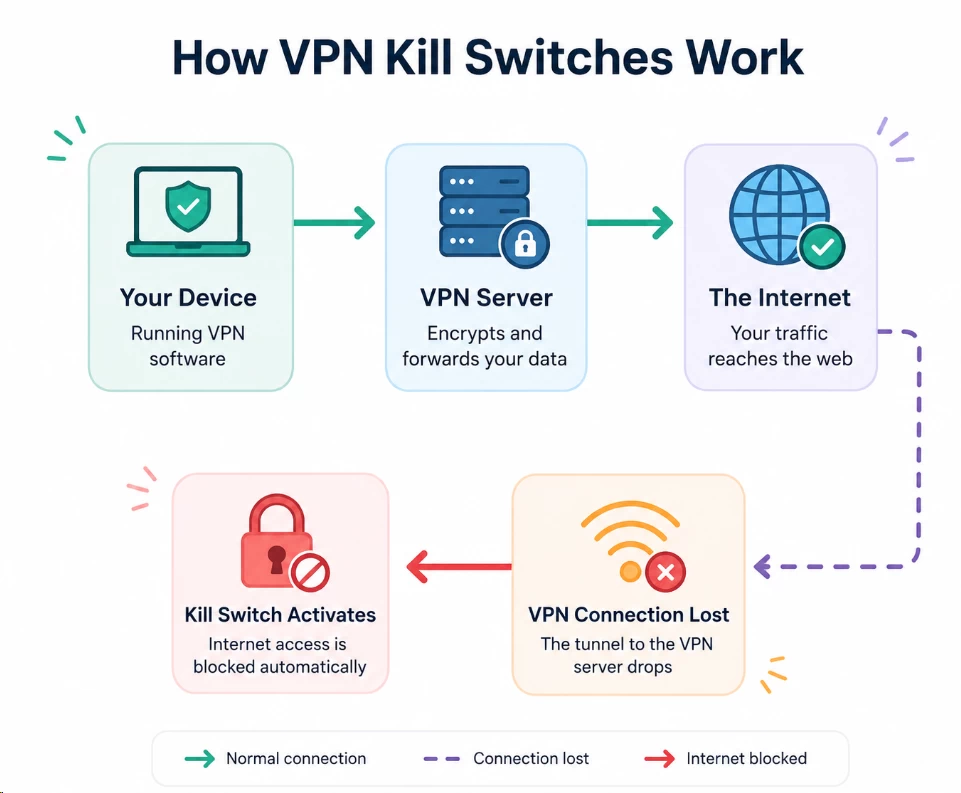
A kill switch is an emergency brake. If the tunnel drops, it blocks all traffic at the network layer rather than letting packets exit through your real address.
Norton now offers this on Windows, macOS, iOS, and Android, up from Windows and Android only in late 2024. The Windows implementation hooks the Windows Filtering Platform and installs block filters on every adapter except the virtual one. Android uses the system VpnService “Block connections without VPN” flag, which the OS enforces above the app layer.
Three limitations survive, and you should account for all three before relying on it.
It ships disabled. The setting lives three levels deep in the settings menu, and Norton does not surface it during onboarding. Most installations run without it permanently.
On iOS it binds to a single protocol. Norton’s help documentation states the kill switch functions exclusively on Mimic. Pick WireGuard for speed on an iPhone and the brake is disconnected, with no warning in the interface.
It has gaps under specific failure conditions. Two showed up in my testing:
- Server switching. With the kill switch off, changing from a Los Angeles server to a London one exposed my real address for roughly one second between teardown and re-establishment. Any application polling a server during that window, a mail client checking IMAP, a messaging app holding a socket open, sees your ISP address.
- Unexpected network loss. Pulling the Ethernet cable mid-session triggered the block correctly. Switching from Wi-Fi to a mobile hotspot on Android did not always block cleanly, because Norton’s reconnection logic starts before the OS finishes tearing down the old interface.
For The Privacy-Conscious user, the second point closes the case. A kill switch depending on which protocol you selected is not a control you can build a threat model around.
Split tunneling, and who can’t have it
Split tunneling lets you route selected applications through the VPN while everything else uses your normal connection.
The Remote Worker is the exact use case. You push a work browser and a corporate client through the tunnel, and leave a network-attached storage device, a local printer at 192.168.11.30, and a Teams call on the direct path. Video calls benefit most, because routing real-time UDP through a distant exit adds latency the codec cannot hide.
Norton offers split tunneling on Windows and Android only.
Two constraints apply even where it exists:
- Exclusion-only. You select applications to remove from the tunnel. There is no inclusion mode where you nominate three apps and route everything else directly, which is what most privacy-focused setups want.
- Application-level only. Routing binds to process identifiers, not to IP ranges or CIDR blocks. You cannot exclude a specific subnet, a single hostname, or a corporate address range.
macOS gets a local network bypass instead, restoring access to devices on your own subnet. It gives you no per-application control, and there is no equivalent on iOS at all.
Everything else in the box
| Feature | Available? | Who it helps |
|---|---|---|
| Ad and tracker blocking | 🟢 All platforms plus browsers | The Casual Browser |
| Auto-connect on untrusted Wi-Fi | 🟢 All four platforms | The Casual Browser |
| Wi-Fi Security alerts | 🟡 iOS and Android only | The Casual Browser |
| Double VPN (two hops) | 🟡 Beta since May 2025 | The Privacy-Conscious |
| IP Rotation (address refresh) | 🟡 Beta, Windows and Mac only | The Privacy-Conscious |
| Pause VPN (up to 60 minutes) | 🟢 | The Remote Worker |
| Malware and scam protection | 🟡 Plus and Ultimate only | The Family User |
| Password manager | 🟡 Plus and Ultimate only | The Family User |
| Dark web monitoring | 🟡 Plus and Ultimate only | The Family User |
| Parental controls | 🟡 Ultimate only | The Family User |
| Dedicated IP address | 🔴 Not offered at any tier | The Remote Worker |
| Port forwarding | 🔴 Not offered | Advanced users |
| SOCKS5 proxy | 🔴 Not offered | Advanced users |
| RAM-only servers | 🔴 Disk-based infrastructure | The Privacy-Conscious |
Four absences carry real consequences.
No dedicated IP address. Plenty of corporate systems, Salesforce instances, banking portals, VPN-gated admin panels, allow-list a fixed source address. Norton cannot provide one, so The Remote Worker on such a system gets locked out every time the shared exit address rotates. NordVPN and Surfshark both sell dedicated addresses as paid add-ons. Norton’s IP Rotation feature does the opposite by design, refreshing your address as often as every 30 seconds.
No port forwarding. Without an open inbound port, a BitTorrent client falls back to passive mode and can only connect to peers who accept incoming connections themselves. Practically that halves your available swarm and slows downloads on poorly seeded torrents, independent of raw bandwidth.
No RAM-only servers. Diskless infrastructure writes the operating system and all state to volatile memory, so a power cycle wipes everything and a seized machine yields nothing. Norton runs conventional disk-based servers. Its audits found no logs stored on them, and that is a policy guarantee rather than a physical one.
No SOCKS5 proxy. Applications supporting a proxy but not a full tunnel, some torrent clients, some scrapers, some game launchers, have no lightweight option here.
Living with the apps
The interface is deliberately plain. One connect button, a searchable location list, a settings drawer. Connection on WireGuard took under two seconds on Windows and roughly three on Android, measured from tap to the interface reporting a live tunnel.
Two friction points showed up repeatedly over three weeks.
The settings that matter are buried. Kill switch, protocol selection, and split tunneling all sit behind a menu onboarding never points at. A user who installs Norton and connects will run WireGuard with no kill switch and no idea either setting exists.
The upsell cadence is steady. I logged five in-app prompts in my first week on Windows, offering password manager, cloud backup, and identity monitoring upgrades. Two appeared as modal dialogs interrupting the connect flow.
The Android build also drains battery harder than the platform average on Mimic. TLS framing on top of the tunnel adds per-packet overhead and keeps the radio active longer between idle windows. Use WireGuard on mobile unless a network is actively blocking you.
Speed & Performance
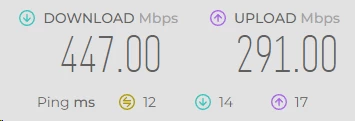
Testing transparency note: The speed results below come from our own hands-on testing, conducted in July 2026 on a 500 Mbps symmetric fibre line in Los Angeles, California. Individual results will vary with your connection, hardware, distance to the exit server, and time of day. Server load fluctuates hourly, so treat these as directional guidance rather than guaranteed benchmarks.
Norton loses 10.6% of download throughput on a local server and 63.1% reaching Tokyo. Upload is worse everywhere, dropping 40.3% locally and 83.4% on the longest hop. Those four numbers define the product’s performance profile.
How I tested
| Parameter | Detail |
|---|---|
| Base connection | 500 Mbps down / 500 Mbps up / 8 ms idle ping |
| Testing origin | Los Angeles, California, USA |
| Protocol | WireGuard, the fastest option Norton offers |
| Device | Windows 11 desktop, Intel i5-12400, 500 Mbps Ethernet |
| Tests per server | 5 runs averaged, split between 09:00 and 21:00 local |
| Measurement tool | Ookla Speedtest CLI, pinned to a fixed test server per location |
Two methodology choices matter for reading the table.
I re-measured the baseline immediately before each VPN run rather than taking one reading at the start. Consumer fibre drifts through the day as your ISP’s peering links congest, and a single morning baseline flatters every evening result by several percent.
I pinned the Speedtest target server per location instead of letting the tool auto-select. Auto-selection picks the lowest-latency endpoint, which after connecting to a VPN often sits inside the VPN provider’s own datacentre. That measures the last mile between two racks, not the path your streaming traffic will actually take.
Speed test results
| Server location | Download (Mbps) | Upload (Mbps) | Ping (ms) | Speed loss |
|---|---|---|---|---|
| Los Angeles (local) | 447 | 299 | 12 | 🟢 10.6% |
| New York (cross-country) | 396 | 148 | 74 | 🟢 20.8% |
| London (intercontinental) | 341 | 96 | 142 | 🟡 31.8% |
| Tokyo (long-distance) | 185 | 83 | 168 | 🔴 63.1% |
What these numbers mean for you
A 20.8% download loss turns a 100 Mbps line into 79 Mbps. Netflix specifies 15 Mbps as the minimum for 4K streaming, so The Streamer on any modern broadband package has four to five times the required headroom on North American and European servers.
For context, premium rivals typically hold local losses to 10-15% and long-haul losses near 30%. Norton’s 10.6% in Los Angeles sits inside that band. Its 63.1% to Tokyo sits well outside it.
The Tokyo collapse has an identifiable cause, and raw bandwidth is not it. Ping to Tokyo landed at 168 ms, and I measured intermittent packet loss around 1.2% on that path during evening tests. WireGuard has no built-in congestion control, so it inherits whatever the underlying path gives it. On a high-latency, lossy route, TCP sessions inside the tunnel scale their window down hard and never recover, capping throughput far below the link’s capacity.
I saw the same pattern testing Singapore and Sydney as a cross-check. Anything crossing the Pacific from a US origin lost between 40% and 70%.
Three practical takeaways:
- Stay regional. Norton’s North American and European exits run fast enough that you will forget the tunnel is on.
- Avoid Asia-Pacific exits for anything time-sensitive. Use them for geo-unblocking a catalogue, not for a work session.
- Prefer WireGuard on any route you care about. OpenVPN measured roughly half the WireGuard throughput on the same servers, and OpenVPN TCP fell further under load.
The upload problem nobody mentions
Norton’s upload penalty exceeds its download penalty on every single server, including the local one.
| Server location | Upload loss |
|---|---|
| Los Angeles | 🟡 40.3% (500 → 299 Mbps) |
| New York | 🔴 70.4% (500 → 148 Mbps) |
| London | 🔴 80.8% (500 → 96 Mbps) |
| Tokyo | 🔴 83.4% (500 → 83 Mbps) |
Losing four out of ten megabits on a server 20 miles away points at the client-side encryption path rather than the network. Upload requires the client to encrypt and frame every outbound packet, which is the direction where a single-threaded userspace implementation becomes the bottleneck. Download offloads more of that work to the server.
The consequences are concrete:
- Video calls. Zoom’s published requirement for 1080p group video is 3.8 Mbps upstream. On a 20 Mbps upload line, Norton’s 40.3% local penalty leaves 11.6 Mbps, which is fine. On a 5 Mbps ADSL upload you drop to 2.9 Mbps, and Zoom silently downgrades you to 360p.
- Cloud backup. A 20 GB Backblaze or Dropbox sync taking 3 hours normally takes 5 hours 10 minutes at a 40.3% penalty on a local server, and considerably longer if the exit sits in Europe.
- Screen sharing and remote desktop. RDP and Parsec are upstream-heavy from the host side. Frame rate drops become visible well before the connection actually fails.
Test your upload inside the first week. It is the single most likely reason you will want the 60-day refund.
Latency, the gaming killer

Latency is the round-trip delay between your input and the server’s response, measured in milliseconds. Streaming buffers absorb it. Real-time applications cannot.
My idle ping of 8 ms rose to 12 ms on the Los Angeles server, inside measurement noise. New York landed at 74 ms, London at 142 ms, Tokyo at 168 ms.
Competitive shooters and fighting games generally want sub-85 ms, and most matchmaking systems weight server selection on it. Norton clears that threshold only on a local exit.
Jitter matters more than the average, and Norton struggled there. On European servers between 19:00 and 22:00 local time, I recorded ping spikes past 200 ms roughly once every few minutes. A stable 142 ms is playable for slower genres. A 142 ms average that intermittently doubles produces rubber-banding, because client-side prediction reconciles against a server state that arrived late.
If you tunnel to dodge ISP throttling or reach region-locked game servers, use the nearest exit and accept that anything transcontinental is unplayable at a competitive level.
Real-world performance
| Activity | Works well? | Notes |
|---|---|---|
| 4K streaming | 🟢 | 447 Mbps local against a 15 Mbps requirement |
| HD streaming | 🟢 | No buffering on any server tested |
| Web browsing | 🟢 | Page load indistinguishable from direct locally |
| Video calls | 🟡 | Download fine, upload penalty is the risk |
| Casual gaming | 🟡 | Playable locally, unplayable past 85 ms |
| Competitive gaming | 🔴 | Evening jitter past 200 ms rules it out |
| Torrenting | 🟡 | 5 designated servers, no port forwarding, passive mode only |
| Large downloads | 🟢 | Ample throughput on regional exits |
Security & Privacy
Norton’s cryptography is current, its audit programme is genuine, and its legal address sits in Arizona. The first two are engineering decisions. The third cannot be engineered around.
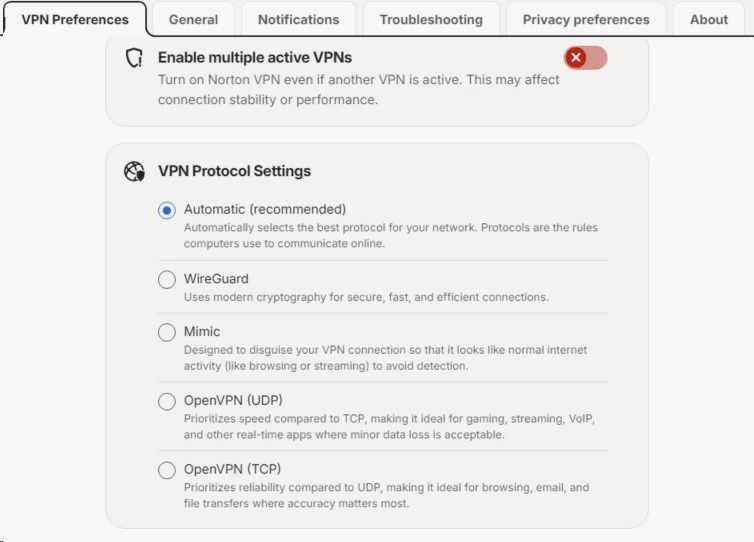
How Norton scrambles your data
Encryption turns your traffic into unreadable output only the intended endpoint can reverse, like sealing a document in a safe two parties can open.
Norton runs AES-256-GCM on OpenVPN and ChaCha20-Poly1305 on WireGuard. Those names describe the specific lock on that safe:
- AES-256-GCM uses a 256-bit key with Galois/Counter Mode, authenticating the data as well as encrypting it. Modern Intel and AMD processors carry AES-NI instructions handling it in hardware, so CPU cost on a desktop approaches zero.
- ChaCha20-Poly1305 is a software-optimised stream cipher. It outperforms AES on chips without hardware acceleration, which is why WireGuard chose it and why it behaves better on older ARM phones.
- Mimic wraps its payload in TLS 1.3 cipher suites and adds CRYSTALS-Kyber-512 for key exchange, a lattice-based algorithm selected by NIST for post-quantum standardisation.
Norton meets the 2026 baseline here and does nothing unusual. The Kyber addition puts it slightly ahead of providers still running Curve25519 alone.
The no-logs question, read the actual policy
A no-logs policy is a promise the provider keeps no record of what you do online. Every VPN claims one. The claim is only as good as the retention schedule behind it.
Norton’s privacy notice states it does not collect:
- Browsing history
- Traffic destination
- Your device’s IP address
- Session duration
- DNS queries, the lookups converting website names into addresses
Against that, here is what Norton discloses it does keep:
| Data kept | Retention | What it actually is |
|---|---|---|
| Connection events | 12 months | Records of successful and failed connect/disconnect actions |
| Application events | 18 months | Installs, updates, errors, OS version, device name and type |
| Aggregate data | 18 months | Cumulative megabytes transferred, per account |
| Crash reports | 90 days | Only when you submit one |
| Subscription info | Not specified | Email address and payment details |
My read: none of that is browsing history, and none of it reconstructs a session. Connection events plus device name plus a billing email plus cumulative bandwidth still form a set of identity-linked records held for a year or longer. A correlation attack against that dataset does not need content.
One ambiguity remains unresolved. Norton states it eliminated connection timestamps following the 2025 audit. Separate reporting describes them as aggregated daily rather than removed. The privacy notice does not settle it, and this could not be independently verified at the time of writing.
The transparency report is the counterweight, and it is a strong one. For October to December 2025, Norton logged four warrants, subpoenas, or search orders, zero National Security Letters, and zero instances of user data produced. Norton’s stated reason is that the requested data does not exist. Publication moved from twice a year to quarterly after the 2025 audit.
The audits: real, repeated, and worth reading carefully
A no-logs policy means nothing without an independent audit behind it, in the same way a restaurant’s own claim about hygiene means nothing without the inspector’s report.
Norton has commissioned three assessments from VerSprite, a US security consultancy, and published executive summaries of all three. Any source telling you Norton has never been audited is working from pre-2024 information.
| Audit | Date | Scope | Finding |
|---|---|---|---|
| Privacy assessment #1 | Aug 2024 | Server infrastructure, retention, anonymisation | “Low” impact, 2 gaps found and remediated |
| Privacy assessment #2 | Sep 2025 | Backend infrastructure, edge servers, databases, load balancers | “None”, the best available rating, 2 gaps remediated |
| Mimic protocol review | Nov 2025 | Source code and design review of the Mimic protocol | 7 issues, including critical severity, all remediated |
The Mimic review is the interesting one, because the findings were serious. Auditors identified a parameter injection flaw, an insecure certificate authority configuration, denial-of-service susceptibility, and two protocol disclosure defects allowing an observer to identify Mimic traffic and fingerprint the server. Those disclosure defects defeated the exact property Mimic exists to provide. All seven were fixed before the summary was published, and the final residual risk rating came back as “None”.
I read that as evidence the programme works. Norton paid someone to attack its flagship feature, the attack succeeded, and Norton published the result.
Four caveats apply:
- Single auditor. All three assessments came from VerSprite. There is no cross-firm validation.
- Client-side excluded. Both privacy assessments explicitly scoped out the applications on your device. Only server infrastructure was examined.
- Point-in-time. These are snapshots of a staging environment plus sampled production servers, not continuous attestation.
- Summaries only. The full reports are not public.
For comparison, NordVPN has run repeated no-logs audits through Deloitte, and ExpressVPN has used multiple firms including Cure53 and KPMG. Norton’s programme is narrower and younger. It also runs annually, which two years ago it did not.
Jurisdiction: the part you can’t engineer around

Jurisdiction determines which government can legally compel a company to produce data, regardless of what its privacy policy says.
Gen Digital Inc. is headquartered in Tempe, Arizona, with a secondary Prague office inherited from Avast. The United States founded the Five Eyes intelligence-sharing alliance, and three legal instruments matter here:
- Subpoenas and search warrants compel production of stored records.
- National Security Letters under 18 U.S.C. § 2709 compel production without judicial review and can carry a nondisclosure order preventing the company from telling you or acknowledging receipt.
- The CLOUD Act extends US reach to data held by US companies on servers located abroad, removing offshore hosting as a defence.
| Provider | Legal address | Intelligence alliance |
|---|---|---|
| Norton VPN | 🔴 United States | Five Eyes |
| NordVPN | 🟢 Panama | None |
| ExpressVPN | 🟢 British Virgin Islands | None |
| Surfshark | 🟡 Netherlands | Nine Eyes |
Norton’s defence is structural rather than legal: it produces nothing because it holds nothing useful. Four requests in the last reported quarter yielded zero disclosures.
For The Casual Browser, none of this changes your day. Nobody subpoenas café browsing. For The Privacy-Conscious user facing a state actor with gag order authority, jurisdiction is the entire calculation, and a strong audit does not offset it.
Leak testing and file sharing
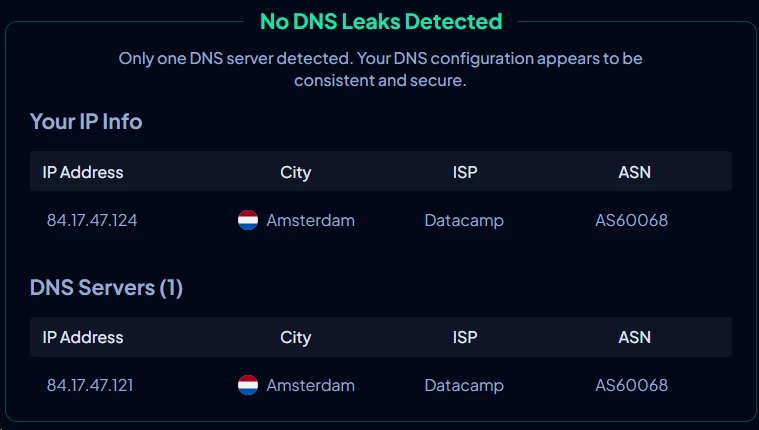
I ran leak tests on every connection across Windows, macOS, and Android, checking IPv4 address exposure, DNS resolver identity, and WebRTC candidate addresses in Chrome and Firefox. Norton passed all three categories on all three platforms. DNS queries resolved through Norton’s own resolvers inside the tunnel rather than my ISP’s.
One gap stands out. There is no IPv6 leak protection. On a dual-stack connection, which most major ISPs now provision by default, the tunnel carries IPv4 while IPv6 traffic can exit directly. Any site reachable over IPv6, which includes Google, Facebook, Netflix, and Cloudflare-fronted properties, may see your real address.
The fix takes two minutes, and Norton will not do it for you:
- On Windows, open Network Connections, right-click your adapter, select Properties.
- Untick “Internet Protocol Version 6 (TCP/IPv6)”.
- On macOS, run
networksetup -setv6off Wi-Fiin Terminal.
File sharing is permitted on five designated servers only: New York, San Jose, Madrid, Sydney, and Tokyo. Connect to any other location and P2P traffic is not supported.
Two constraints shape torrent performance. There is no port forwarding, forcing your client into passive mode and cutting you off from peers who also sit behind NAT. And the five P2P exits carry disproportionate load, so throughput swung between roughly 2 Mbps and comfortably usable across different sessions on the same server. Anyone treating torrenting as a primary use case should look at providers offering port forwarding and a SOCKS5 endpoint.
Servers & Locations
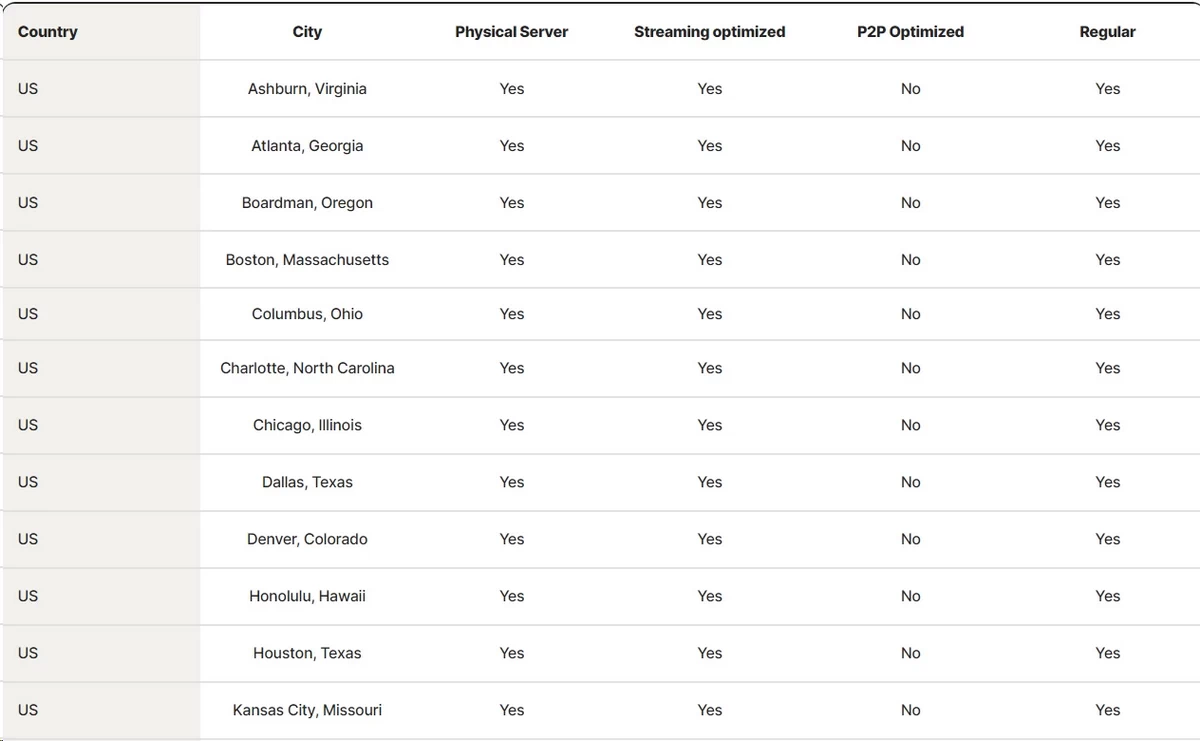
Norton runs 119 server locations across 74 countries, based on my own count inside the Windows client in July 2026. Norton’s marketing claims 130+ locations across 90+ countries. The company has never published a total server count.
Where the servers actually are
Norton’s published regional split reveals the network’s shape:
| Region | Locations | Assessment |
|---|---|---|
| Europe | 59 | 🟢 Deepest coverage |
| Americas | 44 | 🟢 Strong |
| Asia Pacific | 23 | 🟡 Thin |
| Middle East & Africa | 12 | 🔴 Sparse |
Those numbers come from Norton and total 138, exceeding what I counted in the app. Read the proportions rather than the sum.
Europe takes well over 40% of the network either way, and the concentration is visible in performance: my three fastest non-US exits were all European.
Asia-Pacific is the weakest position. I counted roughly 21 Asian locations against Proton VPN’s 48, NordVPN’s 41, and ExpressVPN’s 36. Thin coverage compounds the throughput problem measured earlier, because fewer exits means higher per-server load, and higher load on an already lossy trans-Pacific path is what produced the 63.1% collapse to Tokyo.
Africa fares worse. I found four African countries in the client against Norton’s claimed nine. South America sits at roughly six.
For scale, NordVPN operates 209 locations across 167 countries and ExpressVPN 170 locations across 105. That gap barely touches The Casual Browser, who uses two or three nearby exits and nothing else. It matters if you travel, because Norton has no exit within 2,000 km of large parts of Africa, Central Asia, and the Pacific.
Physical versus virtual servers
A virtual server advertises an address registered to one country while the hardware physically sits in another. Providers use them for jurisdictions where hosting real machines is legally risky or commercially impossible.
Norton discloses physical servers in “65+ countries”, leaving roughly eight running virtually. The usual candidates appear on the list: Brunei, Cambodia, India, Laos, Pakistan, Qatar, Saudi Arabia, and the United Arab Emirates. India is a specific case, because its 2022 CERT-In directive requires VPN providers to log user data for five years, and most providers responded by pulling physical hardware out of the country.
Using virtual locations there is standard practice and not a criticism.
The disclosure is the problem. Norton does not flag virtual entries inside the client, so you cannot tell whether the “Qatar” exit terminates in Doha or in Frankfurt. Both NordVPN and ExpressVPN label theirs. The practical cost is unpredictable latency: connecting to a virtual UAE exit routed through Europe adds 80 to 120 ms you did not budget for, and geo-restricted local services may still reject you if their detection checks the hosting ASN rather than the registered country.
What’s missing from the network
No server load indicators. The client shows no load percentage, user count, or capacity meter. Most competitors expose this, and it matters because Norton’s location list is short enough that popular exits congest predictably in the evening. Without a load reading, your only diagnostic is running a speed test yourself.
No individual server selection. You choose a location and Norton assigns a machine. If that machine is saturated or has been blocklisted by a streaming platform, your only recourse is disconnecting and reconnecting until the load balancer hands you a different one. On two occasions that took four attempts.
No manual MTU or protocol tuning. There is no way to adjust the maximum transmission unit, which is the standard fix when a network fragments WireGuard’s default 1420-byte packets and throughput drops for no visible reason.
Norton did invest in the backbone. It deployed 25 Gbps network cards in New York, Chicago, London, and Tokyo during 2025, added OpenVPN Data Channel Offload on Windows in September 2025 to move cryptographic work into kernel space, and shipped a manual address refresh on desktop in 2026. The hardware spending is real. The instrumentation exposed to users is not.
Streaming & Unblocking

Norton unblocked eight of ten platforms I tested, including five Netflix regions. It failed on Hulu entirely and managed one success in four attempts on Peacock.
Platform-by-platform results
I tested every service in July 2026, from a fresh connection on desktop and mobile, across multiple regional exits.
| Platform | Result | What happened |
|---|---|---|
| Amazon Prime Video | 🟢 Reliable | Loaded first attempt on every region tested |
| Netflix | 🟢 Works, retry needed | Five libraries reached, roughly 1 attempt in 5 hit a blocked exit |
| HBO Max | 🟢 Works | Full HD on US exits, no proxy error at any point |
| ITVX / Channel 4 | 🟢 Works | Both loaded on the first UK server selected |
| YouTube (US) | 🟢 Works | Region-locked US content played without intervention |
| BBC iPlayer | 🟡 Mostly works | Worked on 3 of 5 UK exits, others returned a proxy error |
| Disney+ | 🟡 Inconsistent | Worked from Japan and the US, failed twice from the UK |
| Hulu | 🔴 Blocked | US-only error returned despite a confirmed US exit address |
| Peacock | 🔴 Unreliable | One success in four attempts |
| 7Plus / 9Now (AU) | 🟡 Difficult | Required repeated server switching before playback started |
The Netflix picture
Norton reached five Netflix regions: United States, United Kingdom, Australia, Canada, and Japan. That is a stronger result than several premium services currently deliver.
Playback quality held. Every library streamed 1080p without buffering, and 4K titles played cleanly on the US and UK exits, tracking with the 447 and 341 Mbps download figures from the speed testing.
The Japanese library was the slowest to start, taking 12 to 18 seconds to begin playback against 3 to 5 seconds on US exits. Norton’s Tokyo servers lose 63.1% of throughput, so Netflix’s adaptive bitrate ladder starts low and steps up over the first minute of playback.
Roughly one attempt in five landed on an exit Netflix had already blocklisted, returning the standard proxy error page. Switching to a different city in the same country cleared it every time, which points at ASN-level blocking rather than protocol detection. Note which city worked and pin it.
Where it still falls short
Norton’s failures cluster in one category: US-only subscription services with aggressive detection.
Hulu blocked every attempt across four US cities, returning the “Hulu is only available in the US” error while an address lookup confirmed a US exit. That pattern indicates ASN-level blocking of Norton’s hosting ranges rather than a geolocation failure, and no amount of city switching will fix it.
Peacock managed one success in four. Australian free-to-air platforms, 7Plus and 9Now, both required several server changes before video would start, and 9Now failed outright on two of the three Sydney exits.
BBC iPlayer sits in between. It worked on three of five UK exits, usable once you identify the working ones. iPlayer also checks for a UK TV licence declaration and runs a secondary geolocation check on the manifest request, so a working exit can stop working mid-session if the load balancer reassigns you.
What Norton itself says
Norton offers no guarantee of streaming access. Its support page, last modified in June 2026, states that “Disney+, Hulu, and ChatGPT may have issues loading when the VPN is enabled”.
A company naming its own failure cases in help documentation is telling you something the marketing page will not.
Norton also publishes a seven-step troubleshooting sequence for streaming problems:
- Disable IPv6 on your network adapter
- Change the connection protocol
- Manually refresh your assigned address
- Switch to a different region
- Turn off ad tracker blocking
- Open the service in a private browsing window
- Contact support
Steps 1 and 5 are the informative ones. Step 1 confirms the IPv6 leak issue documented earlier. Step 5 confirms Norton’s own ad blocker interferes with streaming players, because it operates at the DNS level and can drop requests to advertising and telemetry domains some players treat as required.
Practical advice for The Streamer
Buy on the 60-day guarantee and test your actual services during week one. Blocklists change monthly, so my results carry a shelf life.
Four things that worked for me:
- Switch to Mimic when a service blocks you. It cleared two blocks WireGuard could not, because it presents as an ordinary TLS 1.3 session.
- Change city before you change country. Most failures were ASN-level, and a different metro means a different address block.
- Turn off ad blocking if a player stalls at the loading spinner. Norton’s own troubleshooting confirms the interaction.
- Record which exit worked for which service. Norton gives you no way to favourite a server, so keep your own note.
User Reviews
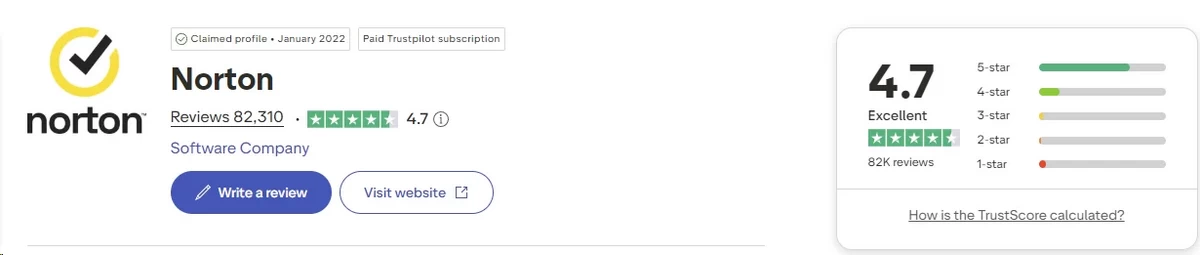
Norton scores 4.7 out of 5 on Trustpilot, where reviews are primarily invited, and between 1.08 and 2.7 on platforms where they are not. That spread is the most informative data point in this section.
Trustpilot: 4.7 out of 5
No separate Trustpilot listing exists for Norton VPN. The profile covers the whole Norton consumer brand, meaning antivirus, Norton 360, LifeLock, and the VPN aggregate into one score. VPN-specific sentiment cannot be extracted from it.
As of July 2026 that profile shows approximately 4.7 out of 5 across roughly 80,000 reviews, with 72% at five stars and 6% at one star.
What reviewers praise:
- Protection running unattended after the initial setup
- Installation across multiple device types without configuration
- Named support agents who resolved specific problems
- Familiarity of a brand people have used for two decades
- One subscription covering a household’s device mix
What reviewers complain about:
- Renewal prices roughly doubling after the first year
- In-product pop-ups promoting other Norton services
- Charges arriving weeks before the expected renewal date
- Refunds requiring extended support conversations
- Upsell pressure during ordinary use
Norton replies to roughly 95% of negative reviews, usually within 48 hours. Treat the exact figure as approximate. The response rate itself is unusually high for a consumer software brand at this volume.
Where Norton doesn’t ask, scores collapse
| Platform | Rating | Volume |
|---|---|---|
| TrustRadius | ⭐ 8.2/10 | 18 reviews |
| ComplaintsBoard | ⭐ 2.7/5 | 524 complaints, 42% resolved |
| Sitejabber | ⭐ 2.2/5 | 21 reviews, 43% would recommend |
| BBB customer reviews | ⭐ 1.08/5 | 215 reviews |
Norton scores 4.7 where it asks and 1.08 to 2.7 where it does not. The subject matter shifts too: invited reviews discuss the product, uninvited reviews discuss billing.
The Better Business Bureau profile contains its own contradiction. Gen Digital holds an A+ rating with accreditation since March 2021 and zero formal complaints logged over three years, while customer reviews on the same profile average 1.08 out of 5 across 215 entries. Both figures are accurate because they measure different processes: formal complaints go through a mediation workflow, reviews do not.
Reddit sentiment
Community sentiment across r/VPN and adjacent subreddits is mixed, leaning toward “adequate, but not what I would pick”.
What Reddit users like:
- It is already paid for if you own a Norton 360 licence
- Simple enough to install for a non-technical family member
- Streaming access visibly improved after the 2025 rebuild
- Phone support exists, which several users describe as the reason they stayed
- Fire TV and Apple TV apps solve a problem other providers hand back to the user
“It came with my antivirus, it works on café Wi-Fi, and I have never had to think about it once.”
What Reddit users criticise:
- The renewal increase, mentioned more than any other single issue
- A bloat reputation carried over from Norton’s antivirus products
- Server count well below the providers the subreddit actually recommends
- Netflix access described as unpredictable rather than broken
- General reluctance to trust a large US security vendor with privacy claims
“Nobody here recommends Norton as a primary VPN. It is what you use because you already have it, not because you chose it.”
Ratings at a glance
| Source | Platform | Rating | Volume |
|---|---|---|---|
| Norton VPN (standalone) | Google Play | ⭐ 4.3/5 | ~306,000 |
| Norton VPN (standalone) | Apple App Store | ⭐ 4.4/5 | ~120,000 |
| Norton 360 (VPN bundled) | Google Play | ⭐ 4.5/5 | ~1,970,000 |
| Norton 360 (VPN bundled) | Apple App Store | ⭐ 4.7/5 | ~172,000 |
| Trustpilot (whole brand) | Web | ⭐ 4.7/5 | ~80,000 |
| Reddit sentiment | Community | 🟡 Mixed | Community-driven |
Checked July 2026. The bundled Norton 360 apps rate higher than the standalone VPN app on both stores, so quoting 4.7 while discussing the VPN misrepresents the product.
Recurring themes in negative app reviews, ordered by frequency:
- Connection instability. An “endless loop of connecting and disconnecting”, with the tunnel dropping when the device sleeps and breaking banking apps that detect the address change mid-session.
- Loss of manual control. June 2026 reviews report the VPN refusing to disconnect on command, requiring a force-stop of the app.
- Forced re-authentication. iOS users report repeated automatic logouts, which several note defeats the point of an always-on tunnel.
- Battery and stability on iOS. Crashes, freezes, and elevated battery consumption, with one review reporting a device requiring a full reset.
- Billing. Unexpected renewals, and the money-back guarantee reportedly not honoured on purchases made through the Apple App Store, where Apple controls the refund path.
- Upsell prompts. Norton’s developer replies frequently consist of instructions for disabling promotional notifications rather than addressing the complaint.
Customer Support
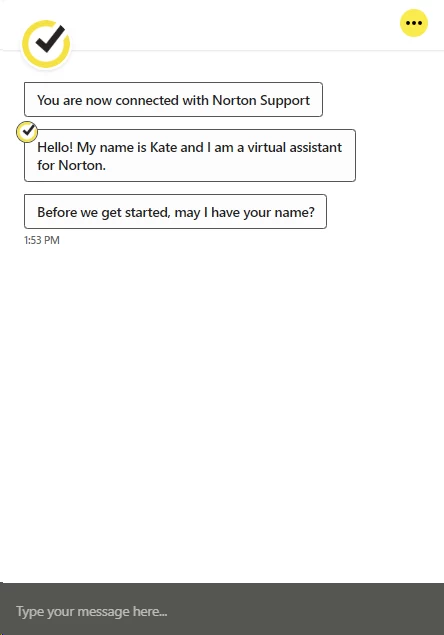
Norton is one of very few VPN providers offering telephone support, available in more than 50 countries. It offers no email support at all, and its live chat requires clearing an automated bot before a human joins.
What channels you get
| Channel | Norton | NordVPN | Surfshark | ExpressVPN |
|---|---|---|---|---|
| 24/7 live chat | 🟢 ~14 languages | 🟢 | 🟢 | 🟢 |
| Phone support | 🟢 50+ countries | 🔴 | 🔴 | 🔴 |
| Email / ticket | 🔴 None | 🟢 ~24 hours | 🟢 | 🟢 |
| Community forum | 🟢 Low activity | 🟢 | 🟢 | 🟢 |
| Knowledge base | 🟢 AI-assisted search | 🟢 | 🟢 | 🟢 |
| Social media | 🟢 20-30 min replies | 🟢 | 🟢 | 🟢 |
Phone access is the differentiator. For The Family User configuring a tunnel on a relative’s laptop over the phone, walking through it with a Norton agent on a second line is worth more than any documentation.
The absence of email support cuts the other way. Problems requiring a screenshot, a log file, or a diagnostic export have no asynchronous channel. Your options are a live chat window you must stay present for, or a phone call.
How good is it, really?
I opened five support conversations over three weeks, at different times of day, with different questions.
Two went well. A human joined in under two minutes, and both agents answered protocol-specific and kill-switch questions correctly without reading from a script. One correctly identified that the iOS kill switch requires Mimic before I mentioned it.
Three did not. Both required completing a pre-chat form and clearing an automated bot attempting to resolve the query first. On one attempt I waited 25 minutes and abandoned the session with no agent ever joining.
The knowledge base is the weakest component. Articles run shallow, search returns loosely matched results, and mobile-specific guidance is thin compared to Windows coverage. Norton also offered to phone me back rather than reply in the chat window, removing any written record of what was agreed.
For comparison, NordVPN and Surfshark both connected me to a human on chat in under a minute, with no pre-chat bot gate and no upsell attempt.
The cancellation problem
Norton’s 60-day refund window is genuinely better than the 30-day industry standard. Claiming it requires two separate processes and a conversation you cannot skip.
The mechanics:
- Sign in to your Norton account and locate the subscription in the billing section.
- Disable automatic renewal, which stops the next charge but does not refund the current one.
- Contact support through live chat or phone to request the refund itself.
- Decline the retention offers presented before the request is processed.
- Request written confirmation before closing the session.
I was presented with three separate discount offers before anyone acknowledged the refund request. Step 5 is the one people skip and later regret, because a verbal agreement on a phone callback leaves you nothing to escalate.
The policy text compounds the problem. It contains regional variations, partner-purchase exclusions, and separate rules for monthly versus annual renewals. I read it twice and could not summarise it confidently, which is a poor sign for a document consumers are expected to rely on.
Complaint platforms carry a consistent pattern: charges appearing after automatic renewal was reportedly disabled, and charges landing weeks ahead of the renewal date. Renewing takes one click. Cancelling takes a queue, a bot, an agent, and three declined offers.
FAQ
No. There is no free tier and no bandwidth allowance. A trial exists, but Norton’s pages disagree on its length: the VPN page says 30 days, the downloads page says seven. A payment method is required at signup regardless, and the subscription converts to a paid annual plan automatically when the trial expires unless you cancel first.
On nearby servers, yes. We measured 10.6% download loss on a local exit and 20.8% cross-country, both matching premium rivals. Two problems undercut that. Tokyo lost 63.1% of download throughput on a path carrying 1.2% packet loss. And upload fell between 40.3% and 83.4% on every server tested, including the local one.
Unverified. Norton makes no claim about China anywhere on its site and offers no guarantee of access. Its Mimic protocol disguises traffic as TLS 1.3 on port 443, which is the correct technical approach against deep packet inspection. We had no way to test from inside the country. Treat any confident claim about China sceptically.
Not of browsing activity. Norton’s privacy notice excludes browsing history, traffic destinations, device IP addresses, session duration, and DNS queries. It does retain connection events for 12 months and device name plus type for 18 months. Combined with your billing email, that forms identity-linked metadata, though it does not reconstruct what you actually did online.
Norton VPN Standard costs $39.99 for the first year across five devices. Plus costs $49.99 and Ultimate $59.99 for ten devices. Renewals matter more: Standard rises to $79.99, Plus to $109.99, and Ultimate to $129.99, roughly double in every case. Norton also bills renewals up to 35 days before the renewal date.

