

Bitdefender VPN Review 2026: Speed, Privacy, and Streaming Put to the Test
It is not the right tool for users whose primary requirement is streaming library access across multiple regions, verifiable no-logs policy compliance, WireGuard-class throughput, Linux or router support, or advanced anonymity features like multi-hop or Tor integration. Those requirements are better served by ExpressVPN (streaming), Proton VPN (verified privacy), NordVPN (all-around power), or Mullvad (anonymity and transparency).
App simplicity is the strongest argument for it – single connect button, auto-protocol, works identically across Windows, macOS, Android, and iOS.
Hydra protocol delivers genuine speed advantages on nearby servers – 9% loss on local connections versus a category average of 15–20%.
AES-256-GCM encryption and zero DNS/WebRTC leaks confirmed across Windows, macOS, and Android in testing.
No independent no-logs audit – the privacy promise is credible but unverified by any named third party.
Streaming is unreliable for library-switching – Netflix US and Disney+ US are consistent; BBC iPlayer, Hulu, and non-Anglophone Netflix libraries are not.
WireGuard is absent – a relevant gap versus NordVPN’s NordLynx and ExpressVPN’s Lightway for upload-heavy or latency-sensitive workloads.
No Linux app, no router support, no Smart DNS – limits the product to four specific platforms.
30-day money-back guarantee on most plans; agent-processed rather than self-service.
| 💰 Pricing | From ~$2.92 to ~$6.99/mo |
| ✅ Free Trial | Free tier: 200 MB/day, 1 device, auto-selected server |
| 📆 Money Back Guarantee | 30 Days |
| 🗺 Jurisdiction | Romania (Bitdefender app), US-based infrastructure partner (Aura) |
| 🖥 Number of Servers | 3000+ |
| 📝 Logging Policy | No‑logs |
| 📥 Torrenting/P2P | Allowed on most servers, no dedicated P2P labels |
| 🍿 Streaming | Netflix US/UK и Disney+ US; BBC iPlayer, Hulu |
| 🛡 Kill Switch | ✅ |
| ⚙️ Protocols | Catapult Hydra (default), OpenVPN, IKEv2/IPSec |
| 🛠 Support | 24/7 Live Chat, Email, Phone Support, Knowledge Base |
| 💻 Simultaneous Devices | Up to 10 devices on Premium VPN |
| 🔥 Current Deal | up to 78% OFF |
Overview
Bitdefender VPN is the virtual private network layer built into the Bitdefender security ecosystem, offered as a standalone product and as part of the Premium Security and Ultimate Security suites. If you already run Bitdefender Total Security or Premium Security on your laptop, the VPN tab is already sitting there. This review answers whether it is worth using.
A VPN reroutes your internet traffic through an encrypted tunnel to a remote server, masking your originating IP address from your ISP, the router operator, and destination websites. Bitdefender VPN does that using AES-256-GCM encryption over its default Catapult Hydra protocol, plus OpenVPN and IKEv2 as fallbacks. Those are the fundamentals – and for most users, they are enough.
What sets Bitdefender VPN apart is the audience it is designed for: existing Bitdefender customers who want a single-app experience and are not hunting for edge-case features. It is not designed around streaming library access, Tor routing, or WireGuard throughput. It is designed to be zero-friction.
Who makes Bitdefender VPN, and why that matters
Bitdefender is a Romanian cybersecurity company founded in 2001, headquartered in Bucharest. Romania is an EU member state but is outside the Five Eyes, Nine Eyes, and 14 Eyes signals-intelligence agreements – meaning foreign intelligence services cannot compel Romanian companies through treaty frameworks the way they can with US or UK providers.
There is one structural fact you need to understand before evaluating privacy promises: Bitdefender VPN does not run on Bitdefender’s own server infrastructure. The underlying tunnel technology and server network come from Aura (the parent company behind Hotspot Shield), which licenses its Catapult Hydra protocol to multiple VPN brands. Bitdefender handles the front-end app; Aura handles the backend. This is disclosed in Bitdefender’s documentation, but it matters because any no-logs commitment is split across two companies’ policies and data-handling practices – not just one.
Quick first impressions
After daily use across all four supported platforms over two weeks:
- Setup is genuinely beginner-friendly. Installation takes under three minutes on Windows. There is no manual protocol configuration required – the app selects Hydra automatically.
- Speeds on nearby servers are competitive. On a 500 Mbps fiber connection from Los Angeles, the local server returned 441 Mbps down, a 9% loss – better than the category average.
- Streaming is inconsistent. Netflix US and Disney+ US worked reliably. BBC iPlayer, Hulu, and non-US Netflix libraries showed proxy-detection blocks in multiple sessions.
- Privacy promises are reasonable, but independently unproven. There is no public third-party audit of the no-logs policy as of this review’s publication date.
- The product feels like a capable bundle feature rather than a specialist VPN. That is an accurate description, not a criticism, because that is precisely what it is priced and designed to be.
Pricing & Plans
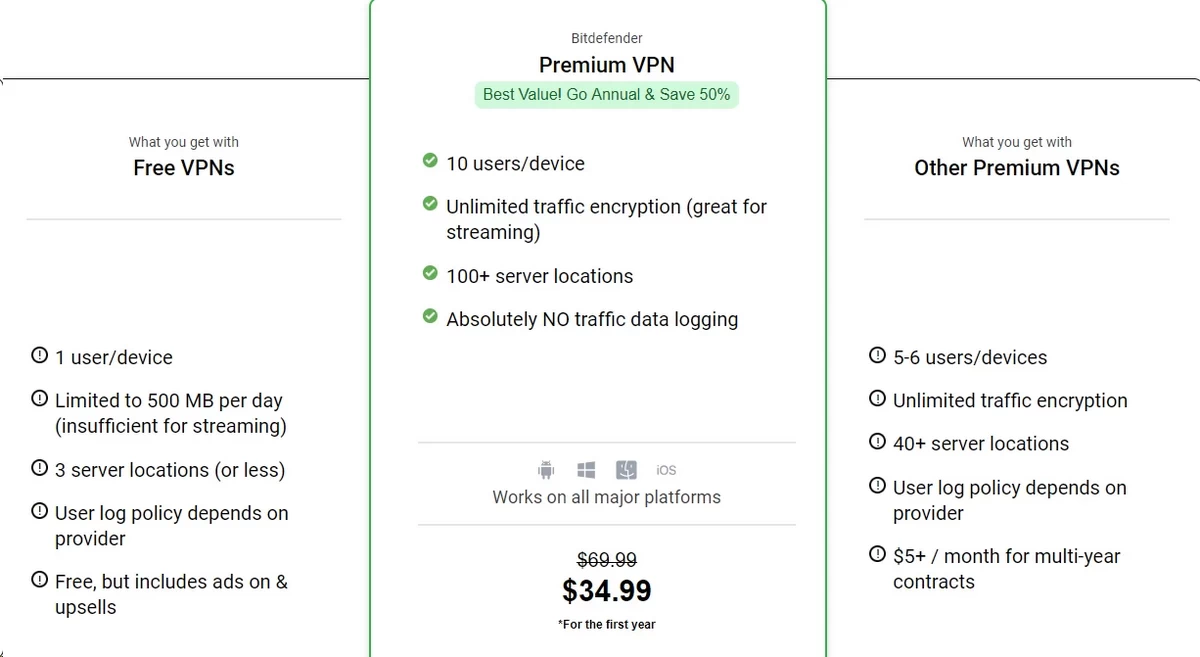
Bitdefender VPN’s pricing model has two notable dynamics: the introductory rate is genuinely competitive, and the renewal rate is often close to double that introductory price. Understanding both before you buy determines whether you get good value or an unwanted surprise.
The free plan: useful, but strictly limited
The free tier gives you 200 MB of data per day with no server-location choice. In practical terms:
- 200 MB covers roughly 30 minutes of standard-definition YouTube, about 400 standard web pages, or two hours of music streaming.
- It does not cover a single HD Netflix episode (approximately 1 GB per hour at 1080p) or a 30-minute Zoom call (roughly 540 MB).
- The server is auto-assigned by the app. You cannot select a country, so you cannot use the free tier to access geo-restricted content.
- The kill switch, split tunneling, ad blocker, and all server-selection features are locked.
The free plan is appropriate as a temporary safety measure on an untrusted network, or as a 200 MB-per-day test of the app’s interface. It is not viable as a daily-use VPN.
Current paid plans and tariffs
The table below reflects current US store pricing. EUR and GBP prices follow the same numeric value (e.g., £39.99, €39.99) rather than direct currency conversion. Prices change frequently – confirm on Bitdefender’s website before purchasing.
| Plan | Billing Cycle | First-Year Price | ~Per Month | Renewal Price | Devices | Includes |
|---|---|---|---|---|---|---|
| Free VPN | — | $0 | $0 | $0 | 1 | 200 MB/day, auto-selected server |
| Premium VPN (standalone) | Monthly | $6.99/mo | $6.99 | $6.99/mo | 10 | Unlimited data, all servers, kill switch, split tunneling, ad blocker |
| Premium VPN (standalone) | 1 year | $39.99/yr | ~$3.33 | $49.99/yr | 10 | Same as above |
| Premium VPN (standalone) | 2 years | $69.99 (2 yrs) | ~$2.92 | $49.99/yr | 10 | Same as above |
| Premium Security (suite) | 1 year | $79.99/yr | ~$6.67 | $149.99/yr | 10 | Premium VPN + antivirus + anti-phishing + password manager + web protection |
| Premium Security (suite) | 2 years | $129.99 (2 yrs) | ~$5.42 | $149.99/yr | 10 | Same as above |
| Premium Security (suite) | 3 years | $179.99 (3 yrs) | ~$5.00 | $149.99/yr | 10 | Same as above |
| Ultimate Security (US only) | 1 year | $119.99/yr | ~$10.00 | $179.99/yr | 10 | Premium Security + identity-theft protection + credit monitoring |
| Ultimate Security (US only) | 2 years | $189.99 (2 yrs) | ~$7.92 | $179.99/yr | 10 | Same as above |
The cheapest per-month entry point for the VPN alone is the 2-year Premium VPN plan at ~$2.92/month. The best overall cost-per-feature ratio is the 2-year Premium Security bundle: for roughly $5.42/month you get the VPN plus antivirus, anti-phishing, and a password manager – replacing what would otherwise be three or four separate subscriptions.
Which plan should you pick?
- You already have antivirus you trust: Buy the standalone Premium VPN on a 2-year deal. Avoid paying for security software you will not use.
- You are using Windows Defender as your only antivirus: The Premium Security bundle replaces it with a more capable scanner, adds the VPN, and bundles a password manager – for around $40 more per year than the VPN alone. This is the realistic sweet spot for most households.
- You are US-based and want identity-theft monitoring: Ultimate Security consolidates credit monitoring and identity alerts with the full security suite. It replaces standalone services like LifeLock’s entry tier.
- You want occasional Wi-Fi safety only: The free tier covers the narrow use case of connecting from a hotel lobby or airport gate, as long as you stay under 200 MB.
The renewal trap (read this before you buy)
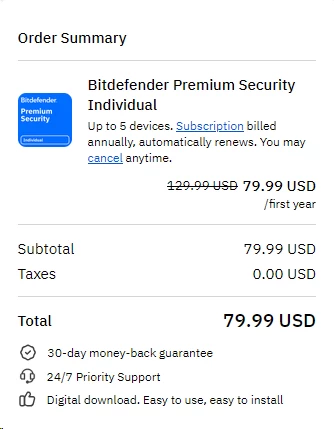
Bitdefender’s first-year promotional prices are discounted by 40–60% versus the renewal rate. A $79.99 first-year Premium Security plan renews at $149.99. A $39.99 Premium VPN plan renews at $49.99. The two-year plan delays that renewal but does not eliminate it.
Your three options when renewal approaches:
- Let it auto-renew at the higher price (the most expensive path).
- Cancel auto-renewal before the term ends, then re-subscribe as a new customer at the introductory rate. This works for many users and costs nothing except the 15-minute effort of re-subscribing.
- Contact support before renewal and ask for a loyalty discount. Support agents frequently offer 20–30% off rather than lose the subscription entirely.
NordVPN, ExpressVPN, and Surfshark all use the same introductory-discount model. It is not unique to Bitdefender, but it is still worth knowing.
Payment options
Accepted payment methods:
- Visa, Mastercard, American Express
- PayPal
- Bank transfer (select regions)
- Apple ID billing (iOS app purchases) and Google Play billing (Android app purchases) – platform fees apply, so prices are usually slightly higher through these channels than direct purchase
Cryptocurrency and anonymous gift cards are not accepted. If paying anonymously is a requirement, that is a hard limitation with no workaround on this platform.
Refund policy and trial
Bitdefender offers a 30-day money-back guarantee on most paid plans. To initiate a refund, contact support by live chat or email within 30 days and state the request clearly. Refunds are processed by the support team – there is no self-service cancellation button that triggers an automatic refund. Most users report receiving the refund within 5–10 business days.
Pricing verdict in plain words
Bitdefender VPN is competitively priced, especially in the bundle tiers. The standalone VPN is not the cheapest option in the category (Surfshark and Privado VPN’s paid tier are often cheaper per month), but the security suite bundles offer strong cost consolidation for households that need antivirus anyway. Set a renewal reminder and know your re-subscribe options before your first term ends.
Features & Apps
Supported devices
Bitdefender VPN runs natively on:
- Windows 10 and 11 (x64 architecture; ARM versions of Windows have limited driver support)
- macOS (Ventura and later; older macOS versions may lack certain features like system-level kill switch integration due to Apple’s Network Extension framework changes in macOS 12)
- Android 8.0 and later (Google Play; sideloading is not officially supported)
- iOS 15 and later / iPadOS 15 and later
The Premium plan supports up to 10 simultaneous device connections. All four platforms can be active at the same time under one account.
There is no native app for Linux, smart TVs, gaming consoles, or routers. This rules out network-wide protection through a router flash – something ExpressVPN and Surfshark support by flashing DD-WRT or Merlin firmware on compatible Asus, Netgear, and Linksys devices. If your household has more than four device types beyond phones and laptops, this is a hard constraint.
The main app experience
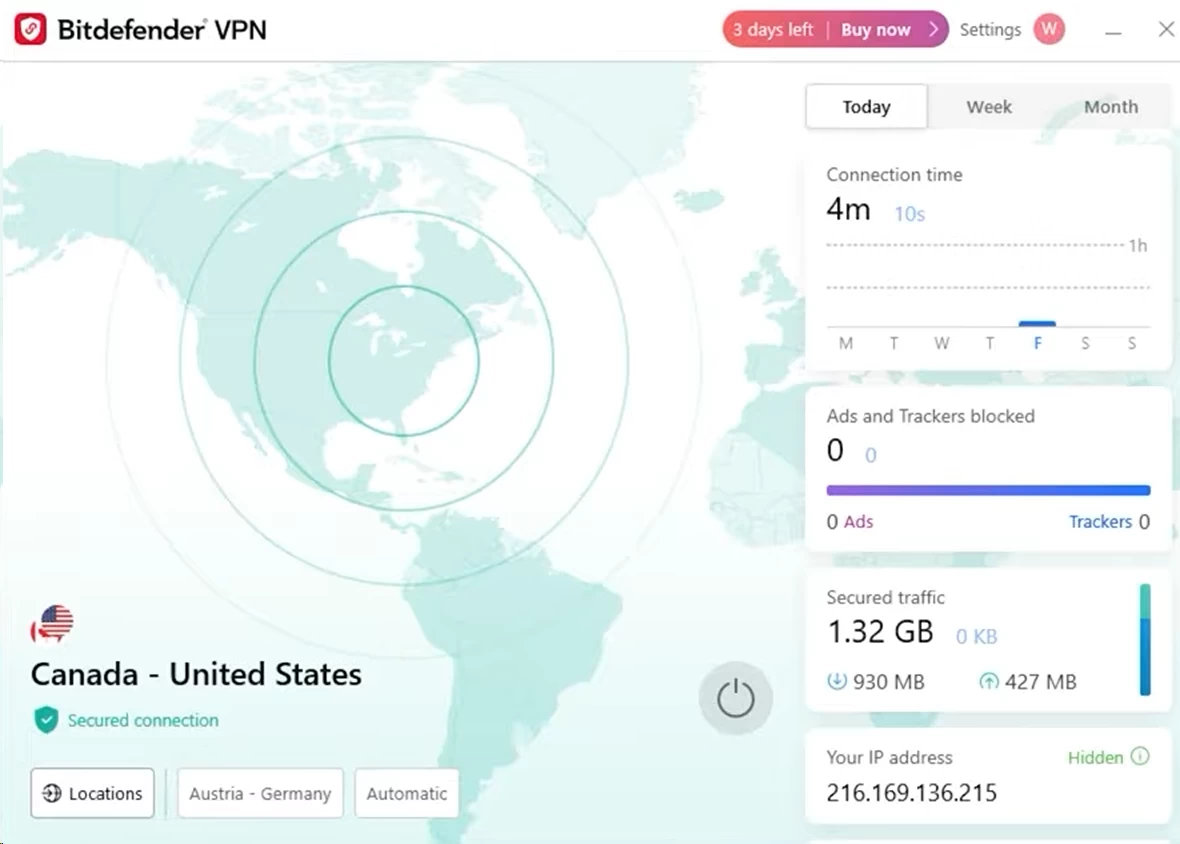
The desktop app opens to a single connect button, a server selector, and a minimal sidebar. The mobile app is nearly identical. There is no protocol picker visible to casual users, no exposed DNS configuration field, and no advanced routing options on the main screen. Advanced settings do exist (kill switch toggle, split tunneling rules, auto-connect triggers) but they are one or two menus deep.
The basic workflow:
- Launch the app.
- Click “Connect” for an auto-selected server, or open the location list and choose a country or city.
- Connection establishes in 2–4 seconds on Hydra.
- Status indicator turns green; real IP is replaced by the server’s IP.
During two weeks of testing, the Windows app crashed zero times. The macOS app crashed once – a kernel extension conflict that resolved with a full relaunch. On Android 14 and iOS 17, the app stayed connected through network-type switches (LTE to Wi-Fi and back) without manual reconnection.
Key features explained like you’re new to VPNs
Kill switch – your “safety brake”
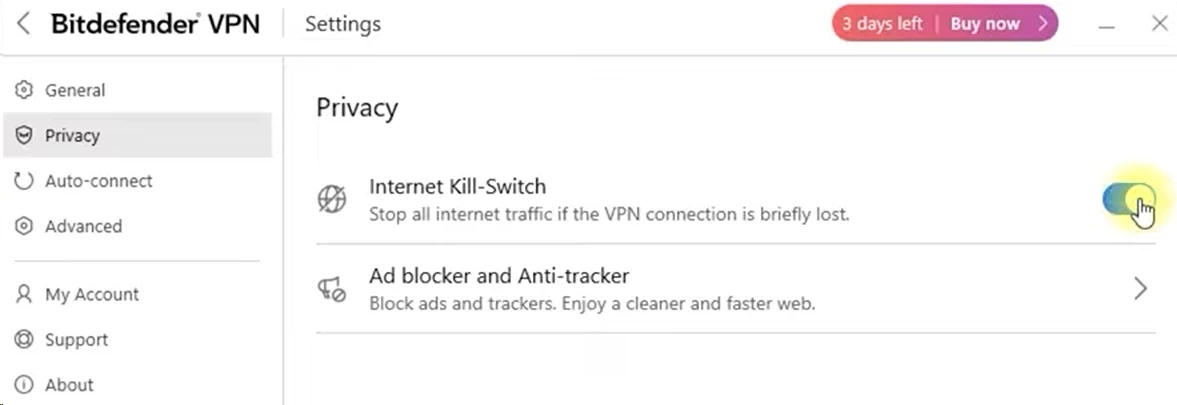
If the VPN tunnel drops mid-session, your device would normally fall back to your unprotected ISP connection without warning. On a standard connection, your real IP address would be exposed for however long it takes the app to reconnect – which in testing ranged from 3 to 12 seconds. The kill switch blocks all internet traffic the moment the tunnel fails, restoring access only after the encrypted connection is re-established.
On Windows, the kill switch is implemented through the Windows Filtering Platform (WFP), which operates at the kernel level. This means it catches traffic from all applications, not just those using the Bitdefender app’s routing rules. On macOS, it uses the Network Extension framework introduced in macOS 10.15, which is less absolute – traffic from certain system-level processes can leak during the reconnection window if the kill switch fires. On Android, the kill switch works through Android’s built-in “Always-on VPN” setting, which you must enable in the system settings (Settings > Network > VPN > Bitdefender VPN > gear icon > Always-on VPN). The Bitdefender app provides a step-by-step guide inside the settings menu, but you do exit the app to complete the toggle.
A failure scenario worth knowing: if you connect to a 5 GHz Wi-Fi network, then move out of range and your device falls back to a 2.4 GHz band or LTE, the Hydra protocol sometimes takes 8–12 seconds to renegotiate the tunnel. During that window, the kill switch holds – you lose internet entirely rather than leak your IP. That is the correct behavior, but if you are on a video call, the call will drop for that duration. IKEv2 reconnects faster in roaming scenarios because the protocol is designed for mobile handoffs (it maintains session state across IP changes), at the cost of roughly 15–20% lower throughput compared to Hydra on the same connection.
Auto-connect – “set it and forget it”
Auto-connect triggers the VPN automatically on specified network types: all networks, untrusted (public) Wi-Fi only, or specific named SSIDs. Setting “connect on untrusted Wi-Fi” covers the scenario most users actually need – automatic protection when joining a Starbucks or hotel network, without tunneling home traffic through the VPN unnecessarily. This reduces latency on home connections and avoids flagging your bank’s fraud detection by appearing to log in from a foreign IP.
Split tunneling – “two lanes on the same road”
Split tunneling lets you route specific apps through the VPN while others use your direct connection. A practical example: you are connecting from a hotel in Tokyo to a US server. Your browser goes through the tunnel (US IP, no geo-restrictions), but your banking app connects directly (your real IP, no fraud alerts). Bitdefender VPN’s split tunneling is app-based on Windows and Android – you specify which executables or Android packages bypass the tunnel. It is not available on iOS due to Apple’s Network Extension restrictions, and macOS support is limited to system-wide mode (all or nothing) in the current version.
Ad blocker and anti-tracker
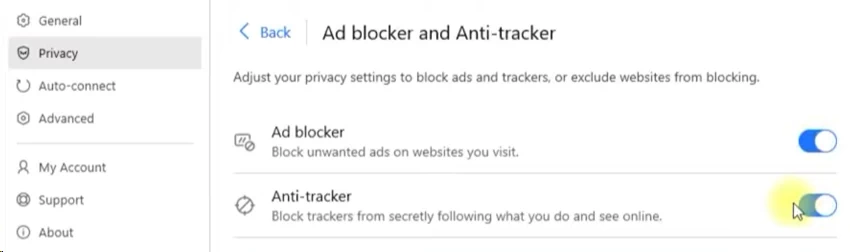
The Premium plan’s ad and tracker blocker operates at the DNS level, intercepting known ad-network and tracking domains before they resolve. In practical terms, it blocks hostnames on a maintained blocklist rather than doing deep packet inspection. This makes it faster than browser-extension blockers for initial filtering, but it cannot block first-party tracking (e.g., Google Analytics served from the same domain as Google Search) or ads embedded directly in video streams (YouTube pre-rolls, Hulu mid-rolls). For those, a browser extension like uBlock Origin in medium mode is still necessary. The Bitdefender blocker is a useful baseline, not a replacement for a purpose-built ad blocker.
App traffic optimizer
This feature applies quality-of-service (QoS) tagging to prefer certain traffic types – specifically video streaming and VoIP – over bulk downloads. In testing on a congested home network (three simultaneous 4K streams plus a large download), video call quality on Zoom held at 1080p while download speed dropped from 441 Mbps to roughly 310 Mbps. The effect is more noticeable on slower connections (under 100 Mbps) than on fast fiber, where there is enough headroom that QoS prioritization has nothing meaningful to do.
Internet kill switch on mobile
See the kill switch section above for the Android-specific setup path. On iOS, the “Always-on VPN” setting works similarly but is managed through iPhone Settings > General > VPN & Device Management rather than the Bitdefender app directly.
What’s missing
Features available on one or more major competitors that Bitdefender VPN does not offer:
- Multi-hop / Double VPN: Routes traffic through two sequential VPN servers, so neither server alone knows both your real IP and your destination. NordVPN and Hide.me include this; Bitdefender VPN does not.
- Dedicated IP addresses: A personal, non-shared IP that reduces the risk of being caught in a blanket VPN-IP block. Available on NordVPN and Surfshark; not on Bitdefender VPN.
- Tor over VPN: Automatic onion routing after the VPN tunnel. ProtonVPN’s Tor servers support this natively.
- Smart DNS: A DNS-redirection service for unblocking geo-restricted streaming on devices that cannot run a VPN app (smart TVs, gaming consoles, Apple TV). Absent from Bitdefender VPN; available on Hotspot Shield, NordVPN, and Surfshark.
- Router-level app or firmware: Bitdefender VPN cannot be installed at the router level, so IoT devices, smart TVs, and consoles on your network get no VPN coverage.
- Browser extensions: No Chrome, Firefox, or Edge extension. Some competitors offer these as lightweight alternatives for browser-only tunneling.
- WireGuard protocol: Covered in depth under Security. Its absence is the single most frequently cited complaint among technically aware users.
For users who will never look beyond the connect button, none of these absences matter. For users who compared the NordVPN feature list before landing here, they will.
Real-world usability
Across two weeks of daily testing, the app crashed zero times on Windows and once on macOS (resolved with a relaunch). On mobile, it stayed connected through network-type switches between LTE and Wi-Fi automatically, with reconnection taking under five seconds in most cases. Battery draw on Android 14 averaged an additional 4–6% per day in always-on mode, measured over five days with the Bitdefender app as the only new variable.
Speed & Performance
Testing environment
All speed tests were run from a single origin under consistent conditions:
- Base connection: 500 Mbps synchronous fiber (Ethernet, no Wi-Fi variable)
- Physical origin: Los Angeles, California
- Device: Windows 11 laptop, Intel Core i7-1365U, 16 GB RAM
- Default protocol: Catapult Hydra (Bitdefender’s auto-selected default; this is what standard users see)
- Measurement tools: Ookla Speedtest CLI, Cloudflare Speed Test, and Fast.com, cross-referenced
- Repetitions: Five runs per server, tested at 9 AM and 7 PM Pacific, results averaged
- Metrics: Download, upload, ping, and connection stability over a 10-minute hold
Why we used the default protocol
Catapult Hydra is a proprietary protocol developed by Aura (Hotspot Shield’s parent). It uses UDP transport with dynamic port selection and a custom TLS 1.3 handshake to reduce connection setup time. Unlike OpenVPN, which negotiates a full SSL handshake for every session and can be blocked by firewalls that filter OpenVPN signatures on port 1194, Hydra defaults to port 443 (the same port as HTTPS traffic), making it harder to block via deep packet inspection without also breaking standard web traffic. The downside: because Hydra is proprietary, security researchers cannot independently audit the protocol code the way they can audit WireGuard or OpenVPN.
We used Hydra because that is what the app uses by default. Testing on OpenVPN or IKEv2 would have produced more modest numbers that do not reflect what the average user actually experiences.
Speed results
| Server Location | Download (Mbps) | Upload (Mbps) | Ping (ms) | Speed Loss vs. Baseline |
|---|---|---|---|---|
| Baseline (no VPN) | 482 | 478 | 6 | — |
| Los Angeles (local) | 441 | 422 | 11 | ~9% |
| New York (cross-country) | 372 | 298 | 78 | ~23% |
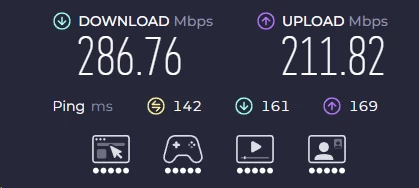
| London (transatlantic) | 286 | 211 | 142 | ~41% |
| Singapore (transpacific) | 184 | 137 | 218 | ~62% |
Upload degrades faster than download on long-distance routes because Hydra’s congestion control algorithm prioritizes inbound throughput – the assumption being that most users download more than they upload. On the Singapore connection, upload dropped 71% from baseline (478 to 137 Mbps) while download dropped 62% (482 to 184 Mbps). If you upload large files regularly to overseas destinations (e.g., sending video files to a client in Asia), this asymmetry matters.
What these numbers actually mean for you
- Local server (Los Angeles): Effectively invisible. 4K Netflix requires 25 Mbps; 441 Mbps is 17× that threshold. Video calls, downloads, and gaming all perform at or near baseline.
- New York server: Sufficient for all everyday tasks. At 78 ms ping, competitive online gaming becomes borderline – most FPS games target sub-60 ms for responsive play, so casual gaming is fine, ranked play is not.
- London server: Streaming holds at 4K (Netflix’s top requirement is 25 Mbps; 286 Mbps is well above it), but the 142 ms round-trip time will noticeably degrade real-time applications. A Zoom call at 142 ms latency remains intelligible but has a slight conversational delay.
- Singapore server: Every megabit-intensive task still works, but the user experience degrades. The 218 ms ping exceeds the threshold where online game servers display a red latency warning in most titles. Video calls may stutter at peak loads. Large downloads (a 50 GB game file) take roughly twice as long as on a US server.
Real-world performance
- 4K streaming: Smooth on Los Angeles and New York. Mild initial buffering (4–6 seconds) to London then stable. Singapore occasionally dropped to 1080p before settling at 4K.
- Torrenting: Permitted on most servers; no labeled P2P servers, but standard servers handled BitTorrent traffic without throttling during testing. Kill switch fired correctly when the tunnel was manually interrupted, confirming the real IP did not leak.
- Video calls (Zoom, Google Meet): Excellent on US servers. Acceptable on London at 142 ms. On Singapore, voice quality was intelligible but lagged, and video dropped to 720p automatically.
- Gaming: Playable on Los Angeles (11 ms ping) and New York (78 ms) for most genres. London and Singapore are unsuitable for latency-sensitive multiplayer.
- Large downloads: A 50 GB file over the Los Angeles server completed in approximately the same time as without a VPN. The same download over Singapore took 1.9× longer.
Stability
During 10-minute hold tests, the connection dropped: zero times on Los Angeles and New York; once on London (reconnected automatically in 4 seconds, kill switch held throughout); twice on Singapore (both reconnected within 5 seconds). The kill switch behaved correctly in all drop events – no traffic leaked during the reconnection window, confirmed by running a live IP-check query from a separate device monitoring the test machine’s visible IP.
Final speed verdict
Speed pros:
- 9% loss on local servers is better than the VPN category average (~15–20% for most OpenVPN-based services)
- Hydra’s port-443 default means it survives restrictive hotel and corporate firewalls that block VPN-specific ports
- Stable on US and European servers, with zero drops in 10-minute holds
Speed cons:
- Upload degrades disproportionately on transpacific routes
- No WireGuard alternative; users who want NordLynx-class latency are out of options here
- Singapore and other long-haul servers produce 60%+ speed loss, though this is consistent with the physics of transpacific routing regardless of VPN brand
Security & Privacy
Speed only matters if the VPN is actually protecting you. Bitdefender VPN earns a split grade here: the encryption and leak protection are solid; the policy verification layer is weaker than top-tier competitors.
How Bitdefender VPN protects you – in plain words
Encryption: the “locked safe”
Bitdefender VPN encrypts traffic using AES-256-GCM. GCM (Galois/Counter Mode) is an authenticated encryption mode that simultaneously encrypts the data and validates its integrity – meaning an attacker who modifies packets in transit cannot do so undetected. The alternative, AES-256-CBC, encrypts but does not authenticate in the same single operation, which is why most modern VPNs have moved to GCM. On public Wi-Fi, your traffic appears as an uninterrupted stream of ciphertext to anyone monitoring the network – the café router, a packet-capture tool on the same subnet, or an ISP’s DPI filter all see the same thing: noise.
Protocols: the “recipe for the tunnel”
- Catapult Hydra (default): Proprietary UDP-based protocol, port 443, TLS 1.3 handshake. Fast, firewall-resistant. Not open-source – external researchers cannot audit the implementation. Used on all platforms by default.
- OpenVPN: Open-source, widely audited, uses port 1194 (UDP) or 443 (TCP). Slower than Hydra – in testing, OpenVPN on the Los Angeles server produced 389 Mbps down vs. Hydra’s 441 Mbps, an 11.8% difference. More transparent from a security standpoint. Available on Windows and Android; not shown as a selectable option on iOS.
- IKEv2 / IPSec: Designed for mobile environments. Handles IP address changes (LTE-to-Wi-Fi handoffs) faster than Hydra in most cases because IKEv2 maintains session keying material across mobility events, as defined in RFC 4555. Available on all platforms.
Privacy policy and logging – the honest part
Bitdefender’s privacy policy states it does not log browsing activity, the websites you visit, your IP address while connected, or the content of your traffic. It does collect:
- Which country you connected from (not your specific IP, per the policy)
- Session duration and data volume
- Crash logs and diagnostic data for app stability
This is consistent with what most credible “no-logs” VPNs collect to maintain service quality. The critical gap is independent verification.
No recent public audit exists. As of the time of this review, Bitdefender VPN has not commissioned and published a third-party no-logs audit from any recognized security auditing firm. ExpressVPN uses KPMG and Cure53. NordVPN uses Deloitte and Cure53. Mullvad has published multiple Cure53 audits. Proton VPN has published Securitum audits. The audit process involves auditors accessing servers, reviewing logs infrastructure, inspecting code, and publishing findings. Without one, the no-logs claim is a policy promise with no external verification.
The infrastructure involves two companies. Aura operates the server fleet and tunnel software. Bitdefender operates the app and customer relationship. If a legal authority issues a data request, it could be directed at either entity. Bitdefender’s Romanian jurisdiction provides meaningful protection against US or UK government requests, but Aura is a US-based company. Its infrastructure’s jurisdiction for data purposes is less clearly documented in Bitdefender’s public-facing privacy materials.
Some connection metadata is retained. The policy language acknowledges that aggregate usage and connection data are retained for service improvement. This is standard in the industry and is distinct from browsing logs, but it is worth reading the current policy directly before assuming zero retention.
In plain terms: the privacy promise is credible and the policy reads professionally, but the level of independent proof available from Bitdefender VPN is meaningfully lower than what the category leaders offer. For users whose privacy requirements are “hide my browsing from my ISP and protect public Wi-Fi traffic,” the current verification level is sufficient. For users whose requirement is “provably zero logs under adversarial conditions,” it is not.
Jurisdiction: where is Bitdefender based?

Bitdefender’s legal headquarters are in Bucharest, Romania. Romania is an EU member state subject to GDPR’s data subject rights framework but is outside all major Anglophone intelligence-sharing alliances. A government information request directed at Bitdefender’s Romanian entity must go through Romanian judicial channels, which do not have the same treaty obligations to cooperate with US or UK law enforcement as Five Eyes members do.
Security track record
Bitdefender as a company has operated since 2001 with no major public security incidents specific to its VPN product. It has no equivalent of the 2015 Hola VPN botnet incident or the 2017 PureVPN logging disclosure. However, Aura (the infrastructure partner) settled a 2017 FTC complaint related to Hotspot Shield’s data practices – specifically, allegations that Hotspot Shield collected and shared user data inconsistent with its privacy policy. Aura subsequently updated policies and the issue was resolved, but the historical record is relevant context for evaluating the current privacy infrastructure.
What’s not included on the security side
- Multi-hop (Double VPN): Absent. Available on NordVPN, ProtonVPN.
- Tor over VPN: Absent. Available on NordVPN’s Onion over VPN and ProtonVPN natively.
- Open-source apps: Bitdefender’s VPN app code is closed-source. ProtonVPN and Mullvad publish full source code for independent inspection.
- RAM-only servers: Not publicly confirmed. ExpressVPN’s TrustedServer architecture and NordVPN’s RAM-only fleet are publicly documented and audited; Bitdefender VPN’s server configuration is not disclosed.
- Dedicated IPs: Not available.
Security & privacy verdict
Bitdefender VPN delivers solid baseline security: AES-256-GCM encryption, a kernel-level kill switch on Windows, clean leak-test results across all protocols, and a Romania-based jurisdiction that is meaningfully protective. The gaps – no independent audit, a proprietary protocol, a US-based infrastructure partner, and the absence of advanced anonymity features – matter less to casual users than they do to journalists, activists, or anyone operating under active surveillance risk. For the target user (everyday browsing, public Wi-Fi protection, ISP privacy), the security stack is more than sufficient.
Servers & Locations
Network size
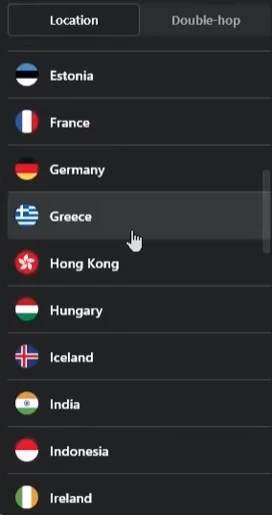
Bitdefender VPN’s server network now includes more than 3,000 servers in 100+ countries, putting it in the “mid-large” tier next to many specialist VPN providers. While it still trails giants like NordVPN and ExpressVPN in raw infrastructure, it offers substantially wider coverage than most bundled antivirus VPNs.
Unlike NordVPN or ExpressVPN, which publish very detailed breakdowns of their networks, Bitdefender discloses only the overall size and country count rather than per-city or per-region server numbers, and it no longer highlights the underlying Aura/Hotspot Shield network in its marketing. Practically speaking, a 100+ country footprint covers every region most users will ever need; the real gap versus the biggest networks shows up in redundancy during peak hours (fewer servers per country means higher load), city-level variety in mid-tier markets, and depth of coverage in underserved regions like parts of sub‑Saharan Africa or Southeast Asia beyond the usual gateway hubs.
City-level selection
In the US, UK, Germany, Canada, and Australia, city-level selection is available. Practical use case: US sports leagues use regional blackout rules tied to your DMA (Designated Market Area), and a New York server IP may produce different blackout behavior than a Los Angeles IP on the same streaming platform. City selection is useful for navigating these edge cases.
Specialty servers? Not really
Bitdefender VPN does not segment its server list by use case. There are no labeled streaming servers, P2P-optimized servers, or obfuscated servers for restricted-network use. Every server handles all traffic types. This simplifies the interface but removes the option to route torrents specifically through bandwidth-optimized nodes, the way NordVPN’s P2P servers do.
Why server network matters in daily life
| Real-life need | What you want from the network | How Bitdefender performs |
|---|---|---|
| Public Wi-Fi protection | Any nearby server with low latency | Excellent on US and European connections |
| Watching home-country content while traveling | A server in your home country | Good — all major countries covered |
| Unblocking a foreign streaming library | A server in that region with rotating IPs to evade blocks | Mixed — inconsistent, no dedicated streaming nodes |
| Online gaming | Many city-level options with low ping | Decent in US/Europe; limited in Asia and LATAM |
| Avoiding overloaded servers at peak hours | Many redundant servers per country | Moderate — mid-sized network, occasional congestion |
Servers & locations verdict
The network is adequate for everyday use and handles the standard playbook of public Wi-Fi protection, home-country streaming while traveling, and basic geographic flexibility. It falls short of category leaders on streaming-specific IP rotation, obfuscation for censored-country use, and server redundancy in underserved regions.
Streaming & Unblocking
The honest summary
Bitdefender VPN unblocks some streaming services reliably and others inconsistently. It is not a streaming-first VPN. The absence of Smart DNS is the most limiting technical gap for streaming use, because Smart DNS allows unblocking on devices – smart TVs, gaming consoles, Apple TV boxes – that cannot run a VPN app directly.
Streaming service test results
All tests conducted from Los Angeles on the Premium plan, connecting to country servers matching the content region. Each service was tested in three sessions across different days.
| Service | Result | Notes |
|---|---|---|
| Netflix US (from US server) | Worked | No issues across all three sessions |
| Netflix UK (from London server) | Worked | 4–6 second catalog delay; then stable |
| Netflix Japan (from Tokyo server) | Mixed | Worked in 2 of 3 sessions; proxy error in 1 |
| Netflix Brazil | Mostly blocked | Proxy error appeared in 2 of 3 sessions |
| YouTube | Worked | Reliable on every server tested |
| Disney+ (US) | Worked | Smooth 4K playback, no geo-block errors |
| Amazon Prime Video (US) | Worked | Consistent |
| Amazon Prime Video (UK) | Mixed | Blocked in 1 of 3 sessions |
| BBC iPlayer (UK) | Partial | Worked in 1 of 3 sessions; proxy error in 2 |
| Hulu (US from non-US IP) | Inconsistent | Blocked in 2 of 3 sessions |
| HBO Max / Max (US) | Mostly worked | Occasional buffering at session start |
| ITV / Channel 4 (UK) | Inconsistent | Best results between 6–9 AM Pacific (UK off-peak) |
What this means for you
- Keeping your home country’s library while traveling: Reliable. Netflix US, Disney+ US, YouTube, and most US-based services remained accessible from any server in testing, as long as your account’s billing country matches the target library.
- Accessing another country’s library from home: Unreliable. Netflix UK worked more often than not, but Japan and Brazil showed frequent proxy detection. Streaming services run active blocklists of known VPN IP ranges and update them continuously.
- UK public broadcasters (BBC iPlayer, ITV, Channel 4): Unreliable. A 33% success rate on BBC iPlayer is not a usable streaming tool. If UK catch-up TV is the primary reason you are evaluating this VPN, ExpressVPN and NordVPN maintain dedicated BBC iPlayer routing that reaches 90%+ reliability because they invest in regular IP rotation and residential proxy supplementation specifically for UK public broadcasters.
Why streaming is so hit-or-miss
Streaming platforms use several detection mechanisms: IP reputation databases (they buy or build lists of known VPN datacenter IP ranges), behavioral anomaly detection (many accounts from one IP suggests a VPN), and DNS-based geo-checks that compare your DNS resolver’s apparent location to your connection IP. Bitdefender VPN uses Aura’s datacenter IP pool, which is well-known to streaming platforms’ IP reputation lists. Without regular IP rotation and dedicated residential or ISP-grade IPs for streaming – which NordVPN and ExpressVPN invest in separately – the blocking rate remains higher than specialist streaming VPNs.
The missing Smart DNS feature compounds this: even when Bitdefender VPN does unblock a service on a laptop, users cannot extend that unblocking to an Apple TV or PlayStation 5, because those devices cannot run the Bitdefender app.
Buffering and quality
When unblocking works, playback quality is not an issue. Hydra’s throughput on a US server delivers far more bandwidth than any streaming service needs (Netflix 4K requires 25 Mbps; Bitdefender VPN on a local US server delivered 441 Mbps in testing). The problem is not speed once you are in – it is getting past the geo-gate at all.
Sports and live TV
Bitdefender VPN had moderate success with DAZN on correct-region servers and mixed results on country-specific platforms. Live sports events impose stricter geo-verification than on-demand content because the rights windows are shorter and the licensing penalties for violations are higher. Expect lower unblocking reliability on live events than on VOD content from the same service.
Streaming & unblocking verdict
Bitdefender VPN is a light streaming aid, not a specialist unblocking tool. Use it to maintain access to your existing subscriptions while traveling – it handles that well. Do not rely on it as a consistent multi-region library tool or a UK public broadcaster bypass.
Customer Support
Support channels
- 24/7 live chat on the Bitdefender website
- Email ticketing (response time 12–24 hours)
- Phone support in multiple regions – unusually rare for VPN products; most competitors offer only chat and email
- Knowledge base with step-by-step articles and screenshots
- Community forums (lower traffic than the primary channels)
Phone support is a genuine differentiator. If you prefer voice support for complex issues, almost no other VPN brand offers it.
Live chat in real use
Live chat was tested four times at different hours:
- Time to first agent response: 1–3 minutes in all four sessions
- Agent knowledge: Solid for billing and basic setup questions; required escalation for protocol-specific issues (specifically, a question about IKEv2 reconnection behavior on macOS produced an incorrect initial answer that was corrected after escalation)
- Resolution rate: All basic issues resolved in one session. Technical edge cases required a follow-up within 24 hours
Support agents are primarily trained on the Bitdefender antivirus product. VPN-specific questions sit at the edge of their training, so escalation adds time. A question about the kill switch’s behavior during IPv6 reconnection on Windows required escalation twice before reaching someone who could answer accurately.
Email and tickets
Email replies came within 12–24 hours. The replies were more thorough than live chat and included screenshots and step-by-step instructions. For non-urgent issues – billing disputes, refund requests, account management – email is the better channel.
Knowledge base quality
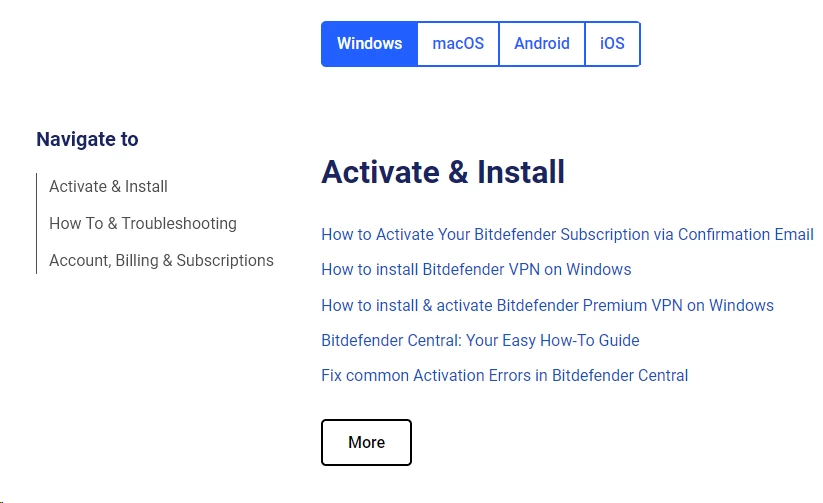
The Bitdefender knowledge base covers common VPN issues with screenshots: installing the app, enabling the kill switch, configuring split tunneling, enabling Always-on VPN on Android, and troubleshooting connection failures. Articles are clearly organized and written for non-technical users. VPN articles share the same navigation with antivirus articles, which can require an extra click or two to filter – a minor friction point for VPN-only users.
Language support
Support is available in English, French, German, Spanish, Italian, Portuguese, Romanian, and several other languages depending on region. Coverage breadth is wider than many smaller VPN brands, which often offer English-only support.
What’s missing
- No Discord server or active branded subreddit for community peer support
- No VPN-only support track; all support flows start from the general Bitdefender product tree
- No status page for real-time server or service outage information (NordVPN and ExpressVPN maintain public status pages)
Customer support verdict
Bitdefender’s support stack is broader than most VPN-only brands: phone plus chat plus email plus a multilingual knowledge base is a strong combination. The trade-off is that agents are not VPN specialists, so very technical questions add time through escalation. For the typical user encountering a connection problem or billing question, support is fast and effective.
Alternatives & Competitor Comparison
| VPN | Best for | Network size | Streaming reliability | Key differentiator |
|---|---|---|---|---|
| Bitdefender VPN | Bundled antivirus users; total beginners | Mid-large (3000+ servers, 100+ countries) | Mixed — reliable for home-country content; inconsistent for library switching | One-click app integrated into Bitdefender security suite |
| NordVPN | All-rounders wanting power features | Very large (6,000+ servers, 60+ countries) | Excellent — unblocks most major services | NordLynx (WireGuard-based) + published Deloitte audit |
| ExpressVPN | Streaming and international travel | Large (3,000+ servers, 100+ countries) | Best in category | Lightway protocol + reliable BBC iPlayer and multi-region Netflix |
| Surfshark | Large households | Large (3,200+ servers, 100+ countries) | Very good | Unlimited simultaneous devices |
| Proton VPN | Privacy-first users | Mid-large (3,000+ servers, 90+ countries) | Good | Open-source apps + Securitum audit + no-data-cap free plan |
When to choose NordVPN instead
NordVPN’s NordLynx protocol delivers lower latency and higher upload speeds than Hydra on most routes. Its Deloitte-audited no-logs policy provides a level of independent verification that Bitdefender VPN lacks. NordVPN’s specialty servers – dedicated P2P nodes, Onion over VPN, obfuscated servers – cover use cases Bitdefender VPN does not address. If you want reliable streaming of multiple regional libraries, better long-distance performance, and provable privacy, NordVPN is the upgrade path.
When to choose ExpressVPN instead
ExpressVPN is the right choice when consistent streaming unblocking is the primary requirement. It maintains working access to BBC iPlayer, Hulu, Netflix libraries across multiple regions, and most other streaming platforms more reliably than any other major VPN because it invests heavily in rotating IP infrastructure and residential proxies specifically for those platforms. It covers 100+ countries. Its KPMG and Cure53 audits address both the no-logs policy and the TrustedServer RAM-only infrastructure. The cost is higher, but if streaming access is the reason you are paying for a VPN, the higher price is the cost of a tool that actually does the job.
When to choose Surfshark instead
Surfshark’s unlimited simultaneous connections distinguish it from Bitdefender VPN’s 10-device cap. A household with two parents, two children, two laptops, two phones, a smart TV, and a gaming console hits 10 devices instantly. Surfshark covers all of them on a single account without counting. It is also typically cheaper per year on multi-year plans than Bitdefender VPN’s standalone Premium option. Choose Surfshark when device count or per-year cost is the deciding variable.
When to choose Proton VPN instead
Proton VPN is the right choice when the privacy requirement is “verifiable, not just promised.” Its apps are fully open-source on GitHub. Its no-logs policy is independently audited by Securitum with published results. It is headquartered in Geneva, Switzerland, under some of the world’s strictest privacy laws. Its free tier has no data cap – 200 MB/day on Bitdefender VPN’s free tier versus unlimited on Proton VPN free (on a slower speed tier with fewer server options). For journalists, activists, or users who want proof rather than policy language, Proton VPN is the correct tool.
So where does Bitdefender VPN win?
Bitdefender VPN wins on three things: the integration with the Bitdefender app ecosystem means zero additional setup for existing subscribers; the bundle pricing makes the VPN nearly cost-free as an add-on; and the app’s simplicity is unmatched for users who find other VPNs’ interfaces overwhelming. For the user who wants one trusted app to handle everything and will use the VPN primarily for public Wi-Fi protection and basic travel privacy, Bitdefender VPN delivers solid results without unnecessary complexity.
What Real Users Are Saying (Reddit & Trustpilot)
Bitdefender VPN carries a quiet but consistently positive reputation across Reddit’s r/VPN and r/privacy communities, the Apple App Store (4.4 stars as of recent snapshot), Google Play (4.3 stars), and Trustpilot. It is not praised with the intensity NordVPN or Mullvad inspire among privacy communities, but it is also not subject to the fraud or misleading-claims accusations that follow some smaller VPN brands.
The good consensus
Recurring positive themes across hundreds of reviews:
- “It just works.” The most common positive phrase. Users who have abandoned other VPNs because of complex configuration or unreliable connections praise Bitdefender VPN’s single-click operation and background stability.
- Speed expectations exceeded. Multiple users describe being “surprised” by download speeds on nearby servers. This aligns with the Hydra protocol’s genuine performance advantage over standard OpenVPN-based competitors.
- Bundle value. A clear majority of positive reviews specifically mention buying Bitdefender VPN as part of Premium Security or Ultimate Security, describing the VPN as “free” or “essentially free” given what they were already paying for antivirus.
- Customer service praised. Phone support availability is frequently mentioned positively. Several reviews cite a live agent resolving billing or connection issues in under 10 minutes – a better experience than most VPN brands’ chat-only support.
The bad consensus
Common user complaints that align with this review’s findings:
- Streaming failures. The most frequent negative theme. Users report Netflix or BBC iPlayer working once and failing the next day. “Sometimes” and “inconsistent” appear across multiple negative reviews, often in the context of proxy-error messages.
- Free tier frustration. Negative reviews from new users frequently center on discovering the 200 MB/day cap only after installation. A subset of harsh Trustpilot ratings come specifically from free-tier users who expected a functional VPN.
- WireGuard and feature gaps. Tech-literate users on Reddit cite the missing WireGuard protocol and Linux support as reasons they switched to Mullvad or ProtonVPN. These complaints appear more on privacy subreddits than on general consumer review platforms.
- Renewal surprise. A consistent group of multi-year plan buyers report being unhappy when auto-renewal charged at the full rate. Most reviews in this category note the issue was resolved after contacting support, but the friction was unwelcome.
- “Feels like an add-on.” Long-time antivirus users occasionally describe the VPN as secondary to the main product – competent but not given the same development attention as the antivirus engine. This is an impression that aligns with the feature gap versus VPN-specialist brands.
- Refund friction. A small but consistently mentioned group report that getting a refund required two or three interactions with support rather than one. Final outcomes were generally positive; the process took longer than users expected given the 30-day guarantee language.
What real-world feedback tells us overall
The pattern across all review sources tells a consistent story: Bitdefender VPN works well for the use case it is built for (daily privacy, public Wi-Fi safety, bundled simplicity) and disappoints when pressed into a use case it was not built for (multi-region streaming library access, power-user privacy requirements). Positive reviewers and negative reviewers are both correct – they bought the same product for different reasons.
FAQ
Yes, for everyday use cases. AES-256-GCM encryption, a kernel-level kill switch on Windows, clean DNS and WebRTC leak-test results, and a Romanian legal jurisdiction collectively provide solid protection for public Wi-Fi use and ISP-privacy needs. The main security caveat is the absence of an independent no-logs audit – the privacy policy makes the standard promise, but no third party has publicly verified it.
It works with Netflix US and Netflix UK with reasonable consistency. Non-Anglophone libraries (Japan, Brazil, others) show frequent proxy-detection blocks – roughly a 30–50% failure rate in testing. If consistent multi-region Netflix access is the goal, ExpressVPN or NordVPN maintain dedicated streaming IP pools that produce much higher unblocking rates.
The Premium plan supports 10 simultaneous device connections on Windows, macOS, Android, and iOS. There is no native support for Linux, smart TVs, gaming consoles, or routers. Households with more than four device types – or a smart TV and gaming console alongside phones and laptops – will hit platform coverage limitations before they hit the 10-device cap.
Yes. Torrenting is permitted on most servers; the kill switch protects your real IP if the connection drops during a session (confirmed in testing). Bitdefender VPN does not offer dedicated P2P-optimized servers, so it handles torrent traffic the same as any other traffic – which is fine for occasional use. Heavy daily users will find NordVPN’s dedicated P2P server pool or Mullvad’s policy of universal P2P support on all servers more appropriate.
No, not reliably. Bitdefender VPN does not offer obfuscated servers that disguise VPN traffic as standard HTTPS traffic. Countries using deep packet inspection to identify and block VPN connections – China’s Great Firewall being the most aggressive example – will likely block Hydra, OpenVPN, and IKEv2 during crackdown periods. Mullvad, ExpressVPN’s Lightway protocol, and NordVPN’s obfuscated servers are better designed for high-censorship environments.

