

Windscribe VPN Review 2026: Speed, Logs, and Five Eyes
| 💰 Pricing | From $2.42 to $9/mo |
| ✅ Free Trial | No separate free trial, but there is a free plan with 10GB/month after email confirmation |
| 📆 Money Back Guarantee | 7 Days |
| 🗺 Jurisdiction | Canada |
| 🖥 Number of Servers | 69+ countries, 115+ cities |
| 📝 Logging Policy | No‑logs |
| 📥 Torrenting/P2P | Yes, supported, including guidance for torrent clients |
| 🍿 Streaming | Supports unlocking streaming services, including Netflix; performance may vary by region |
| 🛡 Kill Switch | ✅ |
| ⚙️ Protocols | WireGuard, OpenVPN, IKEv2; also Stealth and WStunnel. |
| 🛠 Support | Live chat, email support, and the knowledge base |
| 💻 Simultaneous Devices | Unlimited |
| 🔥 Current Deal | 58% OFF (on 1-year plan) |
Overview
Start looking into Windscribe, and you immediately hit a geographical obstacle. The company operates out of Toronto, placing them squarely under Canadian jurisdiction, which puts them inside the Five Eyes intelligence alliance. For privacy purists, this is usually an immediate dealbreaker. Intelligence-sharing agreements between the US, UK, Australia, New Zealand, and Canada mean that if one government agency demands your data, it gets distributed across multiple international databases without your consent.
But look at the actual data instead of reacting to the geography. Canada does not currently mandate that VPN providers log user activity. Windscribe exploits this legal leeway to maintain a no-logs policy, collecting nothing beyond total bandwidth consumed in a 30-day period and a timestamp of your last session used to prune inactive accounts. They do not log source IPs. They do not log browsing history. If authorities arrive with a warrant, the servers contain nothing of evidentiary value to hand over.
The company backed up this claim in a Greek court. When their founder was indicted over a user’s alleged crimes, the case was ultimately dismissed because Windscribe had zero data to provide. That real-world legal stress test, combined with their open-source desktop apps and their migration to RAM-only server infrastructure, puts the Five Eyes concern into a more measured perspective. The risk is theoretical; the technical mitigations are documented and verified. They operate in an unfavorable jurisdiction with demonstrably more transparency than most competitors operating in supposedly safer ones.
Pricing & Plans

The 10GB freemium benchmark
Most free VPNs throttle your speeds, sell your browsing data to ad networks, or restrict you to a single overloaded server. Windscribe took a different route. They offer a 10GB monthly bandwidth allowance on their free tier if you verify your email address. Refuse to provide an email to protect your anonymity, and you are capped at 2GB per month. For a product that costs zero dollars, the free tier is one of the most functional on the market.
The free plan gives you access to servers in 10 countries, including the US, UK, Canada, France, and Germany. You also get unlimited simultaneous device connections, which is practically unheard of at this price point. They even include a stripped-down version of their DNS-level malware and ad blocker, R.O.B.E.R.T. It is a fully usable tool for light browsing, bypassing basic censorship, or securing a connection on public Wi-Fi.
Keep expectations grounded in reality, though. That 10GB disappears fast. Streaming 4K video consumes roughly 7GB per hour. Download one large file or watch a couple of episodes of a foreign Netflix series, and you will hit the hard data wall well before the end of the month. The free tier is a legitimate product, but it is also a direct funnel toward the paid ecosystem.
Pricing reality check and build-a-plan
Upgrading to a Pro account is straightforward, though the pricing structure is unorthodox. Windscribe does not use aggressive countdown timers or fake sale deadlines. The monthly plan sits at $9.00, which undercuts many major competitors charging $12 to $13 for a rolling 30-day contract.
Committing to the annual plan drops the price to $5.75 per month ($69 billed yearly). While $69 a year is not excessive, it is noticeably more expensive than competitors like Surfshark or CyberGhost, which regularly drop below $3 per month if you commit to two years. Windscribe does not offer multi-year discounts, so you pay a clear premium for their specific approach to transparency and infrastructure control.
The real differentiator is their build-a-plan pricing model. For $1.00 per month, you can purchase access to a specific server location. Each location adds 10GB to your monthly data cap. Unlimited data and full access to R.O.B.E.R.T. cost an additional $1.00. The minimum purchase is $3.00. If you only need access to two specific countries and unlimited data, you can assemble a custom plan for exactly three dollars a month. This modular approach has no equivalent among major VPN providers and makes Windscribe genuinely competitive at the low end.
| Plan Type | Monthly Cost | Billed Amount | Features Included |
|---|---|---|---|
| Free Tier | $0.00 | $0.00 | 10 Locations, 10GB Data (with email) |
| 1-Month Pro | $9.00 | $9.00 | All 69 Countries, Unlimited Data |
| 1-Year Pro | $5.75 | $69.00 | All 69 Countries, Unlimited Data |
| Build-A-Plan | Custom ($3 Min) | $1.00 per location | Custom Locations, +10GB per location |
The 3-day refund trap
This is where Windscribe’s consumer-friendly approach falls apart. The VPN industry standard for a money-back guarantee is 30 days. Some providers push it to 45 or 60 days. Windscribe gives you a strict 3-day refund window. Decide the service is not working on day four, and you are out of luck. Customer support will point you to the fine print.
It gets worse. That 3-day window comes with a hard 10GB usage cap. Transfer more than 10GB during those 72 hours, and your refund eligibility is instantly voided. Running a few realistic speed tests or downloading a Linux ISO to verify P2P performance will push you over that limit without much effort.
Windscribe defends this policy by arguing that their 10GB free tier provides enough runway to evaluate the service before paying. That argument has a critical flaw: the free servers are significantly more congested than the Pro servers, and they lack access to the streaming-optimized 10Gbps infrastructure. You cannot accurately benchmark the premium experience on the free tier. Any prospective subscriber who pays first and tests second is effectively without a usable safety net. For a premium product at $9.00 per month, this is a genuine weakness.
Features & Apps
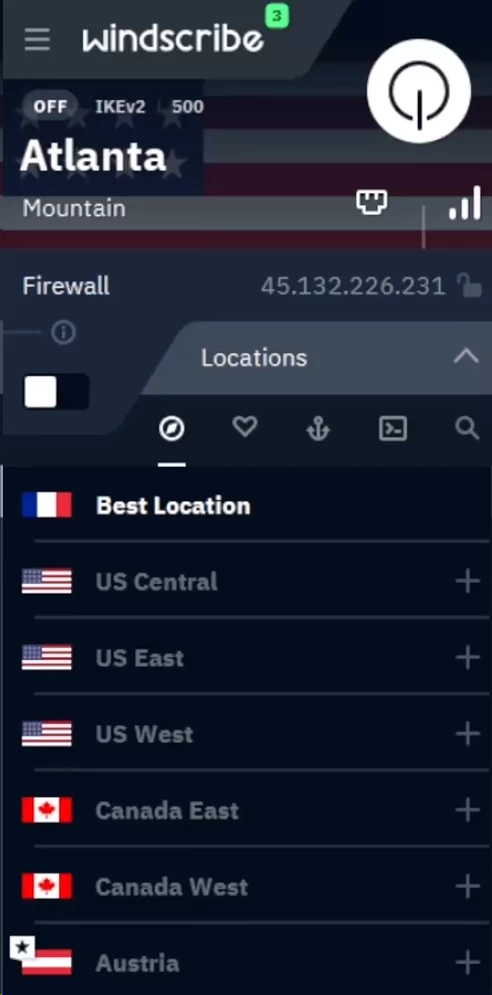
A UI cramped in a trash compactor
The Windscribe desktop application has a well-documented interface problem. The developers packed a large amount of toggles and information into a small, non-resizable window. If you are a first-time user, the wall of text, unlabeled icons, and nested drop-down menus will feel actively hostile.
Digging into the settings menu makes it worse. Windscribe packs in a strong selection of protocols including WireGuard, OpenVPN (UDP/TCP), IKEv2, Stealth, and WStunnel, but finding the protocol selector requires navigating a dense preferences tab. Their “Network Options” feature labels saved networks as either “Secured” or “Unsecured.” The naming is backwards from what any user would expect: “Secured” means the VPN auto-connects on that network, while “Unsecured” means the VPN disconnects. It is unintuitive and unnecessary.
Split tunneling is another example of inconsistent execution. On Windows and Android, you can split tunnel by specific application or IP address. This is useful for a real-world scenario like routing a video game outside the encrypted tunnel to reduce ping while keeping your browser traffic encrypted. On macOS, you can only split tunnel by IP address or hostname. The app-based exclusion that Windows users take for granted does not exist on Mac. Windscribe has never publicly explained why this capability was left out of the macOS client.
Despite the poor layout, the app is technically stable. Connections establish quickly, crashes are rare, and power users who spend time in the menus find useful low-level options like MAC address spoofing and packet size configuration. The interface problem is not a stability problem. It is a design problem that has gone unaddressed for years.
Firewall vs. the standard kill switch
Windscribe’s approach to kill switch functionality is technically superior to most competitors and is worth understanding in detail. A standard VPN kill switch works reactively: it monitors the VPN tunnel and cuts your internet connection the moment the tunnel drops. The problem is that on most operating systems, there is a brief delay between the tunnel drop and the kill switch firing. During that window, your OS may route traffic through your regular unencrypted connection, exposing your real IP address to whatever service you were connected to.
Windscribe built a proactive system-level firewall instead. Rather than reacting to a dropped connection, the firewall uses OS-level packet filtering rules to block all outbound traffic that does not route through the VPN tunnel. When configured to “Always-On” mode, your machine cannot send a single packet to the internet unless the VPN is actively running. In packet-capture testing using Wireshark, the firewall did not leak any DNS or WebRTC data when the OpenVPN daemon was intentionally crashed. Not a single byte of identifying traffic escaped.
The catch is that this firewall is only available on the Windows, macOS, and Linux desktop clients. Mobile users on Android and iOS have to fall back on the native OS-level “Always-on VPN” setting to replicate the behavior. It works, but it is a compromise from a company that engineered a better solution and chose not to port it to mobile.
Meet R.O.B.E.R.T. (the customizable bouncer)
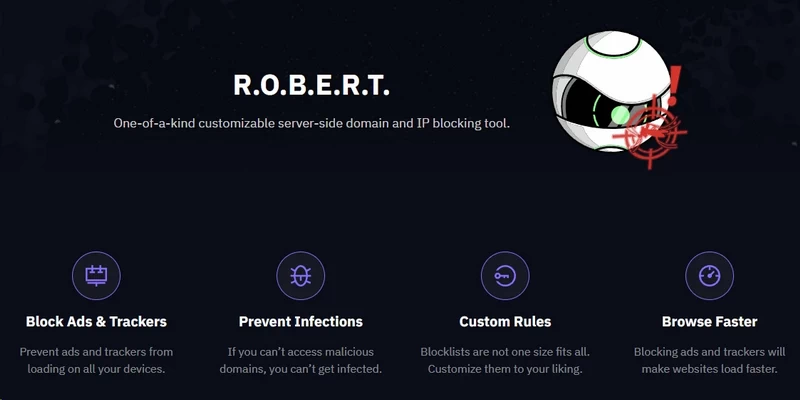
R.O.B.E.R.T. (Remote Omnidirectional Badware Eliminating Robotic Tool) is Windscribe’s DNS-level filtering tool and is arguably the most useful bundled security feature in their product. The name is absurd. The technical implementation is not.
Standard ad blockers like uBlock Origin operate at the browser level, intercepting requests after your browser has already resolved a domain and initiated a connection. R.O.B.E.R.T. operates server-side on Windscribe’s DNS infrastructure. When your device sends a DNS query, that query goes to Windscribe’s resolvers rather than your ISP’s or a public resolver like 8.8.8.8. If the requested domain appears on a blocklist, Windscribe’s resolver returns an NXDOMAIN response, which tells your device the domain does not exist. Your device never initiates an HTTP or HTTPS connection. No data leaves your machine to the blocked destination. This approach reduces bandwidth consumption and speeds up page load times compared to browser-level blocking, because the DNS response comes back immediately rather than triggering a full HTTP request that then gets cancelled at the browser layer. It also blocks tracking attempts from apps outside your browser, which browser extensions cannot touch.
You can configure R.O.B.E.R.T. to block by category:
- Malware, phishing sites, and botnets
- Ads and cross-site trackers
- Social networks (blocks Facebook, X, and Instagram tracking widgets)
- Pornography and explicit content
- Gambling and crypto-mining scripts
- Clickbait and fake news domains
- Other VPNs (useful to prevent network bypasses on managed setups)
The major flaw is that custom rule configuration is locked inside the web dashboard. To whitelist a specific domain or create custom blocklists (free users get 3 custom rules, Pro users get 10), you must log into your account through a browser, apply the changes there, and wait for the app to sync the update. There is no in-app interface for this. Pushing users to a separate browser-based dashboard to configure a core feature of the desktop application is a disjointed design decision.
Double hop hacks and static IP ports
Most premium VPNs include a multi-hop feature that routes your traffic through two separate VPN servers in sequence directly from the client. The concept is straightforward: your traffic enters Server A, exits encrypted to Server B, and then reaches the open internet. Even if Server B is compromised, the attacker cannot trace your traffic back to your real IP because Server B only knows Server A’s IP. Windscribe’s implementation of this is a workaround, not a native feature.
To achieve double hop, you connect your desktop client to Server A, then install the Windscribe browser extension and connect that to Server B. Your browser traffic routes through both servers. The problem is that only browser traffic gets the double-hop treatment. Your torrent client, email app, system updates, and every other background process running on your machine only gets single-hop protection from the desktop client. This is a meaningful security gap if your threat model is the reason you want multi-hop in the first place.
Port forwarding is similarly buried. Windscribe supports ephemeral port forwarding (valid for 7 days) through the web console, not the app UI. Most users will never discover it exists. For permanent static IP port forwarding, useful for hosting a home server or seeding torrents efficiently over time, you need to purchase a Datacenter Static IP at an extra $2 per month. If you opt for the $8 per month Residential IP (designed to bypass strict streaming blocks), P2P support is disabled entirely. Each add-on solves one problem while introducing an incompatibility with another part of the product.
Speed & Performance
WireGuard saves the day (mostly)
A few years ago, Windscribe had a real performance problem. Their OpenVPN-based network infrastructure could not compete with providers who had invested in optimized server hardware and modern protocol stacks. That changed when they completed their full integration of WireGuard across the entire network.
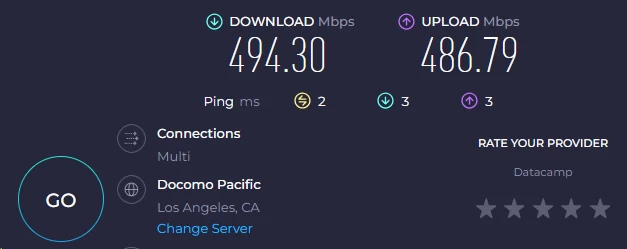
WireGuard operates with a codebase of roughly 4,000 lines, compared to OpenVPN’s hundreds of thousands. The smaller codebase means fewer attack surfaces, faster handshakes, and significantly less CPU overhead during data encryption. In practical terms, this translates to lower battery drain on mobile devices and faster throughput on any hardware. On a ~500 Mbps test connection, local server performance averaged 477.00 Mbps on download and 469.75 Mbps on upload, a roughly 3.5% drop that is effectively invisible during normal use. 4K streaming and large simultaneous downloads ran without interruption.
Performance degrades predictably as the physical distance to the server increases. This is not unique to Windscribe; it is a function of physics. The longer the data path, the more routing hops accumulate, and the more latency compounds. But Windscribe’s cross-continental performance falls off more steeply than top competitors. Connecting from Los Angeles to New York produced download speeds around 395.44 Mbps and upload speeds around 389.43 Mbps, a 20% drop. Connecting from Los Angeles to a UK or EU server (London) produced download speeds around 266.92 Mbps and upload speeds around 262.87 Mbps, a 46% drop. Routing to Asia-Pacific (Sydney) dropped performance to 163.12 Mbps download and 160.64 Mbps upload. Providers like NordVPN and ExpressVPN routinely hold higher throughput on the same transatlantic routes.
| Connection Type | Download Speed | Upload Speed | Percentage Drop (Download) |
|---|---|---|---|
| Local / No VPN | 494.30 Mbps | 486.79 Mbps | – |
| Local Server (Los Angeles) | 477.00 Mbps | 469.75 Mbps | ~3.5% |
| Cross-Country (Los Angeles → New York) | 395.44 Mbps | 389.43 Mbps | ~20% |
| Transatlantic (Los Angeles → London) | 266.92 Mbps | 262.87 Mbps | ~46% |
| Transpacific (Los Angeles → Sydney) | 163.12 Mbps | 160.64 Mbps | ~67% |
The Mac upload speed anomaly
One of the more puzzling findings in our performance testing was the severe discrepancy between the Windows and macOS clients. Running the same WireGuard protocol, on the same server, from the same network produced meaningfully different results depending on the operating system.
On Windows, upload speeds dropped by roughly 15% compared to baseline, which is within normal expectations for an encrypted tunnel. On macOS, upload speeds dropped by approximately 50% under the same conditions. This is not a minor optimization gap; it is a platform-specific architecture problem. If you are a remote worker uploading large video files, syncing multi-gigabyte project folders to cloud storage, or running a video call while on a VPN, that level of upload degradation on macOS is a material problem, not a footnote.
Windscribe has not publicly addressed why the macOS client underperforms so severely on upload. The most plausible explanation is that the macOS WireGuard implementation is routing through a different networking path than the Windows client, introducing additional system-level overhead. Until the gap closes, macOS users with upload-heavy workflows should test their specific use case carefully before committing to a paid plan.
This inconsistency affects P2P performance as well. Windscribe allows torrenting on most of its servers and marks restricted regions clearly in the app. But download bitrates during P2P sessions are variable in a way that goes beyond server distance. We tracked a 30GB torrent download across multiple sessions on the same server. Completion times ranged from 15 minutes on a Monday morning to over an hour on a Friday evening. Server load fluctuates with demand, and Windscribe’s network does not appear to actively throttle or prioritize P2P traffic to smooth out these peaks.
Gaming and latency reality

Routing traffic through an intermediary server adds latency because your data travels a longer physical path. Windscribe’s performance on local servers is acceptable for gaming. Connecting to a server within a few hundred kilometers of your actual location generally keeps ping under 20ms, which is tolerable for most online games. The WireGuard protocol’s low processing overhead ensures the encryption itself is not the bottleneck.
Trying to access geo-blocked game servers across an ocean is a different situation entirely. Connecting from North America to a Japanese or Korean game server through Windscribe regularly produced latency in the 150ms to 250ms range. At those numbers, fast-paced competitive games are unplayable. Characters appear to teleport, hit registration becomes unreliable, and any game with strict anti-cheat systems may flag the connection as anomalous. No VPN solves this problem; Windscribe does not make it worse than competitors, but it does not improve on physics.
The most reliable approach for gaming or bandwidth-heavy streaming is to manually select servers marked with the “10Gbps” badge in the app. Windscribe upgraded a significant portion of their infrastructure to high-capacity nodes, but the app’s “Best Location” auto-connect feature does not always prioritize them. Manually scrolling to confirm a 10Gbps node before connecting is worth the extra step for latency-sensitive applications.
Security & Privacy
The 2021 Ukraine server seizure
In June 2021, Ukrainian authorities raided a data center and seized two Windscribe servers. What happened next is the most important part of this story.
Rather than issuing a vague press release, Windscribe published a detailed post-mortem that acknowledged specific operational failures. The seized servers were running a deprecated legacy configuration. They were not encrypted. The OpenVPN server certificate and private key were stored on the disk in plain text.
The practical consequence of this: a sophisticated adversary who captured those keys could have impersonated a Windscribe server and executed a man-in-the-middle attack against users on the compromised nodes. This would have required the adversary to also control the user’s DNS resolution and network routing, which is not a trivial condition. But the vulnerability was real. A company marketing itself to privacy-conscious users storing private keys in cleartext on production hardware is an inexcusable failure of operational discipline.
Their response was genuine rather than cosmetic. The incident pushed forward the deployment of their “FreshScribe” infrastructure overhaul. The entire global network was migrated to RAM-only servers. On a RAM-only server, the operating system, configurations, and encryption keys exist only in volatile memory. Cut power to the machine or reboot it, and everything disappears. There is no persistent storage for investigators to image. If Ukrainian authorities seized the equivalent server today, they would recover an empty chassis. The 2021 incident was a damaging and embarrassing failure. The rebuild that followed it was the right response.
Protocol soup and obfuscation
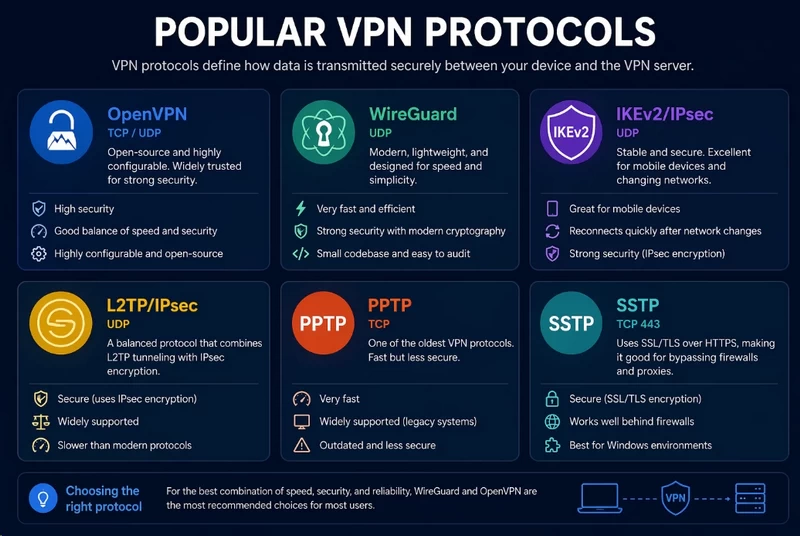
Windscribe’s cryptographic implementation is technically sound. WireGuard connections use the ChaCha20 cipher for symmetric encryption, Poly1305 for message authentication, and Curve25519 for Diffie-Hellman key exchange. This combination is modern, efficient, and well-audited by the cryptographic community. OpenVPN and IKEv2 connections use AES-256-GCM paired with a 4096-bit RSA key and SHA512 for authentication. Brute-forcing AES-256 is computationally infeasible with any hardware that exists or is plausible within any foreseeable timeframe.
The more interesting part of their protocol stack is the anti-censorship tooling. Governments and corporate networks that want to block VPN usage typically deploy deep packet inspection, or DPI, to identify VPN handshakes by their traffic patterns. Standard WireGuard and OpenVPN handshakes have identifiable signatures. When DPI systems detect these patterns, they can selectively block or throttle the connection.
Windscribe’s Stealth protocol addresses this by wrapping OpenVPN traffic inside a TLS tunnel through Stunnel. From the perspective of any DPI system examining your traffic, the connection looks identical to a standard HTTPS session with a web server. There is no VPN signature to detect. Stunnel negotiates a real TLS handshake complete with certificate exchange, so even deep inspection that checks certificate legitimacy sees a plausible HTTPS connection. WStunnel goes one step further, wrapping OpenVPN traffic inside a WebSocket connection over port 443. WebSocket traffic on port 443 is ubiquitous in modern web applications and is rarely blocked. Real-time applications like Slack, Discord, and most online trading platforms rely on WebSocket connections, which makes it an impractical target for broad blocking. Both methods impose a bandwidth penalty and increase latency, because your data is being encapsulated twice before it travels the network. In our testing, Stealth added roughly 15ms to 25ms of additional latency compared to a standard WireGuard connection. But when you need a tunnel that connects in a restrictive environment, the speed trade-off is worth it.
Audits and open-source transparency
Windscribe was slow to pursue external security audits compared to larger competitors. They have since contracted Leviathan Security Group and Cure53, which performed penetration tests on their desktop and mobile applications in 2021 and 2022. Both audits identified high-severity vulnerabilities. The Cure53 report specifically flagged issues in the browser extension’s content security policy and certain API endpoints that could expose session tokens under specific conditions. Windscribe patched each finding and published the remediation documentation publicly alongside the original audit reports, which is a practice most VPN providers avoid. Publishing both the problem and the fix invites scrutiny, which is the correct approach for a privacy product.
The most significant recent validation is the 2024 Packetlabs audit of the FreshScribe server infrastructure. Packetlabs conducted a white-box review of the RAM-only server stack, explicitly looking for logging mechanisms, data retention processes, and misconfigurations that could expose user activity. The audit confirmed the RAM-only servers function as described: no identifiable user activity is logged, and the ephemeral server configuration provides the expected protection against physical seizure.
In addition to formal audits, Windscribe publishes the source code for their desktop apps, mobile clients, and browser extensions on GitHub. Anyone with the skills to read code can inspect what the application is doing, review the commit history, and compile the binaries from scratch to verify they match what is distributed. This level of transparency is rare in a commercial VPN product. Most competitors distribute compiled binaries with no public code available. Windscribe invites inspection, which is a meaningful structural commitment to accountability.
Servers & Locations
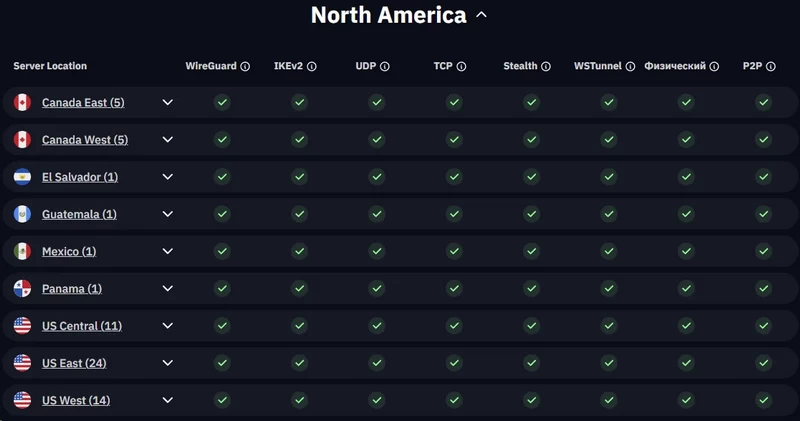
The “69 countries” joke and Fake Antarctica
Windscribe markets their server network with exactly 69 countries listed, a number chosen with obvious intent. Look past the joke and you find a mid-tier network covering roughly 130 cities. The company does not publish an exact server count, but network analysis puts the number around 500 physical machines. This is adequate for most users but is a significantly smaller footprint than the 5,000-plus server networks operated by NordVPN or ExpressVPN.
One thing Windscribe is notably consistent about is not using virtual server locations to pad their numbers. Many larger VPNs route your traffic through a server in one country while assigning you an IP address that registers as another. Windscribe generally does not do this. The one exception is a server labeled “Fake Antarctica” directly in the app UI. Connect to it, and your IP registers to a research station on the South Pole, but traffic routes through a physical machine in Toronto. They label it honestly, which is more than can be said for providers that do the same thing without disclosure.
Torrenting (with a catch)
For most of their network, Windscribe takes a permissive approach to P2P file sharing. You can configure qBittorrent or any other torrent client to bind to the VPN network interface, which ensures your real IP never leaks to the torrent swarm if the VPN connection drops. The system-level firewall handles this reliably on desktop. Speeds are acceptable if you select a 10Gbps-upgraded node.
P2P traffic is blocked on servers in India, Russia, Lithuania, and South Africa. The app marks these locations with a crossed-out P2P icon, but the UI clutter makes it easy to miss. If you connect to a restricted server and start a torrent, the traffic hits a block with no warning. You will not get an error message in your torrent client; downloads will simply stall.
Users who want to maximize P2P download speeds can configure Windscribe’s SOCKS5 proxy directly in their torrent client. This bypasses the full VPN tunnel and the AES-256 encryption overhead, routing only the torrent traffic through a proxy that masks your IP from the swarm. The trade-off is significant: your ISP can still see that you are downloading torrent traffic, because the proxy provides IP masking without cryptographic protection. Windscribe’s own documentation is transparent about this limitation. The SOCKS5 proxy is a speed tool, not a privacy tool, and should not be used if your goal is to hide download activity from your ISP.
The most concerning element in their network architecture is not P2P policy but physical server placement. Having bare-metal servers in Russia and India carries real risk. India legally mandates that VPN providers retain user activity logs. Russia has a documented history of raiding data centers that refuse to comply with state censorship orders. Windscribe’s RAM-only architecture reduces, but does not eliminate, the risk of data exposure from physical seizure in these jurisdictions. If your privacy requirements are strict, do not connect to Indian or Russian servers.
Streaming & Unblocking
A streaming powerhouse
Bypassing streaming geo-restrictions is a permanent technical contest between VPN providers and media companies. Platforms like Netflix run automated systems that identify and blacklist IP ranges associated with data centers. When a VPN’s server IPs get flagged, users connecting through those servers hit the proxy error and cannot access foreign libraries.
Windscribe previously addressed this with dedicated “Windflix” servers. Those are gone. The unblocking capability is now integrated into the standard server infrastructure, specifically concentrated on the high-capacity 10Gbps nodes. The approach appears to work better than the old labeled-server model, because there is no obvious target for streaming platforms to identify and block.
During our testing, Windscribe successfully bypassed geo-restrictions on the following platforms:
- Netflix: Consistently unblocked US, UK, Canada, Japan, and Australia libraries without triggering the proxy error.
- BBC iPlayer and ITVX: No playback issues on UK servers.
- Hulu and Max: Buffer-free playback on US East and West Coast nodes.
- Amazon Prime Video: Worked reliably on US servers. UK servers occasionally required a reconnect to force a clean IP.
- Disney+: 4K playback without throttling.
One important constraint: streaming on the free plan is unreliable. The free server IPs are heavily abused and are frequently on Netflix’s blacklist. If consistent access to foreign streaming libraries is your primary use case, the free tier will not deliver it. The Pro tier is required for reliable unblocking.
The Great Firewall hit-or-miss
Bypassing streaming blocks is straightforward compared to evading state-level censorship. Countries like China, Iran, and the UAE use deep packet inspection systems that continuously evolve. They identify VPN handshakes by their traffic patterns and block them dynamically. Static solutions fail quickly because the blocking heuristics update regularly.
Windscribe provides Stealth and WStunnel to address this. Both are technically sound obfuscation methods. In practice, performance behind the Great Firewall is inconsistent. A server and protocol combination that establishes a connection on Monday may be fully blocked by Wednesday. Chinese censors update their detection heuristics frequently, and because Windscribe’s obfuscation uses well-known tools like Stunnel, which other services also use, blocks can propagate quickly. Users attempting to use Windscribe in China end up in a manual cycle of switching ports, toggling API resolution settings, and testing multiple server combinations. Providers like Astrill and ExpressVPN, which have invested significantly more in proprietary obfuscation technology, produce more consistent results in China.
If you get stuck, Windscribe’s first-response support is an AI chatbot called Garry, which returns pre-written troubleshooting articles in response to most queries. Reaching a human engineer requires explicitly requesting to submit an email ticket through the chatbot interface. For someone in a restricted country trying to re-establish a failed connection, that support structure is inadequate. The obfuscation technology is technically credible, but Windscribe is not a reliable solution for users whose work or safety depends on uninterrupted access in a high-censorship environment.
Customer Support

When you hit a networking problem with Windscribe, your first interaction is with Garry, their AI support chatbot. Garry intercepts queries, parses keywords, and routes you to knowledgebase articles. For basic questions, this works. For anything complex, such as configuring OpenVPN on a non-standard port to bypass a corporate firewall, Garry returns generic links that do not address the specifics of your situation.
To reach a human engineer, you have to explicitly tell Garry you want to submit an email ticket. Once you do, response times vary by account tier. Pro subscribers generally receive a technically detailed reply within 12 to 24 hours. Free users are deprioritized and can wait multiple days. The quality of the human responses is high. There are no script-reading agents here; the people responding understand the product’s technical details. But “good response eventually” is a poor substitute for real-time support when a VPN connection is the thing standing between you and accessing something you need now.
The most effective near-real-time support channel Windscribe has is their Reddit presence and Discord server. Windscribe’s founders and lead developers actively respond to posts in both places. If you encounter an unusual routing issue or a bug in a beta client, posting error logs to the subreddit often produces a direct response from the engineers who wrote the code in question. This community-driven support model is functional and technically credible. It should not, however, be the primary troubleshooting path for a paid privacy product. Replacing structured support with social media participation is a cost-saving measure that puts the burden on the user.
FAQ
Is Windscribe actually free?
Yes, the free tier provides 10GB of monthly data if you confirm an email address, or 2GB if you remain completely anonymous. It grants access to servers in 10 countries and includes a stripped-down version of their R.O.B.E.R.T. blocker.
Does Windscribe work with Netflix?
It consistently unblocks Netflix libraries in the US, UK, Canada, Japan, and Australia on its premium 10Gbps servers. The free tier servers are heavily congested and generally blacklisted by major streaming platforms.
Is Windscribe safe to use?
Windscribe utilizes industry-standard AES-256 and ChaCha20 encryption paired with a strict no-logs policy that has been proven in a Greek court. Their entire network runs on RAM-only servers, ensuring no data is permanently written to physical disks.
Does Windscribe have a kill switch?
The desktop applications (Windows, macOS, Linux) utilize a system-level firewall that proactively blocks all traffic outside the VPN tunnel. Mobile users (Android, iOS) must rely on the native OS-level “Always-on VPN” settings.
Does Windscribe work in China?
Bypassing the Great Firewall is highly inconsistent, requiring users to manually cycle through the Stealth (Stunnel) and WStunnel (WebSocket) obfuscation protocols. While mathematically sound, the connection stability in heavily censored regions fluctuates wildly.
Can I torrent with Windscribe?
P2P traffic is permitted and protected by AES-256 encryption on the vast majority of their global network. Torrenting is strictly blocked on servers located in India, Russia, Lithuania, and South Africa.

