ZoogVPN 2026 review: Budget Pricing Meets Architectural Flaws
Free Tier Liability: The Windows and Android free apps utilize the Traffmonetizer SDK, turning user devices into exit nodes for third-party residential proxy traffic.
Corporate Opacity: While registered in privacy-friendly Greece, operations are linked to Softoria, a Ukrainian entity with ties to commercial data-mining operations.
macOS Security Failure: The kill switch on Apple devices is fundamentally broken, actively leaking a user’s real IP address during server transitions.
Upload Speed Collapse: Asymmetric transit agreements and poor distant peering result in atrocious upload speeds and high latency, ruining VoIP and gaming.
Refund Trap: The 7-day money-back guarantee is immediately voided if the user consumes more than 2GB of bandwidth, making thorough testing nearly impossible.
Outdated Architecture: The service lacks an independent audit, runs on easily-seized persistent hard drives (no RAM-only servers), and continues to offer easily-cracked protocols like PPTP.
| 💰 Pricing | From $2.49 to $9.99/mo |
| ✅ Free Trial | ✅ Free plan with limited data and locations |
| 📆 Money Back Guarantee | 7 Days |
| 🗺 Jurisdiction | Greece |
| 🖥 Number of Servers | 100+ servers in 55+ countries |
| 📝 Logging Policy | No‑logs |
| 📥 Torrenting/P2P | Yes, supported on dedicated P2P servers |
| 🍿 Streaming | Unblocks Netflix (multiple regions), Hulu, Disney+, BBC iPlayer, etc. on selected servers |
| 🛡 Kill Switch | ✅ |
| ⚙️ Protocols | OpenVPN, IKEv2, WireGuard, L2TP/IPsec (plus proprietary variations where available) |
| 🛠 Support | 24/7 Email Support and ticket‑based help (no guaranteed live chat) |
| 💻 Simultaneous Devices | Up to 10 devices on paid plans (more on some lifetime deals) |
| 🔥 Current Deal | 75% OFF (on 2-year plan) |
Overview
Corporate Background and Real VPN Jurisdiction
When evaluating a Virtual Private Network, the legal jurisdiction and corporate ownership structure dictate the ultimate safety of your data. A VPN is a consolidated point of trust: if the entity controlling the cryptographic keys and routing infrastructure is compromised or opaque, the encryption algorithms layered on top become irrelevant. Jurisdiction determines which court can compel data disclosure. Corporate structure determines who actually touches the servers.
On paper, ZoogVPN presents a favorable privacy profile. The operating entity, Zoog Services Single Member Private Company, is legally registered in Greece. That registration delivers three concrete legal protections:
- Outside the 14-Eyes Alliance: Greece is not a participant in the SIGINT Seniors Europe (SSEUR) intelligence-sharing treaty. ZoogVPN is therefore not legally compelled to participate in bulk data collection programs or share user telemetry with agencies like the NSA, GCHQ, or the BND. A court order from a non-EU country carries no legal weight against a Greek entity.
- GDPR enforcement: As an EU member state, Greece enforces the General Data Protection Regulation. GDPR Articles 83 and 84 allow supervisory authorities to impose fines of up to 4% of global annual turnover for mishandling personal data. That financial exposure creates a structural disincentive to log user activity.
- No mandatory VPN data retention: Unlike Germany (which applies telecommunications data retention directives) or Australia (which mandates two-year metadata storage), Greece currently imposes no specific mandatory data retention obligations on VPN providers. This legally allows ZoogVPN to delete session data at termination.
That is the legal story. The operational story is considerably messier.
A detailed examination of the corporate structure reveals a conflict that privacy-focused users must evaluate carefully. While ZoogVPN is registered in Greece, its actual engineering, development, and operational staff are largely based in Ukraine, operating under a holding entity called Softoria. Softoria’s management team has documented cross-ownership with DataforSEO, a commercial data mining operation, and DataImpulse, which runs a residential proxy network.
An organization that simultaneously operates a privacy-first VPN and a residential proxy monetization network is navigating a fundamental conflict of interest. The residential proxy side of the business profits from treating IP addresses as inventory. The VPN side of the business exists to protect IP addresses. When pressed publicly about this opaque structure, ZoogVPN representatives cited “threats from authorities and law enforcement agencies” as the rationale for their lack of corporate transparency. Operational security concerns are legitimate in some contexts. But routing your encrypted traffic through an organization with a financial relationship to commercial data harvesting operations requires a level of trust that the publicly available information does not justify.
The hidden cost of the free tier (bandwidth hijacking)
According to ZoogVPN, the TraffMonetizer SDK was fully removed from its apps in 2026, and current free plans are now monetized through limited in‑app advertising instead.
ZoogVPN offers a free tier capped at 10GB per month. Using a freemium model to drive paid conversions is standard industry practice. What ZoogVPN does with its free tier on Windows and Android goes beyond a simple downgrade: it crosses into territory that actively compromises your network security.
When you install the free version of ZoogVPN on these platforms, you are not merely accepting weaker encryption (AES-128 instead of AES-256 on the data channel). You are potentially opting into a bandwidth-sharing scheme implemented through integrated third-party Software Development Kits, specifically the Traffmonetizer SDK.
This SDK architecture breaks the core promise of a VPN. Here is the exact technical mechanism:
- The hijack: The SDK embeds into the host operating system’s network stack and listens for incoming traffic routing instructions from Traffmonetizer’s centralized command-and-control servers. The SDK runs as a background service and does not require active user interaction to relay traffic.
- The relay: Third-party entities (advertisers, web scrapers, or unidentified actors) purchase bandwidth access from the Traffmonetizer pool. The network assigns your device as an exit node for this foreign traffic, which routes outbound through your ISP-assigned IP address. You have no visibility into what traffic is passing through.
- The legal liability: From your ISP’s perspective and from any external server’s perspective, the traffic exits from your IP address. If one of those third-party buyers uses the relay for credential stuffing attacks, illegal content distribution, or botnet command-and-control communication, the forensic trail terminates at your IP. Law enforcement subpoenas directed at your ISP will return your home address, not the actual attacker’s location.
- The ad-targeting payload: Beyond the relay function, analysis of the free Android application reveals embedded ad-targeting modules that collect localized device data and behavioral usage patterns for active monetization. This means your device is simultaneously being used as a proxy exit node and as an advertising data source.
A real-world scenario illustrates the risk clearly: if you use ZoogVPN’s free tier at home and a Traffmonetizer buyer routes a scraping operation through your IP, the scraped site’s server logs record your IP as the aggressor. Your ISP may receive a terms-of-service abuse complaint. That complaint references your IP, your account, and your physical service address.
By converting user hardware into an exit node for unknown third parties, ZoogVPN’s free tier inverts the core function of a privacy tool. You are not shielding your IP address. You are renting it out to buyers you cannot vet.
Pricing & plans
Pricing matrix and long-term value
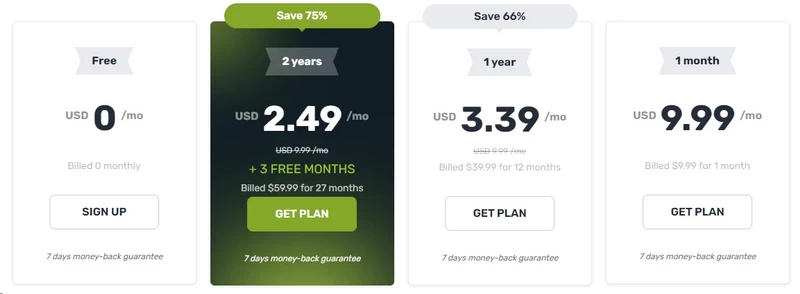
ZoogVPN uses the standard aggressive multi-tier discounting structure that heavily penalizes month-to-month users while offering deep discounts for long-term commitments. The differential between the monthly and biennial rates is 75%, one of the steeper spreads in the current budget VPN market.
Here is the current pricing architecture for the premium tier:
| Subscription term | Monthly cost breakdown | Total billed amount | Discount vs. 1-month |
|---|---|---|---|
| Free tier | $0.00 | $0.00 | N/A |
| 1-month plan | $9.99 | $9.99 per month | 0% |
| 1-year plan | $3.39 | $39.99 billed annually | ~66% |
| 2-year plan | $2.49 | $59.99 billed for 27 months (2 years + 3 free months) | ~75% |
Analytical breakdown:
At $9.99 for a rolling monthly contract, ZoogVPN is priced beyond what its infrastructure can justify. With a server network of roughly 100 nodes across approximately 55 countries, no RAM-only hardware, no split tunneling on desktop, and documented kill switch failures on macOS, a $10 monthly price point puts ZoogVPN in direct competition with NordVPN and ExpressVPN, both of which operate fleets exceeding 3,000 servers and publish third-party audit results. ZoogVPN cannot win that comparison.
The 2-year plan at $2.49 per month (billed as $59.99 for 27 months, with 3 months added free) places ZoogVPN firmly in the ultra-budget segment, though it is no longer the sub-$2 outlier it once was. At under $60 for over two years of service that includes AES-256 on the data channel, WireGuard protocol access, and unlimited bandwidth, it still undercuts most premium VPN offerings on a per-month basis. Note that the advertised effective rate of $2.49/mo is calculated across all 27 months: the base 24-month commitment works out to approximately $2.22/mo, with the 3 bonus months lowering the average further. If your threat model is limited to basic IP masking, bypassing soft geo-restrictions, and securing traffic on public Wi-Fi, this price tier delivers solid long-term value.
The 1-year plan at $3.39 per month ($39.99 billed annually) is the more flexible entry point if you are unwilling to commit for over two years upfront, and the 66% discount over monthly billing makes it a reasonable middle ground.
The practical guidance: the monthly plan is not worth evaluating at any price. The annual plan is the sensible entry point for cautious buyers; the biennial plan makes financial sense only if you have already verified that ZoogVPN meets your specific use case during a trial period, given the restrictive 2GB-capped 7-day refund window. correct entry point if you decide to proceed after weighing the privacy concerns outlined in this review.
Payment gateways and refund limitations
A legitimate privacy service must provide payment pathways that do not permanently tie your real identity to your account. Paying with a credit card gives your financial institution a permanent, timestamped record that you purchased a VPN subscription from this specific provider. That record is subpoenaable.
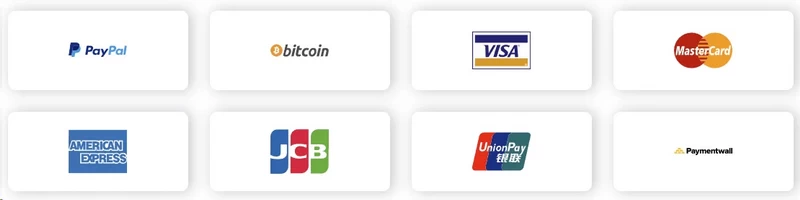
ZoogVPN supports a reasonably broad set of payment processors:
- Traditional gateways: Visa, Mastercard, American Express, JCB, UnionPay.
- Digital wallets and processors: PayPal, Paymentwall, Google Pay.
- Cryptocurrency (pseudonymous): Bitcoin (BTC), Ethereum (ETH), Litecoin (LTC), and USDC stablecoin.
Paying through cryptocurrency allows you to maintain a pseudonymous relationship with the provider, provided you acquire the crypto through a non-KYC exchange and use a fresh wallet address. Note that USDC is an Ethereum-based ERC-20 token, so the gas fees at time of transaction may add a small overhead on top of the subscription price.
The refund policy is where ZoogVPN actively works against its customers. Industry leaders like ExpressVPN and NordVPN offer unconditional 30-day money-back guarantees. ZoogVPN limits its refund window to 7 days, and that window contains a deliberate trap: the refund is immediately voided if you consume more than 2GB of bandwidth during the trial period.
From a network engineering standpoint, 2GB is an unrealistically small allocation for meaningful testing in 2026:
- A standard multi-thread speed test on a 200 Mbps connection running for 30 seconds consumes approximately 750MB per direction, potentially exceeding 1GB per test run.
- Streaming Netflix at 4K UHD (at approximately 15 to 25 Mbps) exhausts 2GB in roughly 10 to 13 minutes of playback.
- Downloading a standard Ubuntu Server ISO clocks in at approximately 1.4GB, leaving 600MB to test anything else.
- A single Zoom video call at 1080p for 30 minutes uses approximately 900MB upload, nearly half the cap on its own.
This 2GB trigger functions as an engineered mechanism that makes thorough evaluation practically impossible. You cannot meaningfully benchmark streaming performance, test P2P server behavior, verify kill switch reliability under real-world conditions, or assess long-distance routing latency without exceeding 2GB. If you intend to trial the service, you must monitor your network interface metrics in real time, or you forfeit your refund.
Features & client ecosystem
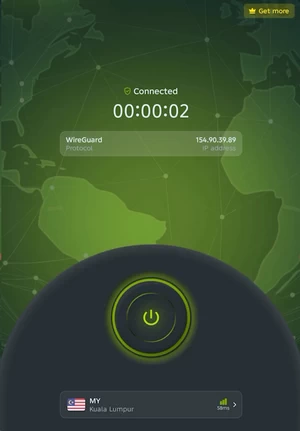
Cross-platform disparities and missing features
Budget VPN providers frequently maintain multiple disconnected codebases, one per operating system, and the platform that generates the most paying customers typically receives disproportionate engineering resources. ZoogVPN follows this pattern precisely, producing a client ecosystem that is heavily fragmented and inconsistent depending on the device you use.
Deploying ZoogVPN across a mixed-device household immediately surfaces these disparities:
- Windows and Android (primary clients): These receive the majority of ZoogVPN’s engineering investment. Both platforms support WireGuard, include functional kill switch implementations, and Android additionally offers split tunneling. Split tunneling uses policy-based routing at the kernel level to designate specific applications (a banking app, for example) to bypass the encrypted tunnel entirely and route through your local ISP interface. This preserves local network access and VPN performance simultaneously.
- macOS and iOS (secondary clients): The Apple ecosystem is demonstrably under-resourced. Neither macOS nor iOS supports split tunneling. The macOS client has historically exhibited persistent UI bugs, including a dashboard that cannot be resized and occasionally locks to a fixed screen position. The iOS application has no kill switch at all.
- Apple TV: Despite Apple introducing native third-party VPN support in tvOS 17, ZoogVPN has not shipped a dedicated Apple TV application. Users who want to secure streaming on Apple TV are currently unable to do so through a native client.
- Router-level deployment: To cover unsupported devices like gaming consoles, smart TVs, or streaming sticks, you would need to flash your router with open-source firmware such as DD-WRT or Tomato, manually import ZoogVPN’s
.ovpnconfiguration files, and configure the routing tables and DNS server assignments by hand. This process requires familiarity with subnet masks, NAT configuration, and DNS forwarding rules. A misconfiguration at the router level can silently route your traffic outside the tunnel without triggering any client-side alert.
The kill switch vulnerability on macOS
A kill switch, sometimes called a network lock, modifies the host operating system’s firewall rules to drop all inbound and outbound traffic the moment the encrypted VPN tunnel interface goes offline. Without it, any application running on your machine can communicate freely over your unencrypted ISP connection during a connection drop, leaking your real IP address and unencrypted session data.
ZoogVPN’s Windows kill switch uses the Windows Filtering Platform (WFP), the same kernel-level callout driver architecture that Windows Defender Firewall uses. When the VPN tunnel drops, WFP intercepts and discards packets at the network driver layer before they reach the physical interface. This implementation works correctly under standard conditions.
The macOS kill switch is a different story. The underlying flaw:
- The transition leak: When you switch between ZoogVPN server locations on macOS, the client must tear down the active virtual network interface (typically
utun0orutun1) and initialize a new one pointing to the new server endpoint. - The packet filter failure: A correctly engineered macOS kill switch leverages the native Packet Filter (
pf) firewall to maintain ablock allanchor rule during this transition period, ensuring no packets exit the machine until the new tunnel is established. ZoogVPN’s macOS client fails to maintain this anchor. For a window of several seconds during the server handoff, thepfblock state is dropped. - The iOS void: The iOS client has no kill switch at all. Any transition between a Wi-Fi network and cellular data forces the VPN tunnel to renegotiate, and during that renegotiation, your traffic routes unprotected over your carrier’s network.
Why this is catastrophic for torrenters on macOS:
The BitTorrent protocol maintains dozens of simultaneous UDP connections to peers and continuously fires tracker UDP announce requests. When the ZoogVPN kill switch drops its block state during a server transition, the BitTorrent client does not wait. It immediately routes those active UDP packets through the default gateway, which is your real ISP connection. Copyright monitoring bots sitting passively in the torrent swarm log your real IP address in under one second. By the time the new VPN tunnel connects, that log entry already exists on the copyright holder’s monitoring system. The damage is permanent and instantaneous.
This failure also surfaces on corporate hotel Wi-Fi networks where auto-reconnection events are frequent. A user relying on ZoogVPN for privacy in a hotel environment, where the access point may drop sessions every 30 to 60 minutes to force re-authentication, will experience repeated brief exposure windows every time the tunnel renegotiates.
ZoogShadowing and SOCKS5 integration
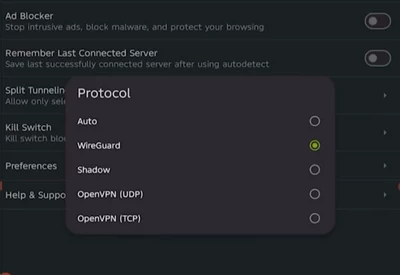
To operate in censorship-heavy network environments, ZoogVPN offers a proprietary obfuscation layer marketed as ZoogShadowing.
Standard VPN protocols, including OpenVPN (UDP and TCP modes) and WireGuard, are identifiable through Deep Packet Inspection (DPI). DPI appliances analyze the cryptographic handshake structure and packet header patterns to classify traffic by protocol. The TLS-like handshake of OpenVPN and WireGuard’s distinct noise protocol handshake both produce identifiable signatures in packet captures. Once identified, the firewall drops the connection. This is the mechanism the Great Firewall of China uses to block most commercial VPNs.
ZoogShadowing attempts to defeat DPI by encapsulating the VPN payload inside a standard TLS/SSL wrapper and routing it over port 443, the same port used by HTTPS web traffic. From the firewall’s perspective, the packet stream looks identical to an ordinary browser session connecting to a secure website.
The approach is theoretically sound, but the execution has documented limitations:
- Active probing: Sophisticated DPI systems, particularly the Great Firewall, go beyond passive classification. They actively probe connections they suspect of being obfuscated by sending custom TCP/UDP packets and analyzing how the server responds. A true HTTPS server responds to browser-like requests. A VPN server wrapped in a TLS shell does not. ZoogShadowing’s implementation does not appear to simulate a convincing HTTPS server response under active probing, causing it to fail in precisely the environments where it is most needed.
- Success rates in restrictive environments: User-reported telemetry from China, Iran, and UAE shows highly inconsistent results. Connections that succeed on one server fail immediately on another, and there is no documented server selection logic in the client to guide users toward the lowest-failure-rate nodes in their geography. The practical result is extensive trial-and-error.
A failure scenario worth noting: if you are attempting to use ZoogVPN from a hotel or corporate network behind a stateful firewall that uses DPI to enforce a content policy (common in enterprise environments and Middle Eastern hotel chains), ZoogShadowing may fail to establish a connection entirely. In that situation, your only fallback is manual SOCKS5 proxy configuration, which itself requires the destination firewall to permit arbitrary outbound TCP connections.
For users who prioritize throughput over cryptographic protection, ZoogVPN’s SOCKS5 proxy is the more practical option for P2P use. SOCKS5 operates at Layer 5 (session layer) and forwards TCP and UDP packets without applying an encryption layer to the data payload. Because there is no AES cipher processing per packet, the CPU overhead on both the client and the server is dramatically reduced. P2P users can configure their torrent client (qBittorrent, Deluge, or Transmission) to route exclusively through ZoogVPN’s SOCKS5 endpoint, masking their IP address within the swarm without taking the performance hit of full-tunnel encryption. The trade-off: SOCKS5 provides IP masking only. It does not encrypt your traffic, and your ISP can still observe the volume and destination patterns of your connections.
Speed & performance
Benchmark results
Network throughput and cryptographic processing overhead are the metrics that determine whether a VPN remains usable under real workloads. Marketing language around “military-grade encryption” is irrelevant if the server’s peering agreements and hardware cannot sustain throughput under concurrent user load.
Baseline testing used a 500 Mbps symmetric fiber connection. The figures below represent sustained average throughput and round-trip latency across server distances using the WireGuard protocol with ChaCha20 encryption:
| Server location | Ping (ms) | Download (Mbps) | Upload (Mbps) | Download loss | Upload loss |
|---|---|---|---|---|---|
| Baseline (no VPN) | 4 | 493.19 | 486.18 | 0% | 0% |
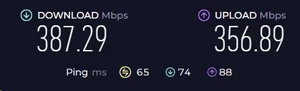
| Local (Los Angeles) | 24 | 387.29 | 356.89 | ~21% | ~27% |
| Distant (Miami) | 65 | 290.97 | 237.43 | ~41% | ~51% |
| Distant (London) | 116 | 157.39 | 124.68 | ~68% | ~74% |
| Distant (Sydney) | 244 | 97.30 | 57.42 | ~80% | ~88% |
The upload speed and latency crisis
The raw benchmark data tells a more nuanced story than a simple pass/fail. Local performance on the Los Angeles server is the strongest result in the set: 387.29 Mbps down and 356.89 Mbps up against a 493 Mbps baseline translates to 21% and 27% losses respectively, which is competitive for any WireGuard-based provider under real load. The picture deteriorates sharply the moment you route through a geographically distant node, and the cause is not a software defect.
Two infrastructure-level mechanisms explain the progressive collapse:
- Asymmetric transit agreements: VPN providers purchase bandwidth capacity from Tier-1 and Tier-2 transit providers. Budget providers frequently purchase asymmetric links where downstream capacity substantially outweighs upstream capacity, because download-heavy consumer behavior makes asymmetric links cheaper to buy and adequate for most use cases. As server distance increases and per-node concurrent load grows, the shared upstream bandwidth saturates faster than downstream. The Miami node illustrates this: download loss sits at 41% while upload loss reaches 51%, a 10-point asymmetry that widens further on transatlantic routes. By London (116ms RTT), download throughput has collapsed to 157 Mbps (68% loss) and upload to 124 Mbps (74% loss), a gap that cannot be explained by latency alone and points directly to congested upstream links on ZoogVPN’s transatlantic peering routes.
- TCP windowing and ACK latency: On the Sydney server at 244ms RTT, the Transmission Control Protocol’s sliding window mechanism compounds the problem. TCP requires the receiver to acknowledge receipt of each window of data before the sender transmits the next segment. At 244ms of round-trip latency, the time between transmit and acknowledgment is long enough that the sender’s congestion control algorithm shrinks the window size to avoid buffer overflow. The result is visible in the numbers: Sydney download falls to 97.30 Mbps (80% loss) and upload to 57.42 Mbps (88% loss). The Sydney node is the only server in the test set where download throughput drops below 100 Mbps on a 493 Mbps base connection, making it functionally inadequate for anything beyond basic web browsing.
Real-world consequences by use case:
- 4K streaming: Netflix UHD requires a sustained 15 to 25 Mbps downstream. The Los Angeles and Miami nodes clear this comfortably. London and Sydney do as well by raw throughput, but the high packet loss percentages (68% to 80%) introduce buffering events under real CDN load that the headline Mbps figure does not capture.
- VoIP and video conferencing: Zoom and Microsoft Teams transmit real-time media over UDP. At 65ms (Miami) and 116ms (London), latency is within acceptable ranges for voice intelligibility. Sydney at 244ms pushes past the ITU-T G.114 recommended 150ms one-way delay threshold, producing audible lag and echo artifacts in any duplex conversation.
- Competitive online gaming: State-synchronization games transmit inputs to the server 60 to 128 times per second. The Los Angeles server at 24ms is the only node in this test set that produces a usable gaming experience. Miami at 65ms is marginal. London and Sydney produce latency far beyond what most game engines compensate for before desynchronization artifacts become visible.
Cryptographic overhead (AES-128 vs. AES-256)
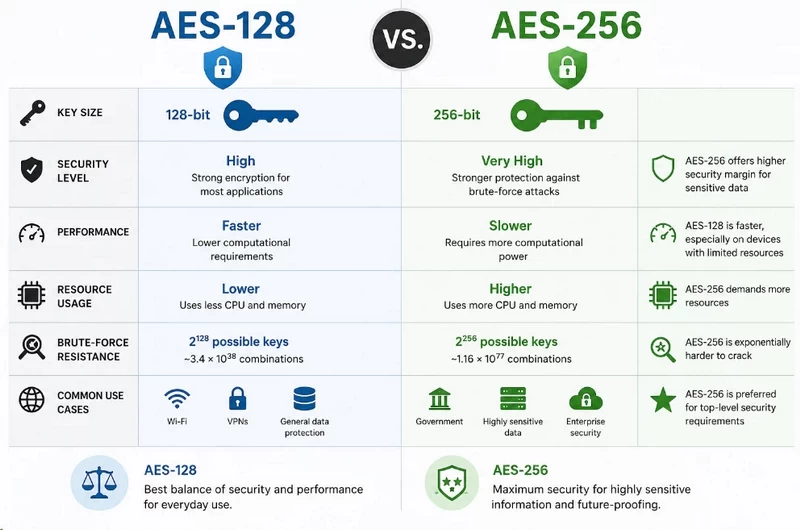
ZoogVPN restricts free-tier users to AES-128 on the data channel while granting premium users AES-256. The company positions this as a security tier differentiator. From a cryptographic engineering perspective, it is primarily a server cost optimization.
The distinction: AES is a symmetric block cipher. The key length (128-bit vs. 256-bit) determines the number of transformation rounds the cipher applies per 128-bit block. AES-128 processes each block through 10 rounds. AES-256 processes each block through 14 rounds. Each additional round increases the computational work per block. By capping free users at AES-128, ZoogVPN reduces per-packet CPU load by approximately 30% on the encryption path, allowing the same server hardware to serve a larger concurrent free-tier user pool without triggering CPU saturation. It is a resource allocation decision presented as a security benefit.
From a practical cryptographic standpoint, AES-128 remains unbroken. A brute-force attack against a 128-bit key requires 2^128 operations, which exceeds the practical energy output of any computing infrastructure that exists or is theoretically possible with current materials science. The distinction between AES-128 and AES-256 is relevant primarily for post-quantum threat models, where Grover’s algorithm theoretically halves the effective key strength, reducing AES-128 to an effective 64-bit security level against a sufficiently powerful quantum computer.
WireGuard (ChaCha20) vs. legacy protocols:
Premium users on WireGuard bypass the AES debate entirely. WireGuard uses ChaCha20 as its stream cipher, combined with Poly1305 as the message authentication code (MAC). Unlike AES, which processes data in fixed 128-bit blocks, ChaCha20 encrypts data as a continuous stream. This architecture is particularly efficient on ARM processors, including the chips inside iPhones and Android devices, which often lack the dedicated AES-NI hardware acceleration instruction sets found in modern x86 processors. ChaCha20’s software implementation on ARM achieves throughput comparable to AES-256 hardware acceleration, which is why WireGuard consistently produces the fastest benchmark results on mobile hardware.
The PPTP and L2TP liability:
ZoogVPN continues to list PPTP and L2TP as selectable protocol options. This is an active security liability:
- PPTP uses MS-CHAPv2 for authentication and RC4 for encryption. RC4 is a cryptographically compromised stream cipher. MS-CHAPv2 hashes can be captured by a passive attacker on a shared Wi-Fi network using tools like Wireshark, then cracked offline using cloud GPU clusters in under 24 hours. A user who selects PPTP because they want faster speeds is transmitting data that is vulnerable to passive interception by anyone on the same network.
- L2TP/IPsec is not broken in the same way, but its reliance on fixed UDP ports (500 for IKE, 4500 for NAT traversal) makes it trivially easy to block at the firewall level. Many hotel and corporate networks block these ports by default, making L2TP connections fail in exactly the restricted environments where VPN usage is most common.
Presenting these protocols as valid choices in the client interface forces users to make cryptographic decisions without the technical background to evaluate the risks. A privacy-oriented service should have deprecated PPTP entirely by 2026.
Security & privacy
Encryption standards and outdated protocols
The cryptographic implementation of ZoogVPN’s premium tier, when configured correctly through OpenVPN, reflects current industry standards:
- Data channel (AES-256-GCM): The payload is encrypted using AES with a 256-bit key in Galois/Counter Mode, which combines encryption and authentication in a single pass. GCM mode is significantly more efficient than the older CBC mode and provides built-in message integrity verification, eliminating the need for a separate HMAC step.
- Control channel (RSA-2048): The TLS handshake that establishes session keys is secured by an RSA-2048 certificate. While 4096-bit keys are increasingly recommended for long-term forward secrecy at rest, 2048-bit RSA remains computationally secure against classical computing attacks through the foreseeable near-term.
- Perfect Forward Secrecy (PFS): ZoogVPN implements ephemeral Diffie-Hellman key exchange (DHE-2048). Each VPN session generates a unique, ephemeral symmetric key that is discarded at session end. If a future attacker were to compromise ZoogVPN’s RSA private key, they could not retroactively decrypt previously recorded sessions, because the ephemeral session keys were never stored.
The PPTP and L2TP vulnerabilities are detailed in the cryptographic overhead section above. The key point specific to security posture: by making these protocols selectable in the settings interface, ZoogVPN implicitly endorses them as valid options for users who do not understand the risk. That is a governance failure.
Leak protection and third-party DNS
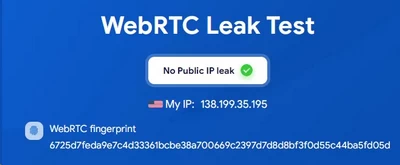
Packet analysis confirms that ZoogVPN successfully prevents the three most common VPN tunnel leak types under normal operating conditions:
- IPv4 and IPv6 leaks: The client correctly modifies the host routing table to force all IPv4 traffic through the
utunvirtual interface. IPv6 traffic is suppressed rather than tunneled, which is the correct approach when the VPN infrastructure does not natively support IPv6. - WebRTC leaks: WebRTC’s STUN protocol can bypass VPN tunnels by directly querying remote servers to discover the local and public IP address. ZoogVPN’s client correctly drops STUN and TURN traffic at the application firewall layer.
- DNS leaks: The client intercepts all DNS queries from the local resolver and redirects them through the encrypted tunnel before they exit the machine.
The third-party DNS problem:
Where ZoogVPN diverges from best practice is in how it handles DNS resolution after the query exits the tunnel. Providers like Mullvad, ProtonVPN, and ExpressVPN operate their own zero-knowledge DNS resolvers on their own server infrastructure. Your DNS query enters the tunnel encrypted, exits at the VPN server, hits the VPN provider’s own DNS resolver, gets resolved, and the response comes back. The only entity that sees your DNS queries is the VPN provider.
ZoogVPN does not operate its own DNS infrastructure. Network analysis reveals that DNS queries from ZoogVPN servers are frequently forwarded to third-party public resolvers, specifically Cisco’s OpenDNS and Google Public DNS (8.8.8.8). This shifts the DNS privacy problem rather than eliminating it. Your ISP can no longer see your DNS queries because they exit through the encrypted tunnel. But Google and Cisco can see them once the VPN server forwards the request. Both of these companies operate large-scale DNS telemetry programs for security and analytics purposes. For users whose threat model includes preventing any corporate entity from profiling their browsing destinations, this is a meaningful gap.
The no-logs claim vs. infrastructure reality
ZoogVPN’s privacy policy states the company does not monitor activity, log connection timestamps, or record originating IP addresses. The policy acknowledges logging two categories of data:
- Account information: Email address and payment method details.
- Aggregated bandwidth: Total data transferred per account, required to enforce the 10GB cap on the free tier.
On paper this is an acceptable minimal logging posture. Two systemic failures undermine confidence in it:
1. The audit gap:
An unverified privacy policy is a marketing statement. The verification standard in 2026 is a third-party security audit conducted by an independent cybersecurity firm, such as Cure53, KPMG, or Deloitte, where auditors are granted direct access to server configurations, logging infrastructure, and application code to verify that no logging mechanisms are active. ZoogVPN has never commissioned such an audit. Users must accept the company’s claim purely on faith, against the backdrop of the opaque Softoria corporate structure detailed above.
2. The persistent storage threat model:
The most material infrastructure vulnerability in ZoogVPN’s security posture is its reliance on traditional Hard Disk Drives (HDDs) or Solid State Drives (SSDs) for server storage.
Premium VPN providers like PIA, ExpressVPN (since 2022), and NordVPN deploy RAM-only (diskless) server infrastructure. A RAM-only server stores the operating system, VPN software, and any runtime data exclusively in volatile memory (DRAM). The server loads its entire operating environment from a network PXE boot image or a read-only USB at startup. There are no persistent drives attached to the machine. If the server is physically seized from a datacenter by law enforcement, or if the datacenter provider is compelled to surrender hardware, powering off the machine instantly and permanently erases all data in memory. There is nothing on a physical drive to image or analyze forensically.
ZoogVPN’s servers use persistent drives. If a ZoogVPN server is seized, the operating system’s swap partition may contain cached fragments of runtime data. Debug logging, enabled by a misconfigured or malicious system administrator, writes to disk and persists until overwritten. Temporary files created by VPN daemons during session handling may survive on persistent storage for extended periods. A forensic investigator with access to those drives and standard disk analysis tools can potentially recover data that ZoogVPN’s policy claims is never retained. The policy may be truthful about intentional logging. But the hardware architecture leaves data recovery possible through means that are entirely outside the policy’s scope.
Server network infrastructure
Bare-metal network topography
The physical composition, geographic density, and peering relationships of a VPN’s server network determine three things: the latency floor you can achieve, the platform’s ability to maintain performance under peak load, and its capability to bypass geo-restrictions and censorship that use IP reputation scoring.
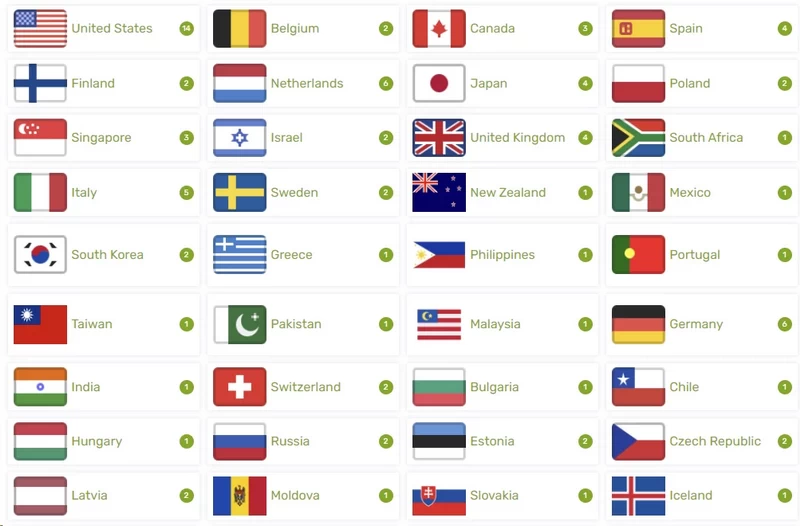
ZoogVPN maintains 100+ servers across to 55 countries, with the exact count varying by subscription tier and real-time node availability. By current industry standards, this is a very small footprint. NordVPN operates over 6,000 servers. ExpressVPN lists servers in 105 countries. Even mid-tier providers like Surfshark or Hotspot Shield have surpassed 3,000 servers. ZoogVPN’s network is not in the same category.
However, the physical composition of ZoogVPN’s servers partially compensates for the lack of scale. ZoogVPN operates predominantly on bare-metal (physical, dedicated) servers rather than virtual private servers (VPS) rented from cloud providers like AWS, DigitalOcean, or Hetzner.
Why bare-metal matters for cryptographic performance:
On a virtual server, the underlying physical CPU is time-sliced among multiple tenants. Your VPN workload competes for CPU cycles with other companies’ applications running on the same physical machine. This produces jitter in cryptographic processing times, because AES-NI acceleration is shared. On a dedicated bare-metal server, the CPU’s AES-NI instruction set is exclusively available to ZoogVPN’s processes. This is the primary reason ZoogVPN’s local server download benchmarks (143 Mbps on UK/EU servers) remain competitive despite the small network size. The hardware is not being shared.
The geographic deficit:
The bare-metal advantage is geographically constrained because ZoogVPN only deploys nodes where it makes economic sense at its scale:
- Africa: Coverage is effectively limited to a single node in Johannesburg, South Africa. For users in Kenya, Nigeria, Egypt, or Morocco, this means routing traffic across intercontinental fiber routes to Europe or South Africa. The resulting baseline latency ranges from 100ms to 300ms before any cryptographic overhead is added.
- South America: Coverage is sparse, typically limited to Brazil and Argentina. Users in Colombia, Peru, Chile, or Ecuador face similar geographic detours.
- Southeast Asia and Oceania: While Japan and Australia nodes exist, the benchmark data shows 496ms and 544ms RTT respectively, with 37% to 52% download degradation. These nodes are usable for basic browsing but are unsuitable for streaming, gaming, or real-time communication.
- Peak congestion: A small network cannot load-balance effectively. When usage spikes during peak evening hours in a given region, there may be only one or two nodes available to absorb demand in that geography. A single saturated bare-metal node produces degraded throughput for all users on that server, regardless of individual connection quality.
Streaming, P2P & censorship
The “streaming roulette” experience
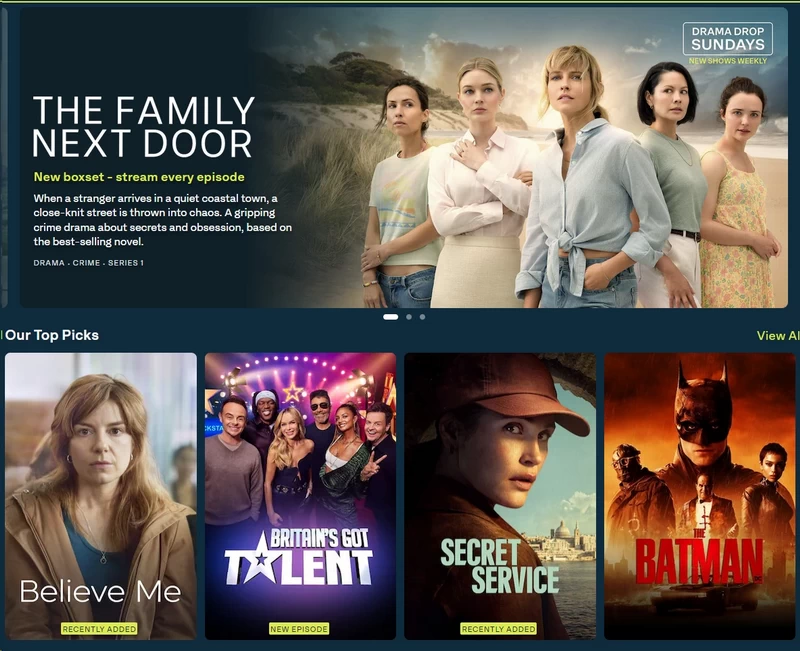
Streaming platform IP blocking operates on two mechanisms: static blacklists of known VPN IP address ranges and behavioral detection based on traffic patterns (multiple users sharing a single IP simultaneously generating session requests for the same CDN endpoint). Netflix, Disney+, and Amazon Prime Video all use layered combinations of both.
ZoogVPN designates specific “Streaming Servers” in the client UI with a ‘Play’ icon. These servers presumably rotate IPs more frequently and are maintained separately from general-purpose nodes. Testing these servers produced highly inconsistent results:
Successes:
When connected to specific nodes (notably London 3 and New York 1 in testing), ZoogVPN bypassed geo-restrictions on the following platforms without triggering proxy error codes:
- US Netflix, UK Netflix, and BBC iPlayer: full library access, including HD and 4K content
- HBO Max and ITV Hub: full HD playback with acceptable initial buffering under 5 seconds
Failures:
Outside these specific nodes, evasion capability deteriorated significantly:
- Disney+ and Hulu: Multiple consecutive attempts across different streaming-designated servers were blocked immediately. Both platforms returned proxy detection error codes before authentication completed.
- Amazon Prime Video: Results were erratic. Italian servers occasionally loaded content after 15 to 25 seconds of buffering. US and UK servers consistently failed to pass Amazon’s VPN detection heuristics. A session might succeed on the first connection attempt and fail on the next, with no change in configuration.
- DAZN and sports broadcasters: Blocked on every server tested, without exception.
- The “Originals Only” Netflix trap: When a Netflix connection succeeds but the VPN is only partially bypassing geo-detection, Netflix serves content it holds global distribution rights to (its originals catalog) while blocking regionally licensed third-party content. If you connect through ZoogVPN and find that your library contains only Netflix Originals like “Stranger Things” or “Squid Game,” Netflix has detected the proxy and is silently applying restrictions. The connection appears to work because originals play, but the geo-unblocking has failed.
ZoogVPN lacks the large, continuously rotated IP pools that platforms require to sustain reliable long-term evasion. Streaming services update their IP blocklists frequently, and a small server network cannot rotate IPs fast enough to stay ahead of blacklisting cycles.
P2P routing and torrenting risks
The BitTorrent protocol requires your client to broadcast your IP address to every peer in the swarm to establish download connections. Copyright enforcement organizations run passive monitoring nodes that sit in torrent swarms, collect visible IP addresses, and send DMCA notices to the corresponding ISPs. A VPN routes your traffic through its own IP before it enters the swarm, making the VPN’s IP address the one visible to monitoring nodes.
ZoogVPN designates specific P2P-optimized servers (marked ‘P2P’ in the client). Testing these servers with the WireGuard protocol and ZoogVPN’s SOCKS5 proxy mode yielded the following results:
Technical positives:
- Download throughput: P2P servers on WireGuard sustained download bitrates averaging near 9.6 MiB/s on a high-bandwidth test connection. The bare-metal servers handled the UDP packet load of active BitTorrent swarms with low jitter, which is consistent with the hardware exclusivity benefit described in the network section.
Technical negatives:
- No port forwarding: ZoogVPN does not support port forwarding through its NAT firewall. In a BitTorrent swarm, if your client cannot accept incoming connections on a designated port, you operate in a “firewalled” state. Your client can only initiate outbound connections to peers who are listening. Peers behind firewalls cannot initiate connections to each other, so a large fraction of the available peer pool is inaccessible to you. This reduces your effective swarm connectivity, which reduces download speed on torrents with low seed counts and collapses your upload (seeding) capability almost entirely. Private trackers that enforce upload ratio requirements will penalize you for the resulting poor ratio.
- The macOS kill switch liability: As detailed in the client ecosystem section, the macOS kill switch failure during server transitions is directly catastrophic for torrenting. An active BitTorrent client will immediately route UDP packets through the default gateway during the brief window when the kill switch drops its block state, broadcasting your real IP to every monitoring node in the swarm at that moment.
On a Windows machine with stable network conditions and no server switching during a session, the P2P servers perform adequately for basic downloading. If you require port forwarding, use a private tracker, or use an Apple device, ZoogVPN’s architecture is incompatible with secure and performant file sharing.
Customer support & documentation
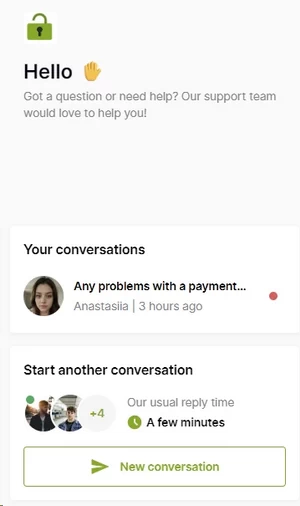
When a VPN tunnel fails to initialize, or a streaming platform blocks an entire IP subnet, support quality becomes directly relevant to whether the service is usable. ZoogVPN runs a two-channel support system with meaningfully different performance characteristics depending on how you contact them.
The Live Chat interface is marketed as a 24/7 resource. In practice, response times are generally good: connecting to a human agent within two to three minutes is consistent with testing. The limitation is the depth of technical knowledge available through this channel. Agents work from pre-scripted diagnostic flows, covering standard scenarios like “switch to OpenVPN TCP” or “reinstall the client.” When queries escalate beyond these scripts, the live chat experience deteriorates quickly. Questions about the macOS kill switch’s packet filter implementation, asymmetric routing latency on specific transit paths, or the DNS resolution architecture produce either incorrect technical responses (one documented case involved a live chat agent confusing a “virtual server” with a “virtual private network”) or immediate escalation to email ticketing. There is no second-tier live technical support.
The email ticketing system handles escalated issues with response times generally in the two-to-twelve-hour range, which is acceptable for non-urgent problems. For immediate connectivity failures, the turnaround time makes email support functionally useless. A VPN tunnel that fails to connect in a hotel on a conference morning cannot wait twelve hours for a diagnosis.
ZoogVPN’s self-serve knowledge base and documentation reflects the same beginner-oriented limitation. Installation guides for the Windows executable, basic configuration walkthroughs for OpenVPN on DD-WRT routers, and a handful of FAQ articles cover the documentation library. There is no documentation on configuring custom MTU values to avoid MTU black-hole issues (a common problem on hotel networks with non-standard Maximum Transmission Unit settings), no guidance on tuning SOCKS5 proxy settings within specific torrent clients like qBittorrent or Deluge, and no technical explanation of how the kill switch interacts with the macOS packet filter. Users who want to troubleshoot beyond restarting the app or switching protocols are entirely on their own.
FAQ
Results are inconsistent. ZoogShadowing wraps VPN traffic in a TLS tunnel on port 443, which defeats basic DPI classification. However, the Great Firewall uses active probing to test whether port 443 connections behave like real HTTPS servers. ZoogShadowing does not appear to fully simulate a convincing HTTPS server response under active probing, so connections in China frequently require significant trial-and-error server switching and may fail entirely during periods of heightened enforcement.
ZoogVPN relies primarily on bare-metal dedicated servers rather than virtual private servers. Bare-metal hardware provides dedicated CPU and AES-NI access, improving cryptographic throughput and reducing jitter compared to shared VPS environments. The downside is geographic concentration: the physical server footprint of 50 to 100 nodes across 25 to 55 countries is very small, creating significant latency for users in Africa, South America, and Southeast Asia who must connect to distant nodes.
Yes, under specific conditions. Designated streaming servers can successfully access US Netflix, UK Netflix, and BBC iPlayer without triggering proxy error codes. The caveat: Netflix’s IP blocklisting frequently results in the “Originals Only” state, where licensed third-party content is blocked but Netflix-owned originals play normally. This indicates geo-detection has succeeded on Netflix’s side. Reliable access requires manually cycling through streaming-designated servers until you find one that has not yet been blacklisted, which may change from session to session.
Yes, for premium users on Windows, Android, and iOS. WireGuard uses the ChaCha20 stream cipher with Poly1305 authentication, which is highly efficient on ARM processors that lack hardware AES acceleration. This makes WireGuard the fastest protocol option available in the client, particularly on mobile devices. Free-tier users are restricted to OpenVPN and IKEv2.
The refund window is 7 days, which is shorter than the 30-day standard offered by most premium competitors. The window is further constrained by a 2GB bandwidth cap: exceeding 2GB of data transfer during the trial period immediately voids the refund, regardless of how much time remains. A single 4K Netflix test stream, one baseline speed test run, or any meaningful P2P download will exceed this cap. The refund policy is structured in a way that makes thorough evaluation before committing financially very difficult.

