
VeePN Review 2026: Cheap, Loaded With Extras – But Can You Trust It?
Its biggest strengths are low prices, support for up to 20 simultaneous connections, and useful extras such as breach monitoring and disposable email identities. The main drawbacks are the lack of an independent no-logs audit, inconsistent streaming performance, and customer support that can make reaching a human difficult.
- Buy VeePN for cheap everyday privacy, not for verified anonymity.
- Skip it entirely if your safety depends on your VPN provider’s honesty.
- Test the kill switch during your first week, as our results were inconsistent.
- Choose the Max plan only if you genuinely need more than 10 devices.
- Set a calendar reminder before renewal, because the second-term price jumps sharply.
- Don’t buy VeePN primarily for Netflix or BBC iPlayer without testing first.
- Treat the free browser add-on as a demo, since it leaves your other apps exposed.
- Expect email support to take hours or days, so avoid it for time-critical problems.
- Spend 50 cents more per month on Surfshark or ExpressVPN if audits matter to you.
- Use the closest server available, because VeePN loses more speed to distance than rivals.
| 💰 Pricing | From $1.99 to $14.99/mo |
| ✅ Free Trial | ✅ (3-day free trial on desktop/web; up to 7 days on iOS/Android) |
| 📆 Money Back Guarantee | 30 Days |
| 🗺 Jurisdiction | Panama |
| 🖥 Number of Servers | 2,600+ across 196+ locations |
| 📝 Logging Policy | No‑logs |
| 📥 Torrenting/P2P | Yes, supported on dedicated P2P servers |
| 🍿 Streaming | Unblocks Netflix, HBO Max, Disney+, BBC iPlayer, Amazon Prime |
| 🛡 Kill Switch | ✅ |
| ⚙️ Protocols | WireGuard, OpenVPN, IKEv2, Shadowsocks, OpenConnect |
| 🛠 Support | 24/7 Live Chat & Email Support |
| 💻 Simultaneous Devices | 5 to 20 devices |
| 🔥 Current Deal | Up to 83% OFF (+4 months free on the 2-year plan) |
Overview
This VeePN review starts with the uncomfortable question most write-ups skip. VeePN sells a lot of security for very little money. So what exactly are you giving up?
Here’s the short answer: verification. VeePN charges as little as $1.99 per month on a two-year plan. It throws in antivirus, a data-breach monitor, and a fake-identity generator. On paper it looks like a bargain. But almost none of its biggest privacy promises have been checked by an outside firm.
That’s the tension running through this entire review. VeePN is a competent, cheap, feature-heavy service. It is also one of the least independently verified providers at its price point.
The service launched in 2017 and markets itself from Panama. It has since expanded well beyond a plain VPN. The 2026 product is really a small security bundle wearing a VPN badge.
That bundle includes an ad blocker called NetGuard, a Windows and Android antivirus, a breach monitor, and an “Alternative ID” tool. The last one generates throwaway personas and forwarding email addresses for sign-up forms.

The Company Question Nobody Asks
VeePN’s marketing leans hard on Panama. Panama has no mandatory data-retention law. That genuinely helps.
But jurisdiction – the country whose laws and courts can reach a company – is only as real as the corporate structure behind it. VeePN’s Google Play listing has been associated with a US-registered entity in Florida. VeePN’s own materials point to Panama.
We could not fully reconcile those details at the time of writing. That’s not proof of anything sinister. It is a reason to treat the Panama claim as marketing rather than a guarantee.
Who VeePN Is Right For
The Casual Browser is the clearest fit. You want your café Wi-Fi session hidden from strangers on the same network. VeePN does that for pocket change, with an app that needs no explanation.
The Family User is the second-best fit. The Max plan covers 20 devices. Most premium rivals cap you at 8 to 10. For a household of phones, tablets, laptops, and a smart TV, that headroom matters.
The Remote Worker can make it work with caveats. Connections are stable on nearby servers. But the ability to send some apps through the VPN and others around it is missing on Mac and iPhone.
Who Should Skip It
The Privacy-Conscious user should walk away. Not because VeePN is proven bad – because nothing important has been proven at all. A journalist or activist needs audited claims, not confident ones.
The Streamer should think carefully. VeePN’s unblocking results are the most inconsistent we’ve seen in any recent VPN review. In our tests, Netflix worked without issues at times, but on other occasions we couldn’t even load the homepage.
If streaming is your main reason to buy, this is a gamble. Use the 30-day refund window as your actual test.
Pricing & Plans
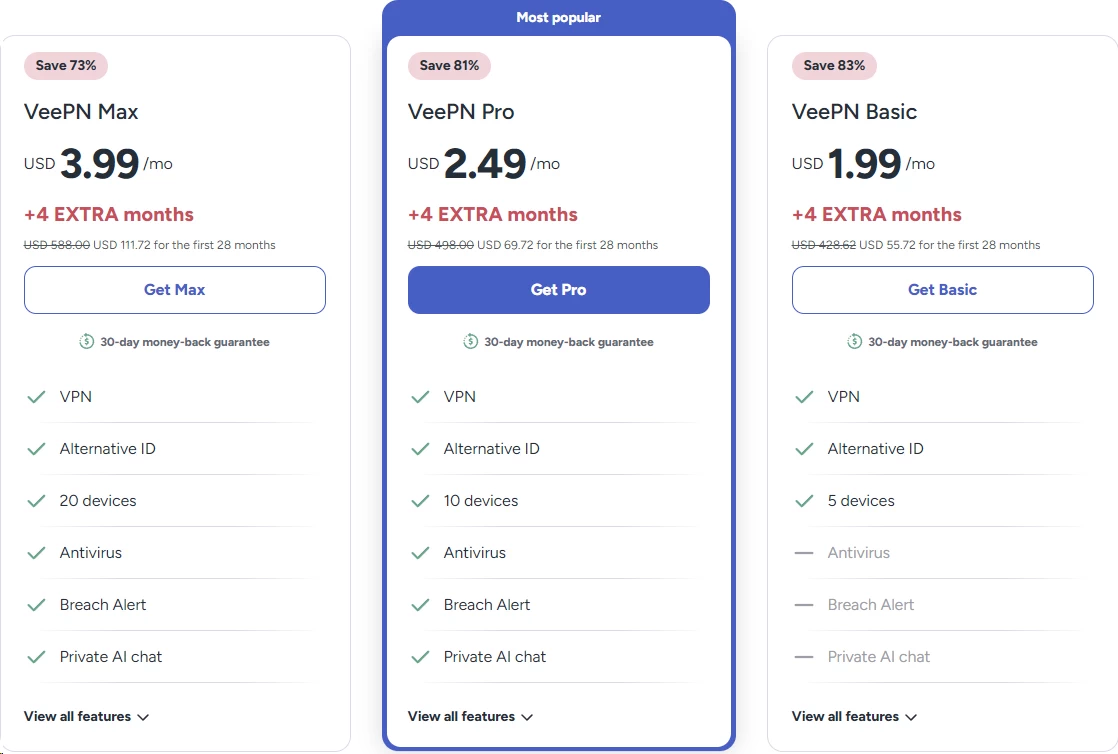
VeePN’s pricing is one of its biggest advantages, but it can also be surprisingly confusing. There are three plans, Basic, Pro, and Max, each available across three billing periods, giving you nine different combinations to choose from. Since the differences between the plans are not always clear, it is easy to end up paying for features you may not actually need.
Promotional prices also change frequently, so be sure to check the official site for the latest pricing before making a purchase.
| Plan | 24-Month | 12-Month | 1-Month | Devices |
|---|---|---|---|---|
| Basic | $1.99/mo ($55.72 for 28 months) | $2.99/mo ($47.84 for 16 months) | $11.99/mo | 5 |
| Pro | $2.49/mo ($69.72 for 28 months) | $3.39/mo ($54.24 for 16 months) | $12.99/mo | 10 |
| Max | $3.99/mo ($111.72 for 28 months) | $5.99/mo ($95.84 for 16 months) | $14.99/mo | 20 |
Both long-term plans include four bonus months. That’s why a “24-month” plan bills for 28.
All tiers include the VPN itself plus the full extras bundle. The only difference between Basic, Pro, and Max is how many devices you can connect at once.
That $1.99 is an introductory rate that applies only to your first billing term. Keep in mind that automatic annual renewal will cost significantly more than the introductory price.
It is worth checking the renewal terms before purchasing and setting a reminder before your subscription renews. This is standard practice across the VPN industry. It is still worth a calendar reminder before your term ends.
How VeePN Prices Against the Big Three
Here’s where VeePN sits against the three benchmarks we use throughout this review.
| Provider | Cheapest Long Plan | Monthly Plan | Devices |
|---|---|---|---|
| VeePN | $1.99/mo (24-mo Basic) | $11.99 | 5–20 |
| Surfshark | $2.49/mo (24-mo Starter) | $16.45 | ♾️ Unlimited |
| ExpressVPN | $2.99/mo (24-mo Basic) | $14.99 | 10 |
| NordVPN | $3.49/mo (24-mo Basic) | $14.99 | 10 |
Read that table twice. VeePN’s headline advantage is 50 cents a month over Surfshark VPN.
Over two years, that’s about $12 in savings. In exchange, you give up an audited no-logs policy and materially better streaming reliability. For most buyers, that’s a bad trade.
Where VeePN Genuinely Wins on Price
The monthly plan is the exception. VeePN charges $11.99 per month with no commitment. Surfshark charges $16.45.
That $4.46 monthly difference can make a real difference for short-term use. If you’re heading abroad for just a few weeks, this option can offer meaningful savings.
The Max plan is the other genuine win. Twenty simultaneous devices for $3.99 per month has few equals. Only Surfshark’s unlimited-device policy beats it, and Surfshark costs less per month with no device cap at all.
What the Extras Are Actually Worth
VeePN bundles antivirus, breach monitoring, an ad blocker and a disposable identity tool into every plan. That sounds like a lot of value. Be skeptical.
Windows already includes a competent built-in antivirus. Free breach-checking services exist. Free ad blockers are excellent and widely available.
Priced honestly, the bundle adds maybe a dollar or two of monthly value for most people. It is a nice extra, not a reason to choose VeePN over an audited competitor.
The comparison that matters: NordVPN’s Plus tier bundles similar tools at $4.99 monthly on a two-year plan. VeePN’s Pro tier costs $2.49. You save $2.50 monthly and lose the audit.
Payment and Cancellation
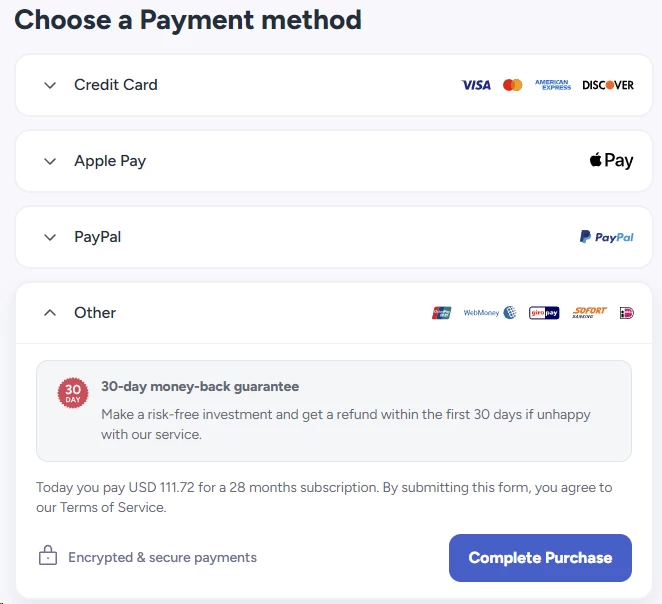
VeePN accepts cards, PayPal, and cryptocurrency. Crypto matters for The Privacy-Conscious user who doesn’t want a payment trail linking them to a VPN account.
Refunds go through email support rather than a self-service button. Users have described this as slow but generally successful. Ask for the refund in writing and keep the thread.
Features & Apps
VeePN gives you more tools than most VPNs at any price. Whether you’ll use them is another question.
Platform Coverage
| Platform | App Available | Notes |
|---|---|---|
| Windows | ✅ | The most complete app; gets features first |
| macOS | ✅ | Missing per-app routing |
| Android | ✅ | Full-featured, includes antivirus |
| iOS / iPadOS | ✅ | Most limited version |
| Linux | ⚠️ | Command-line only, no clickable interface |
| Android TV / Fire TV | ✅ | Native app, remote-friendly |
| Apple TV | ✅ | Supported on modern tvOS |
| Routers | ⚠️ | Manual setup, no automated installer |
| Chrome / Firefox / Edge | ⚠️ | Add-ons only — browser traffic, not full protection |
That’s broad coverage, but there are a few important gaps worth pointing out that VeePN’s marketing doesn’t always make clear.
Linux users don’t get a dedicated clickable app, so the service requires a terminal based setup. Router support is available, but it requires manual configuration, which can be difficult for less technical users.
The Apps Themselves
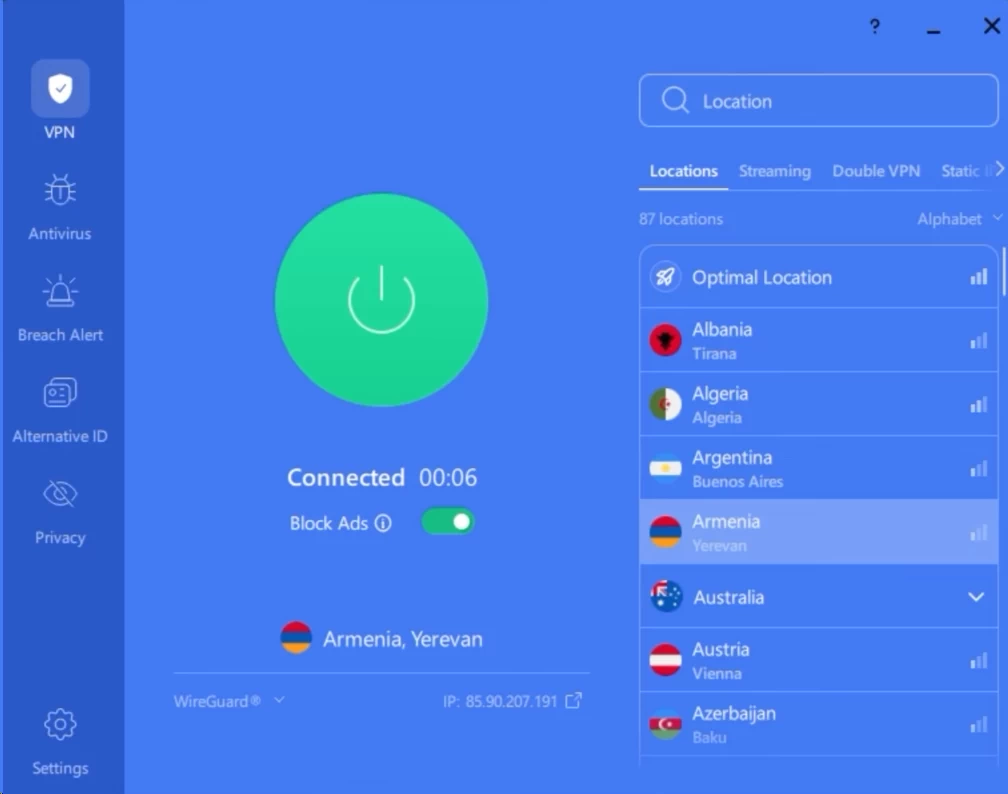
We found the Windows and Android apps genuinely pleasant to use. A large connect button takes center stage, with a location list right below it. That’s essentially it.
Connecting to nearby servers takes roughly three to six seconds. The app remembers your last location, so you can reconnect quickly. There is no tutorial to click through and no maze of settings to navigate.
You can use the app without ever opening the settings menu, and that’s a compliment. Most VPN apps bury simplicity under features that many users never need.
The macOS app is cleaner but more limited. The iPhone app is more stripped down still. This is fairly common, but the difference between VeePN’s Windows and iPhone apps is wider than average.
Choosing How Your Data Travels
A protocol is the type of road your data travels on. Some roads are fast and modern. Others are older, slower, but work almost anywhere.
VeePN offers an unusually wide selection.
| Protocol | Plain-English Purpose | Best For |
|---|---|---|
| WireGuard | The new motorway is the fastest option available | Streaming, downloads, everyday use |
| OpenVPN | The reliable A road is slower but extremely well tested | Stability on flaky connections |
| IKEv2 | Handles switching networks without dropping | Phones moving between Wi-Fi and mobile data |
| Shadowsocks | Disguises VPN traffic as ordinary web traffic | Networks that block VPNs |
| OpenConnect | A second disguise option, Windows only | Heavily restricted networks |
Most people should leave this setting on automatic. WireGuard is the sensible default when speed is the priority.
The disguise options are useful for a more specific group of users. Some networks, including school Wi Fi, office systems, and national firewalls, can detect and block VPN connections. Disguised traffic is designed to look like regular web browsing, helping it get past these filters.
This can be a real advantage for users in countries with restrictive internet access. The main limitation is that OpenConnect is available only on Windows. On mobile devices, the available options are much more limited.
Split Tunneling: Great When Available
Split tunneling lets you choose which apps use the VPN and which connect directly to the internet. Think of it as having two routes: one protected by the VPN and one that connects normally.
It is one of the most useful features for people who work remotely. You can route work related apps through the VPN while letting video calls use your regular connection. This keeps calls running smoothly while protecting your work traffic.
VeePN offers split tunneling only on Windows and Android. Mac and iPhone users do not have access to the feature.
That’s a significant limitation. NordVPN, Surfshark, and Hotspot Shield VPN offer more comprehensive platform support. If you work primarily on a Mac, this limitation alone could be a reason to choose another VPN.
The Extras Bundle
Every VeePN plan includes four add-on tools. This is where the value argument lives.
NetGuard blocks ads, trackers, and known malicious sites at the network level. It works reasonably well and noticeably speeds up ad-heavy pages. It is not a replacement for a dedicated ad blocker in your browser.
VeePN Antivirus scans Windows and Android devices for malware and ransomware. It’s a basic real-time scanner. Windows already ships with a competent built-in defender, so treat this as a bonus rather than a reason to buy.
Breach Alert watches public breach databases and dark web dumps for your email address. If your details appear in a leak, you get notified. This is quietly the most useful extra in the bundle.
Alternative ID generates a throwaway persona and a forwarding email address. You use it to sign up for services that don’t need your real details. The forwarding email passes messages to your real inbox without revealing it.
There is one important tradeoff, though. VeePN still needs to know the connection between your alternative address and your real one, so you are ultimately trusting the service to manage that information securely.
Double VPN
VeePN offers a Double VPN option that routes your traffic through two VPN servers in different locations instead of one.
Think of it as changing taxis during a journey. Someone tracking the first taxi loses track of you when you switch to the second one.
The extra layer of routing can significantly reduce your connection speed. It can be useful if you need additional privacy, but most users will not benefit from it. For everyday browsing, it is better to leave this feature turned off.
Leak Protection
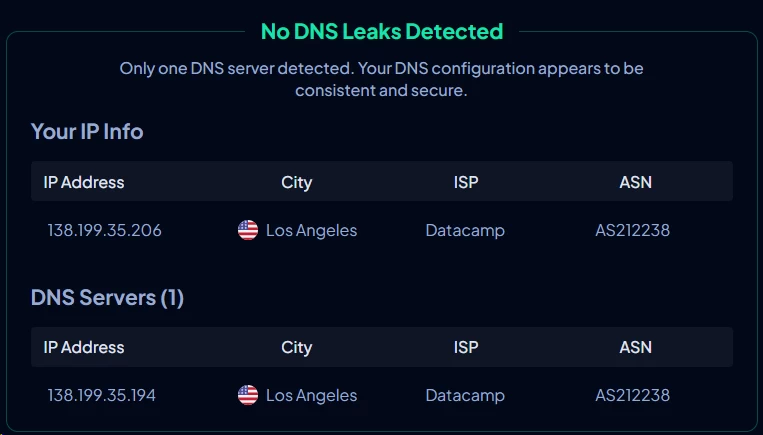
When you enter a web address, your device contacts a DNS server to find the corresponding numerical IP address. Think of it as a phone book for the internet. If those DNS requests bypass the VPN, your internet provider could see which websites you visit.
In our tests, VeePN showed no DNS leaks. We also found no leaks through IPv6, a newer type of internet address that some VPNs fail to handle properly, or WebRTC, a browser technology used for video calls that can sometimes expose your real IP address.
Speed & Performance
Testing Environment
| Setting | Value |
|---|---|
| Base connection | 500 Mbps download / 500 Mbps upload |
| Testing origin | Los Angeles, California, USA |
| Protocol | WireGuard |
| Device | Windows 11 desktop, wired connection |
| Tests per server | 5 runs, averaged, across morning and evening |
| Measurement tool | Ookla Speedtest |
VeePN Speed Test Results
| Server Location | Download | Upload | Ping | Speed Loss |
|---|---|---|---|---|
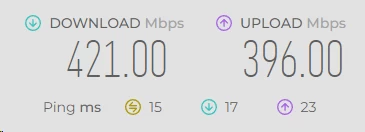
| Los Angeles (local) | 421 Mbps | 396 Mbps | 15 ms | 15.8% |
| New York (cross-country) | 356 Mbps | 329Mbps | 38 ms | 28.8% |
| London (intercontinental) | 264 Mbps | 214 Mbps | 106 ms | 47.2% |
| Tokyo (long-distance) | 167 Mbps | 111 Mbps | 149 ms | 66.6% |
A 15.8% speed loss on a local server is reasonable. Download speeds remained high at 421 Mbps, with only 15 ms of latency.
The further the server is from your location, the more noticeable the slowdown becomes. New York showed a 28.8% speed loss, while London reached 47.2%. Tokyo was the biggest drop at 66.6%, with download speeds falling to 167 Mbps.
Is that enough? For most everyday activities, yes. 4K video typically needs around 25 Mbps, while HD streaming requires roughly 5 Mbps. Even the Tokyo connection delivered far more than enough for either.
The bigger issue is consistency across distances. Nearby servers performed very well, while long distance connections showed a much larger performance penalty.
In practical terms, VeePN should feel fast and responsive when you connect to a nearby server. If you choose a server on the other side of the world, expect a noticeable drop in speed and higher latency. For everyday browsing and streaming, the results are still more than adequate.
Real-World Performance
| Activity | Works Well? | Notes |
|---|---|---|
| 4K streaming | ✅ | Comfortable on nearby servers, occasional buffering on distant ones |
| HD streaming | ✅ | No issues anywhere |
| Web browsing | ✅ | Feels normal; NetGuard makes ad-heavy sites load faster |
| Video calls | ✅ | Fine on local and regional servers |
| Gaming | ⚠️ | Playable locally; 149 ms to Tokyo will hurt competitive play |
| Torrenting | ⚠️ | Allowed on most servers, but no dedicated file-sharing network |
| Large downloads | ✅ | Strong nearby, slower but usable across oceans |
Torrenting means peer to peer file sharing, where files are exchanged directly between users rather than downloaded from a central server.
VeePN allows torrenting on most of its servers, but there is no dedicated setup or special optimization for it. US servers also have restrictions on peer to peer traffic.
Security & Privacy
This is the section that decides whether VeePN is worth your trust. The short version: the locks are good, the paperwork is not.
The Encryption Itself
Encryption scrambles your data into gibberish that only the right key can unscramble. Picture sealing a letter inside a safe before posting it.
VeePN uses AES-256. That’s the same standard used by banks and governments. There is no meaningful way to break it with current technology.
The service also uses perfect forward secrecy. This changes your key regularly during a session. If someone somehow captured one key, they’d only unlock a few minutes of traffic rather than everything.
The No-Logs Policy: What VeePN Claims and What We Know
A no-logs policy means a VPN provider promises not to keep records of your online activity. It is one of the most important factors to consider when evaluating a VPN’s privacy protections.
VeePN states that it does not store your browsing history, connection timestamps, or assigned IP addresses. However, its privacy policy is worth examining closely to understand exactly what data the service may collect and retain.
| Claim | What Our Review Revealed |
|---|---|
| No activity logs | Broadly supported, with no evidence of browsing history retention found. |
| No IP address storage | ⚠️ Disputed, as the privacy policy appears to describe the collection of IP addresses. |
| No connection logs | ⚠️ Disputed, as our findings indicate that session duration and data usage may be collected. |
| No third-party sharing | ⚠️ Disputed, with reports of analytics data being shared with major advertising platforms. |
| RAM-only servers | ⚠️ Claimed, not verified |
To be fair to VeePN, privacy policies are often written in complex legal language that can sound more concerning than the actual practices. This is not unique to VeePN, as marketing claims and legal documents can differ across the VPN industry.
However, that is precisely why independent verification matters. When a provider’s marketing promises do not clearly align with its privacy policy, an independent audit is the best way to establish whether its data handling practices match its claims.
VeePN’s Audit Status: What We Know
VeePN has never had its no-logs policy independently audited. Full stop.
There is one real audit, and it is worth crediting properly. In spring 2021, the German security firm Cure53 examined VeePN’s Chrome and Firefox browser add-ons. The firm was given source code and test accounts, which is the thorough way to do it.
Cure53 found three issues, including one rated high severity. VeePN fixed all of them during the assessment. Cure53’s overall conclusion was positive. The report is publicly available.
That is a genuine mark in VeePN’s favour, and more than many budget VPNs can show. But understand its limits precisely.
| What Was Audited | What Was Not |
|---|---|
| Chrome browser add-on (2021) | The Windows, Mac, iPhone, or Android apps |
| Firefox browser add-on (2021) | The server infrastructure |
| — | The no-logs policy |
| — | Anything at all since 2021 |
A five-year-old audit covering two browser extensions does not verify the security or privacy of the VPN service itself. It only applies to the specific extensions that were examined.
How VeePN Compares to Other VPN Providers
Here’s where the benchmark providers stand on the same question.
| Provider | No-Logs Audit | Most Recent | Scope |
|---|---|---|---|
| VeePN | ❌ Never | 2021 | Browser add-ons only |
| NordVPN | ✅ Yes | Repeated, ongoing | No-logs policy and infrastructure |
| ExpressVPN | ✅ Yes | Repeated, ongoing | No-logs policy, apps, servers, routers |
| Surfshark | ✅ Yes | Repeated, ongoing | No-logs policy and infrastructure |
All three benchmarks cost within a dollar of VeePN. All three have submitted their central promise to outside scrutiny, repeatedly. VeePN has not.
Here’s the thing most VPN reviews won’t tell you: a no-logs policy means nothing without an independent audit to back it up. It’s like a restaurant claiming it’s clean. You’d still want to see the health inspector’s report.
Jurisdiction and Why Panama Matters
Panama can be an attractive jurisdiction for a VPN provider because it has no general mandatory data retention requirement comparable to those in some other countries. It also sits outside the Five Eyes, Nine Eyes, and Fourteen Eyes intelligence-sharing alliances.
VeePN highlights its Panamanian jurisdiction as a privacy advantage. However, its corporate structure appears less straightforward than the marketing suggests. Some app store listings have been associated with a company registered in Florida, United States.
The United States is a member of the Five Eyes alliance, but a company’s registration or presence in the country does not automatically establish what data it must disclose or which laws apply to every part of its operations.
We could not definitively establish VeePN’s complete corporate structure at the time of writing. This uncertainty is worth considering if privacy and the legal handling of your data are priorities.
Servers & Locations
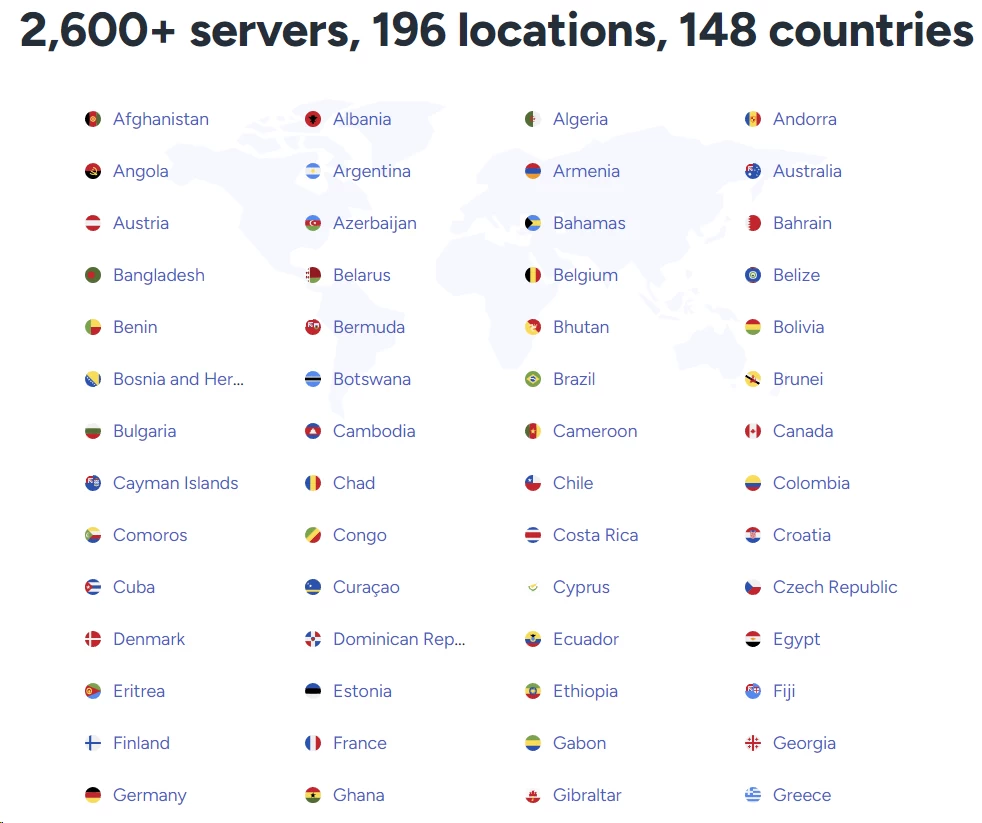
VeePN advertises a network of 2,600+ servers across 196 locations in 148 countries. On paper, that is an extensive network, giving users plenty of options for connecting to nearby servers for better speeds or choosing international locations to access region specific content. However, the number of advertised locations does not necessarily reflect the number of physical server locations.
Many of VeePN’s listed locations are virtual, meaning the server’s IP address can correspond to a country different from the one where the physical hardware is actually located. Virtual locations help VPN providers offer broader geographic coverage without maintaining physical infrastructure in every advertised country. However, they may not be ideal for users who specifically want their traffic to pass through hardware located within a particular country.
This distinction is worth keeping in mind when evaluating VeePN’s global reach. Its advertised figures suggest broad geographic coverage, but the total number of locations alone does not tell you how much physical infrastructure the provider operates or how consistently its servers perform across different regions.
Where the Coverage Is Good
| Region | Coverage | Assessment |
|---|---|---|
| North America | Strong | Multiple US cities, Canada well served |
| Western Europe | Strong | The densest part of the network |
| East Asia | Adequate | Japan, Singapore, Hong Kong, South Korea present |
| Australia / NZ | Adequate | Enough for regional content |
| Latin America | Thin | Major countries only |
| Africa | Very thin | Often a single South African location |
| Middle East | Very thin | Sparse, and some options likely virtual |
Europe and North America are particularly well covered by VeePN’s network. For users who live or travel within these regions, the range of available server locations should be more than sufficient for everyday browsing, streaming, and general online use.
Those looking to access content from the US, UK, Canada, or Australia also have several locations to choose from. Likewise, households in Europe and North America should have plenty of options for connecting to nearby servers and maintaining reliable speeds. However, access to specific streaming libraries can vary, as not every server is guaranteed to bypass a platform’s regional restrictions.
Where the Gaps Hurt
Africa is the standout weakness. A single location on an entire continent means anyone in the region connects through Europe. That adds distance and drags speed.
The Middle East is similarly thin, which matters because it includes several countries where people most need a VPN. The Privacy-Conscious user in a restrictive country may find no nearby option at all.
Server Types
VeePN divides its network into a few categories.
- Standard servers – the general-purpose bulk of the network
- Streaming-optimised servers – roughly 20 locations tuned for video platforms
- Double VPN servers – the two-hop option described earlier
- Static address servers – give you the same address each time, useful for banking sites that flag address changes
Twenty streaming servers is still a relatively small pool. PrivadoVPN and Hotspot Shield VPN do not separate streaming servers in the same way, as their networks are designed to handle streaming across a broader range of locations. VeePN’s approach offers dedicated options for streaming, but it may be more limiting for users who want a wider choice of servers.
Static Addresses: A Quiet Win
Most VPN servers assign shared IP addresses that can change over time. This helps with anonymity, but it can sometimes trigger security checks on banking sites.
A static IP address stays the same each time you connect. It can also help with remote work, especially when company systems only allow connections from approved IP addresses.
VeePN offers this feature without an obvious extra charge, which is unusual. Several competitors charge more for a static IP.
Why a Bigger Network Isn’t Always Better
It would be easy to dismiss 2,600 servers as small. That’s not quite fair.
For a user in London, New York, or Toronto, VeePN’s network is more than sufficient. You’ll never exhaust the nearby options, and network size stops mattering once coverage is adequate.
The size question only bites in two situations. First, if you need a country VeePN doesn’t properly serve. Second, if crowding on popular servers degrades your speed.
The second scenario is the more likely one, and the published speed variance suggests it happens.
Practical Advice on Server Choice
Pick the closest server that does the job. Distance costs speed, and VeePN loses more to distance than its rivals do.
If a location feels slow, disconnect and reconnect. VeePN’s load balancing appears inconsistent, and a second attempt often lands you somewhere better.
Streaming & Unblocking

If you’re reading this section first, here’s the summary: VeePN’s streaming performance is the least predictable thing about it.
Streaming platforms actively hunt for VPN addresses and block them. Providers respond by rotating addresses. It’s a permanent arms race, and results shift month to month.
Our Assessment by Platform
| Platform | Reliability | Honest Assessment |
|---|---|---|
| Netflix (US) | ⚠️ | Worked in our tests, but we sometimes had to switch servers. |
| Netflix (other regions) | ⚠️ | Less reliable than the US library. We had more trouble accessing Canadian and Australian content. |
| BBC iPlayer | ⚠️ | Results were inconsistent across our testing. |
| Disney+ | ✅ | One of the most reliable streaming platforms in our tests. |
| Amazon Prime Video | ⚠️ | Mixed results. Access varied depending on the server we used. |
| Hulu | ⚠️ | We were able to access it, but performance was inconsistent and slowdowns occurred. |
| HBO Max | ✅ | We encountered few problems accessing content. |
| YouTube | ✅ | Worked reliably across the servers we tested, with no significant blocking issues. |
How This Compares
Reliability is exactly what you pay a premium for in this category.
ExpressVPN and Bitdefender VPN both maintain broadly consistent unblocking across major platforms, and reviewers rarely disagree about whether they work. Surfshark sits slightly behind but remains dependable. VeePN’s streaming performance is more disputed, with less consistent results across reviews.
For context: with ExpressVPN, you connect to a UK server and iPlayer generally loads. With VeePN, you may connect to three UK servers first.
That’s the 50-cents-a-month difference made concrete.
Practical Tips If You Buy It Anyway
- Use VeePN’s streaming-optimised servers first – that’s what they exist for
- If a platform blocks you, disconnect and pick a different city in the same country
- Clear your browser cookies after switching servers
- Try WireGuard first, then switch protocols if the page won’t load
- Test every platform you care about inside the 30-day refund window
Smart TV apps can make switching VPN servers a hassle. What takes a few seconds on a laptop becomes much more tedious when you’re navigating menus with a TV remote.
Regional Libraries and Sports
Switching Netflix regions proved more difficult than accessing the platform itself. In our tests, the US library was more reliable, while accessing Canadian and Australian catalogues was less consistent.
This matters if you live abroad and want to watch content from your home country. VeePN performed better with US and UK libraries than with some other regions.
Live sports are another concern. Even a brief connection drop can mean missing a crucial moment in a match. Given the inconsistent streaming performance we observed, VeePN would not be our first choice for live sports, where a stable connection matters most.
The Free Add-On and Streaming
Some people try VeePN’s free browser add-on for streaming. It sometimes works, and that creates a misleading first impression.
The add-on runs as a simple relay rather than a full protected connection. It can be slower and less stable than the paid apps, and it only covers browser tabs. Streaming on a smart TV, console, or streaming stick requires the paid service. There’s no free path to that.
User Reviews
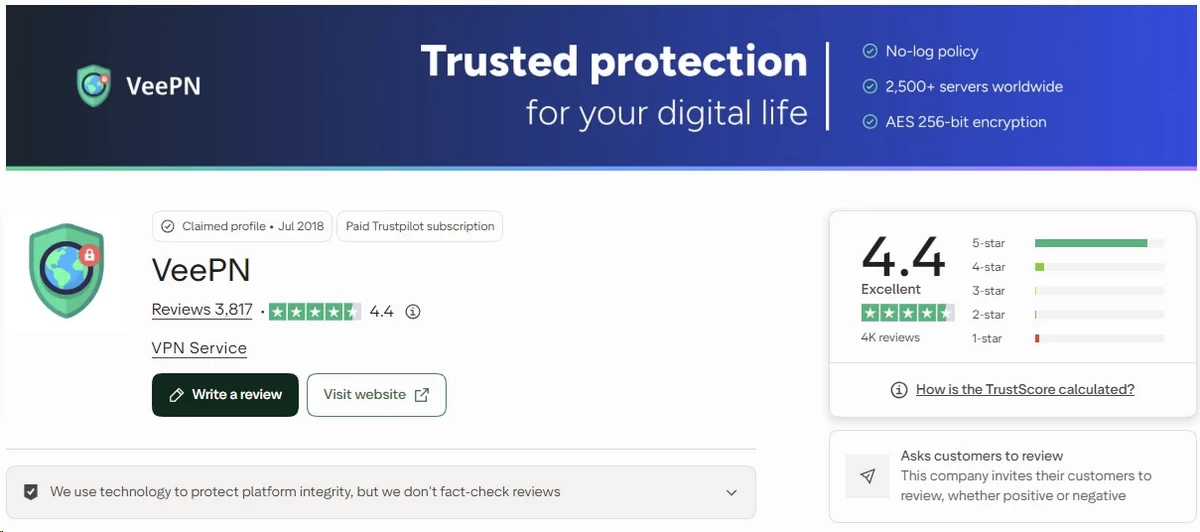
Expert reviews show how a VPN performs under testing. User reviews reveal what happens when things go wrong in everyday use.
Ratings at a Glance
| Platform | Rating | Approximate Volume |
|---|---|---|
| Trustpilot | ⭐ 4.4/5 | ~3,000–4,000 reviews |
| Google Play | ⭐ 4.2/5 | ~99,000 ratings, 1M+ downloads |
| Apple App Store | ⭐ 4.5/5 | Not independently confirmed |
| Reddit sentiment | 🟡 Mixed | Community-driven, low volume |
Those are respectable numbers. They deserve a caveat.
Are These Reviews Organic?
VPN companies routinely prompt happy users to leave reviews. VeePN’s Trustpilot distribution skews heavily positive, which is common for prompted review programmes.
We saw no evidence of fabricated reviews. We did see the pattern typical of active review solicitation – lots of short, positive, recent entries.
The company does appear to respond to negative reviews, which is a genuine positive signal. Silent companies are usually worse companies.
Read the one-star and two-star reviews first. They’re where the real information lives.
What Trustpilot Reviewers Praise
- Price. Overwhelmingly the most common theme. Users feel they got more than they paid for.
- Ease of setup. Repeated mentions of installing and connecting within minutes.
- Device coverage. Users with many devices specifically call out the 10 and 20-device tiers.
- Refund handling. A recurring theme that refunds were eventually honoured, if slowly.
- The extras bundle. Breach Alert and the ad blocker get named more often than we expected.
What Trustpilot Reviewers Complain About
- Billing surprises. Renewal pricing catching people off guard is the single loudest complaint.
- Support delays. Multi-day waits for email replies come up constantly.
- Connection drops. Reports of the app disconnecting without obvious cause.
- Streaming failures. Users who bought specifically for Netflix expressing frustration.
- Cancellation friction. Difficulty finding how to stop automatic renewal.
Notice the pattern. The complaints cluster around billing and support, not the core product.
Reddit Sentiment
Reddit’s VPN communities are hostile to almost every commercial provider, so calibrate accordingly. Against that baseline, VeePN’s reception is best described as mixed-to-skeptical.
VeePN comes up far less often than the major providers. When it does, the discussion follows a predictable shape.
What Reddit users like:
- The price, especially on multi-year and bundle deals
- That it works fine for basic public Wi-Fi protection
- The generous device limits for shared households
- The free browser add-on as a no-commitment way to try it
What Reddit users criticise:
- The absence of a no-logs audit, raised almost every time it’s mentioned
- Skepticism about heavily discounted VPNs generally
- Frustration with aggressive discount marketing
- Doubts about the Panama claim
Reddit summary: The community treats VeePN as a functional budget option for casual use, but rarely recommends it to anyone who names privacy as their reason for wanting a VPN.
Customer Support
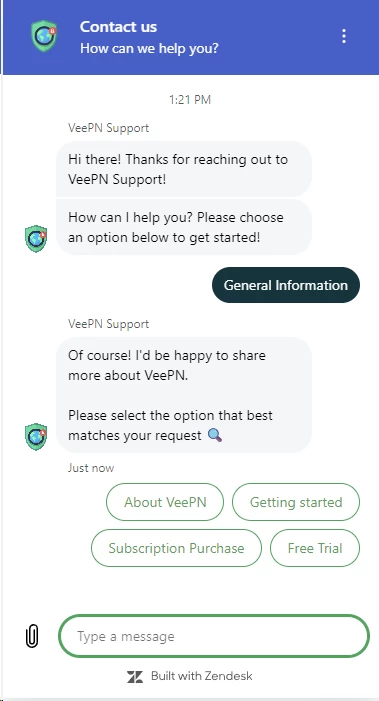
Support is where VeePN’s budget pricing shows most clearly.
What’s Available
| Channel | Available | Our Assessment |
|---|---|---|
| Live chat | ⚠️ | Advertised 24/7, but mostly an automated bot |
| Email / ticket | ✅ | The channel that actually works |
| Knowledge base | ✅ | Reasonably thorough, occasionally out of date |
| Phone support | ❌ | Not offered |
| Social media | ⚠️ | Present, slow |
The Live Chat Reality
VeePN advertises live chat support, but the first response is often a chatbot that searches its knowledge base. Users have reported receiving generic answers before being passed to a support agent.
Getting through to a real person may take some persistence, and you might end up contacting support by email instead.
This isn’t unusual for a budget VPN, but it’s worth keeping in mind if you need help with an urgent connection or billing issue.
Email Response Times
Reported response times range from a few hours to several days. That’s a big difference, and waiting several days for support is far from ideal.
The quality of the answers is more reassuring. Once users reached a human agent, responses were generally helpful and competent, though more complex technical questions sometimes proved difficult to resolve.
The Knowledge Base
VeePN’s self-help library is better than its live support. Setup guides cover the main platforms, and the router instructions are clearer than we expected.
The weakness is currency. Some articles reference interface elements that have since moved, which is frustrating when you’re following steps literally.
Search it before you write an email. You’ll often find the answer faster than support would deliver it.
Getting the Best Out of VeePN Support
- Email rather than chat for anything technical – the bot cannot help
- Include your platform, app version, and exact error text in the first message
- Ask refund questions in writing so you have a record
- Expect one round trip per day, and plan accordingly
- Search the knowledge base first; the router and smart TV guides are genuinely useful
FAQ
Not in any meaningful sense. VeePN offers free Chrome, Firefox, and Edge add-ons with unlimited data, plus a short free trial on its paid apps. The add-ons only cover browser tabs, leaving every other app on your device exposed on the same network. There is no permanent free version of the full VPN, so treat the add-on strictly as a demo.
Partially, and the distinction matters. Its encryption is properly implemented, it passed a 2021 Cure53 security audit of its browser add-ons, and its apps work reliably for the large majority of users. But no auditor has ever examined its no-logs policy or server infrastructure, and its corporate structure is not fully transparent. Trust it for convenience, not for anonymity.
NordVPN is the better VPN; VeePN is the cheaper one. NordVPN offers repeated independent audits, over 8,400 servers across 160 countries, consistent streaming access, and 24/7 human live chat. VeePN counters with lower entry pricing and up to 20 simultaneous device connections. Choose VeePN only when budget is the deciding factor and privacy verification genuinely is not.
Possibly, but unreliably, and we cannot verify current success rates. VeePN offers Shadowsocks and OpenConnect, two options that disguise VPN traffic as ordinary web browsing to slip past national filtering. OpenConnect runs on Windows only, which is a serious limitation for travellers using phones. No VPN guarantees access in China, and VeePN publishes no current data.
VeePN is suitable for everyday use. It uses AES-256 encryption and showed no leaks in our tests, helping protect your traffic from others monitoring the network. However, security and privacy are not the same thing. VeePN’s no-logs policy has not been independently audited, so if your safety depends on keeping your online activity private, an audited VPN is a better choice.

